OPERATION
Adjusting the Air ow Direction
You can adjust the air ow direction to increase your comfort.
ATTENTION
• Always use a remote controller to adjust the aps angle.
- If you attempt to move it forcibly with hand when it is swinging, the
mechanism may be broken.
• Be careful when adjusting the louvres.
- Inside the air outlet, a fan is rotating at a high speed.
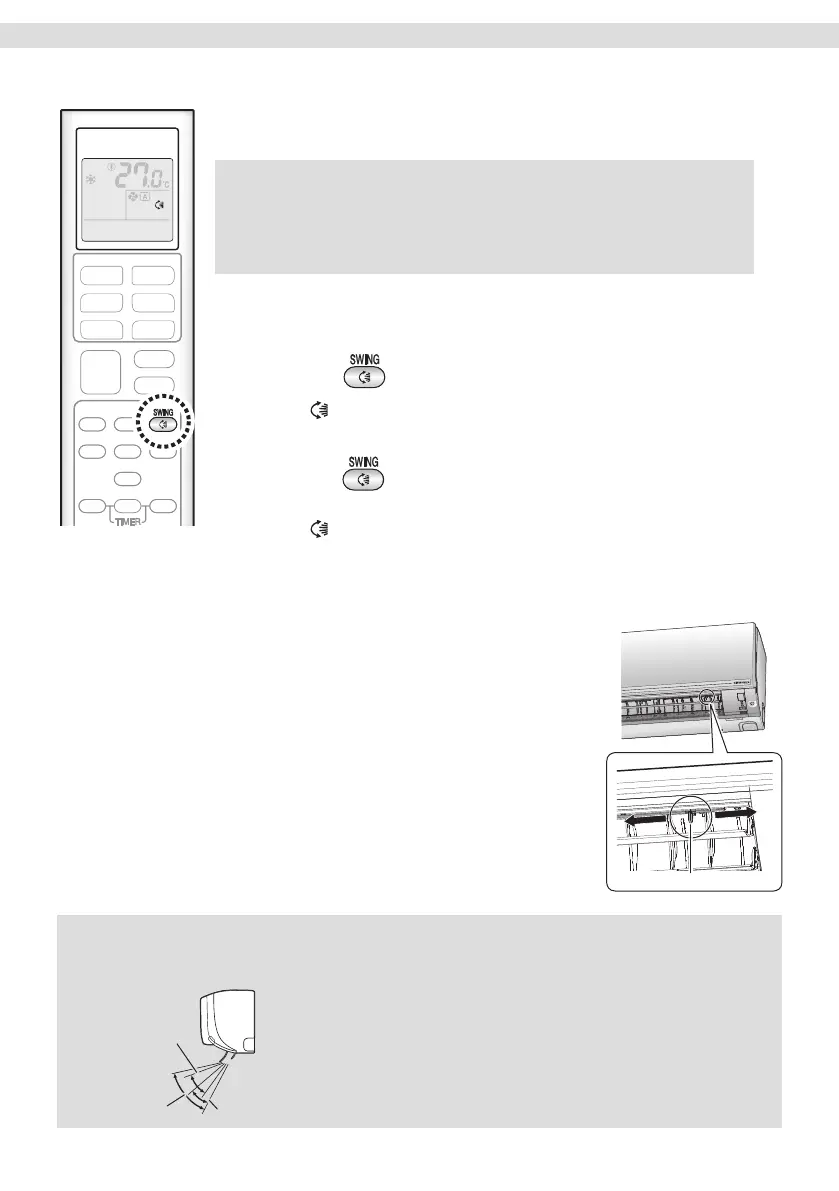
[Auto swing – for up and down air ow direction]
To adjust the aps (horizontal blades)
1. Press .
• “ ” appears on the LCD and the aps will begin to swing.
2. When the aps have reached the desired position,
press
once more.
• The aps will stop moving.
• “
” disappears from the LCD.
[Manual adjustment – for right and left air ow direction]
To adjust the louvres (vertical blades)
Hold the knob and move the louvres.
(You will nd a knob on the left-side and the
right-side blades.)
• When the unit is installed in the corner of a
room, the direction of the louvres should be
facing away from the wall.
If they face the wall, the wall will block off the
wind, causing the cooling ef ciency to drop.
Knob
NOTE
Notes on air ow direction setting
• The movable range of the aps varies according to the operation mode.
[Movable range of the aps]
COOL / DRY
FAN ONLY
HEAT
12


 To Next Page