OPERATION
MOLD PROOF Operation
MOLD PROOF operation is a function which reduces the spread of mold by using
FAN operation to lower the humidity inside the indoor unit.
[To automatically operate]
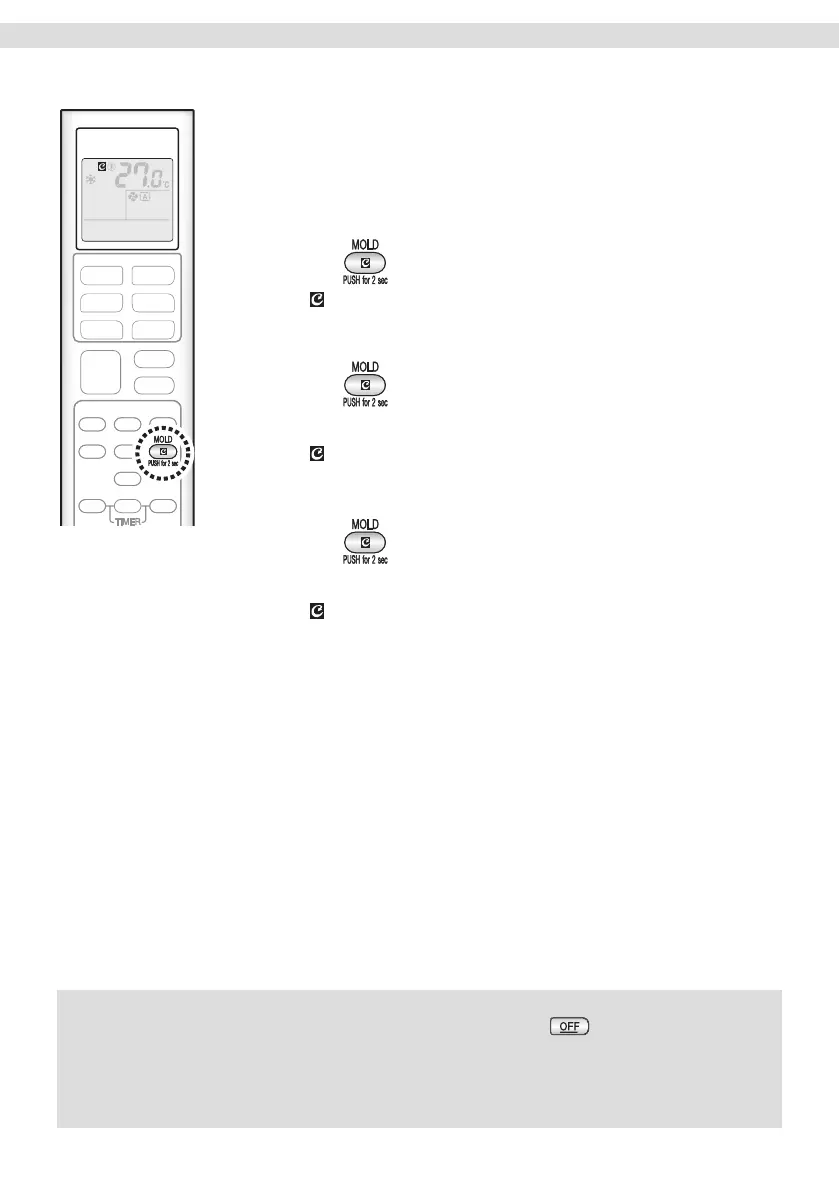
To start
1. Press and hold the button for two seconds.
• “ ” appears on the LCD.
To cancel
2. Press and hold the button for two seconds one
more time.
• “ ” disappears from the LCD.
[To manually operate]
1. Press for about 2 seconds while the unit is not
operating.
• “ ” blinks on the LCD, and the display returns to normal after a
while.
NOTE
Notes on MOLD PROOF operation
• When you want to stop MOLD PROOF operation midway, press .
• After DRY or COOL operation stops, the air conditioner starts MOLD PROOF operation
automatically, and then stops automatically 60 minutes later.
• This function is not designed to remove existing dust or mold.
• MOLD PROOF operation is not available when the unit is turned off using the OFF TIMER.
16


 To Next Page