24
English
NOTE
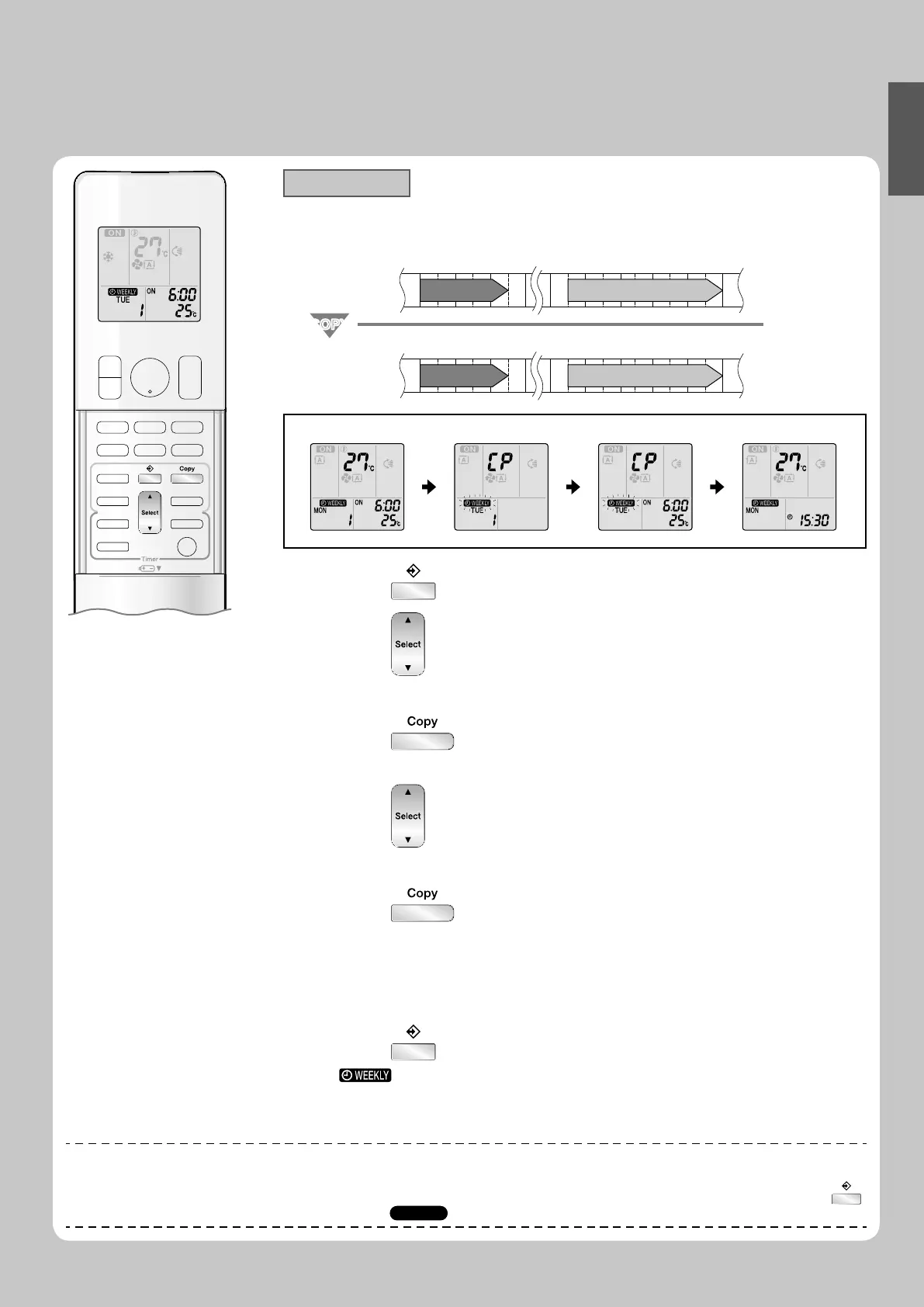
Note on copy mode
The entire reservation of the source day of the week is copied in the copy mode.•
In the case of making a reservation change for any day of the week individually after copying the content of weekly reservations, press
and change the settings in the steps of setting mode.
Page 22
►
Copy mode
A reservation made once can be copied to another day of the week. The whole reservation •
of the selected day of the week will be copied.
6:00 8:30 17:30 22:00
25°C 27°C
6:00 8:30 17:30 22:00
25°C 27°C
COPYCOPY
Program 1 Program 2 Program 3 Program 4
ON OFF ON OFF
[Monday]
Program 1 Program 2 Program 3 Program 4
ON OFF ON OFF
[Tuesday]
to
[Friday]
Setting Displays
Confi rmation Copy Paste Normal
Press 1. .
Press
2. to confi rm the day of the week to be
copied.
Press
3. .
The whole reservation of the selected day of the week will be copied.•
Press 4. to select the destination day of the
week.
Press
5. .
Be sure to direct the remote controller toward the indoor unit and check for a receiving •
tone and fl ashing the OPERATION lamp.
The reservation will be copied to the selected day of the week. The whole reservation •
of the selected day of the week will be copied.
To continue copying the settings to other days of the week, repeat step •
4 and step 5.
Press 6. to complete the setting.
“ • ” is displayed on the LCD and WEEKLY TIMER operation is activated.
01_EN_3P276869-1A.indb 2401_EN_3P276869-1A.indb 24 8/8/2012 4:18:26 PM8/8/2012 4:18:26 PM








 To Next Page