31
Care and Cleaning
Titanium apatite photocatalytic air-purifying fi lter
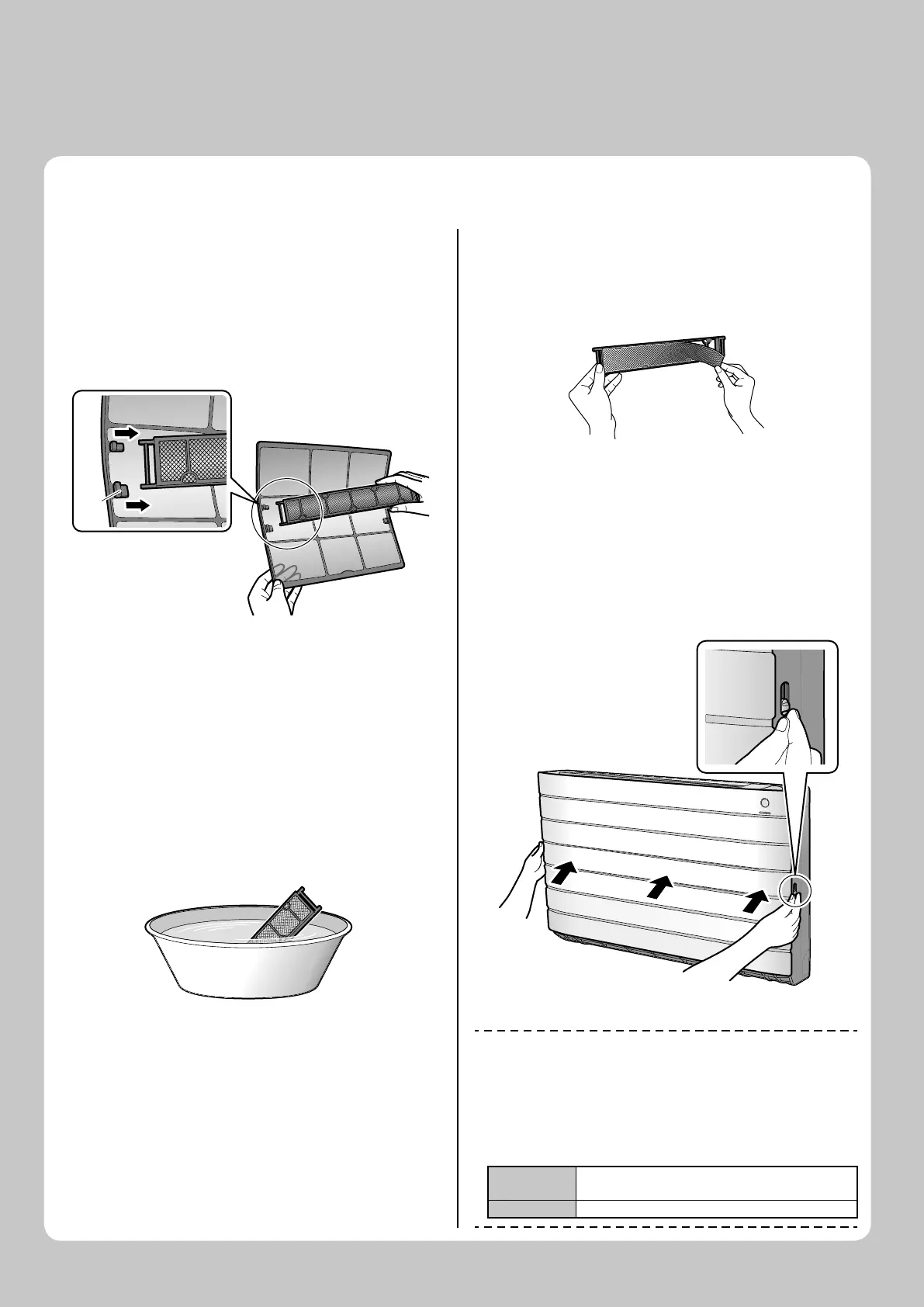
Take off the titanium apatite 1.
photocatalytic air-purifying
fi lter.
Open the front panel and pull out the air fi lters.•
Hold the recessed parts of the frame and unhook the •
4 claws.
Claw Claw
Clean or replace the titanium 2.
apatite photocatalytic air-
purifying fi lter.
[Maintenance]
Vacuum dusts, and soak in lukewarm 2-1
water or water for about 10 to 15 min-
utes if dirt is heavy.
Do not remove the fi lter from frame when washing •
with water.
After washing, shake off remaining 2-2
water and dry in the shade.
Since the material is made out of polyester, do not •
wring out the fi lter when removing water from it.
[Replacement]
Remove the tabs on the fi lter
frame and replace with a new
fi lter.
Do not throw away the fi lter frame. Reuse the fi lter •
frame when replacing the titanium apatite photocata-
lytic air-purifying fi lter.
Dispose of the old fi lter as non-fl ammable waste.•
Set the fi lters as they were 3.
and close the front panel.
Close the front panel and lock it by sliding the front •
panel stoppers on both sides downward.
NOTE
Operation with dirty fi lters:•
cannot deodorise the air, –
cannot clean the air, –
results in poor heating or cooling, –
may cause odour. –
Dispose of old fi lters as non-fl ammable waste. •
To order titanium apatite photocatalytic air-purifying fi lter contact to •
the service shop there you bought the air conditioner.
Item
Titanium apatite photocatalytic air-purifying fi lter
(without frame) 1 set
Part No. KAF970A46
01_EN_3P276869-1A.indb 3101_EN_3P276869-1A.indb 31 8/8/2012 4:18:32 PM8/8/2012 4:18:32 PM






 To Next Page