9
Operation
WARN IN G
Do not turn off the unit by unplugging it from the power socket. (Fire or an electric shock may result from heating)
Changing the Airfl ow Rate
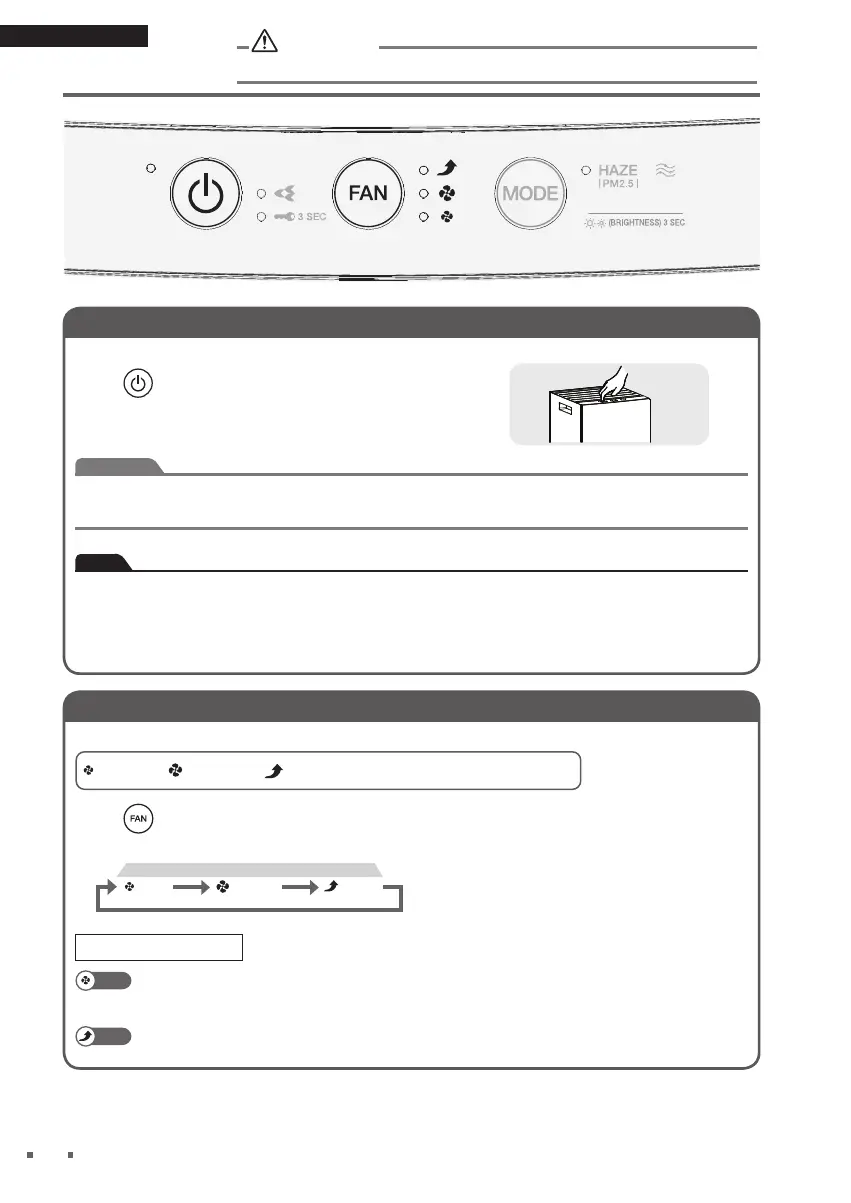
Select the desired FAN setting.
* The size of the symbols varies in accordance
with the FAN setting.
: Turbo
: Standard: Quiet
**
Press
.
• Each press cycles between the FAN lamps [blue].
FAN
(Standard)
(Turbo)
(Quiet)
A gentle breeze is emitted. Recommended for use during sleep hours.
To quickly eliminate odours from a room, it is recommended that the FAN be set
to Standard or above, otherwise, deodorising capacity is reduced.
The ambient air is quickly purifi ed using a maximum airfl ow. Recommended for use
whilst you are cleaning up a room.
Using the Air Purifying Operation (turning operation ON/OFF)
Cleans the air in the room.
Press .
• ON-OFF lamp [blue] lights up.
• Press again to turn OFF.
Attention
• Do not move the unit, or attach or remove parts to/from the unit while it is in operation.
Breakage or malfunctioning may result.
Note
•
At the time of purchase, the unit is set to Turbo fan.
• When the unit is unplugged or turned OFF, it will operate with the settings last used the next
time it is tu
rn
ed ON.
• Operation settings cannot be changed for about 2 seconds immediately after the power
supply plug is inserted.
Operation
1-3P664947-1-OM-MC30YVM7-HAZE-DAIKIN_EN.indd 91-3P664947-1-OM-MC30YVM7-HAZE-DAIKIN_EN.indd 9 12/10/2021 3:18:29 PM12/10/2021 3:18:29 PM


 To Next Page