Main Functions SiBE041401E
33 Function and Control
• The “ ” will disappear from the LCD.
• The TIMER lamp goes off.
• To reactivate the WEEKLY TIMER operation, press again.
• If a reservation deactivated with is activated once again, the last reservation
mode will be used.
• If not all the reservation settings are reflected, deactivate the WEEKLY TIMER operation once. Then press again to reactivate the
WEEKLY TIMER operation.
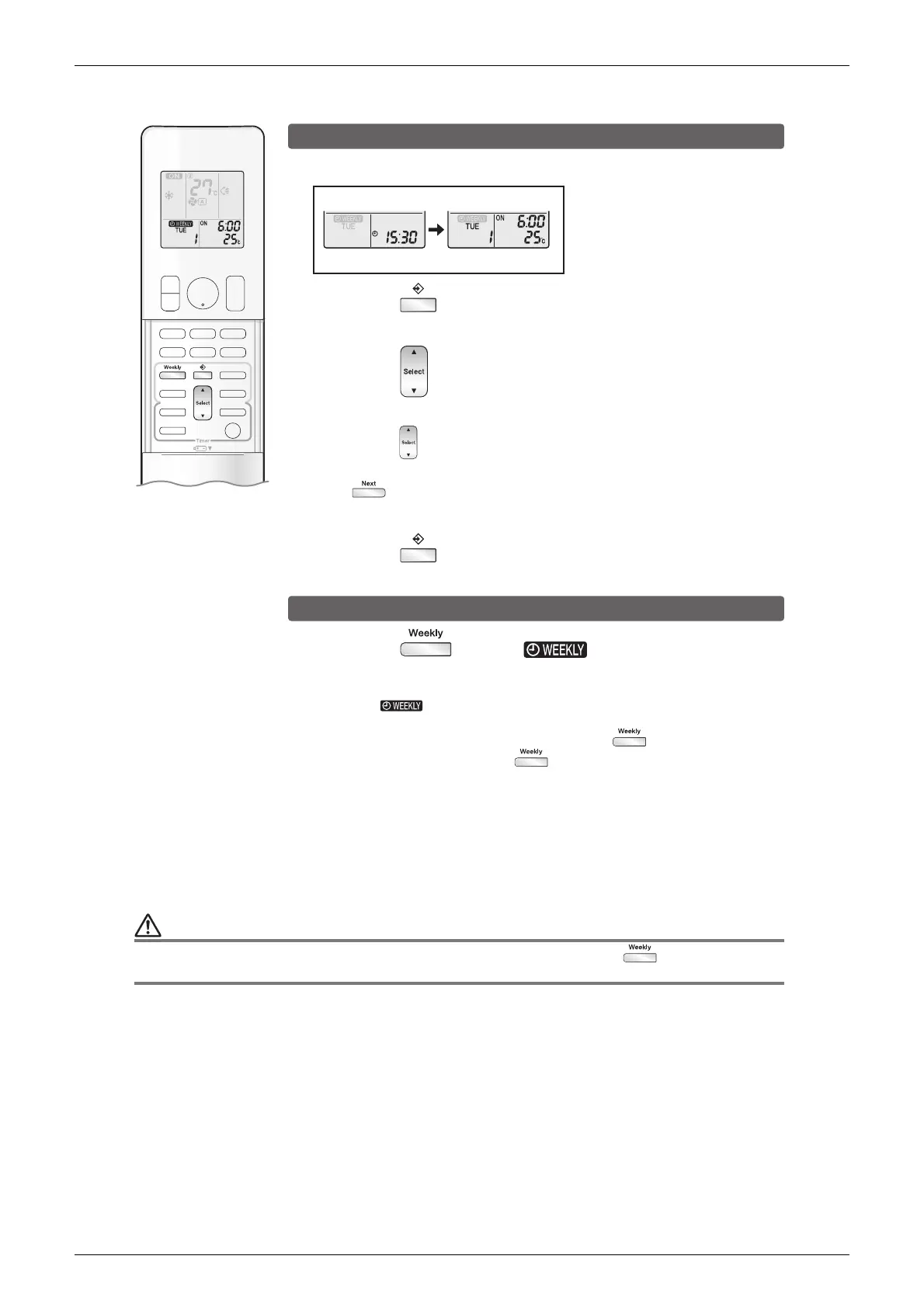
Confirming a reservation
• The reservation can be confirmed.
Setting Displays
Normal Confirmation
1.
Press .
• The day of the week and the reservation number of the current day will be displayed.
3.
Press to exit confirming mode.
To deactivate WEEKLY TIMER operation
CAUTION
2.
Press to select the day of the week and the
reservation number to be confirmed.
• Pressing displays the reservation details.
• To change the confirmed reserved settings, select the reservation number and press
The mode is switched to setting mode. Go to setting mode step
2
.
.
Press while “ ” is displayed on
the LCD.





 To Next Page