SiBE041401E Main Functions
Function and Control 34
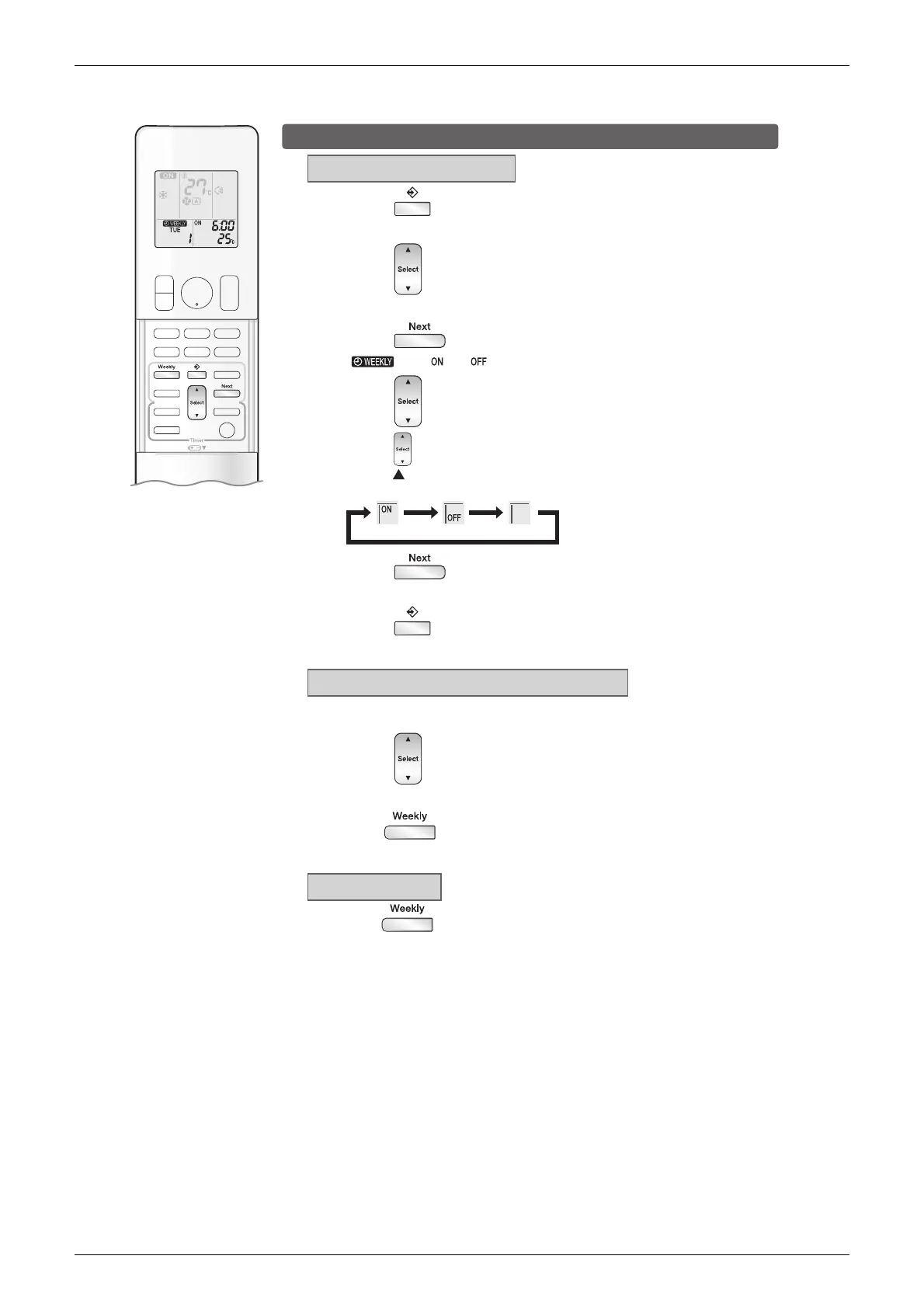
To delete reservations
The individual reservation
1
. Press .
3
. Press .
5
. Press .
6
. Press .
ON TIMER OFF TIMER blank
The reservations for each day of the week
All reservations
• The day of the week and the reservation number will be displayed.
2
. Press to select the day of the week and the
reservation number to be deleted.
• “ ” and “ ” or “ ” blink.
4
. Press and select “blank”.
• Pressing changes ON/OFF TIMER mode.
Pressing alternates the following items appearing on the LCD in rotational sequence.
• Selecting “blank” will cancel any reservation you may have.
• The selected reservation will be deleted.
• If there are still other reservations, WEEKLY TIMER operation will be activated.
• This function can be used for deleting reservations for each day of the week.
• It can be used while confirming or setting reservations.
•
Be sure to direct the remote controller toward the indoor unit and check for a receiving tone.
• This operation is not effective while WEEKLY TIMER is being set.
• All reservations will be deleted.
Hold for about 5 seconds while in normal
display.
• The reservation of the selected day of the week will be deleted.
2
. Hold for about 5 seconds.
1
. Press to select the day of the week to be
deleted.



 To Next Page