9
OPERATION
ProgramDryOperation
Programdryisafunctionthatalternatesbetweenweakcoolingandstoppingtheunittoremovehumidityfrom
theair,inordertopreventtheroomtemperaturefromdroppingandbecomingtoocold.
• The microcomputer automatically controls the temperature and fan strength, so these cannot be set using the remote
controller.
• This function is not available if the room temperature is 16°C or lower.
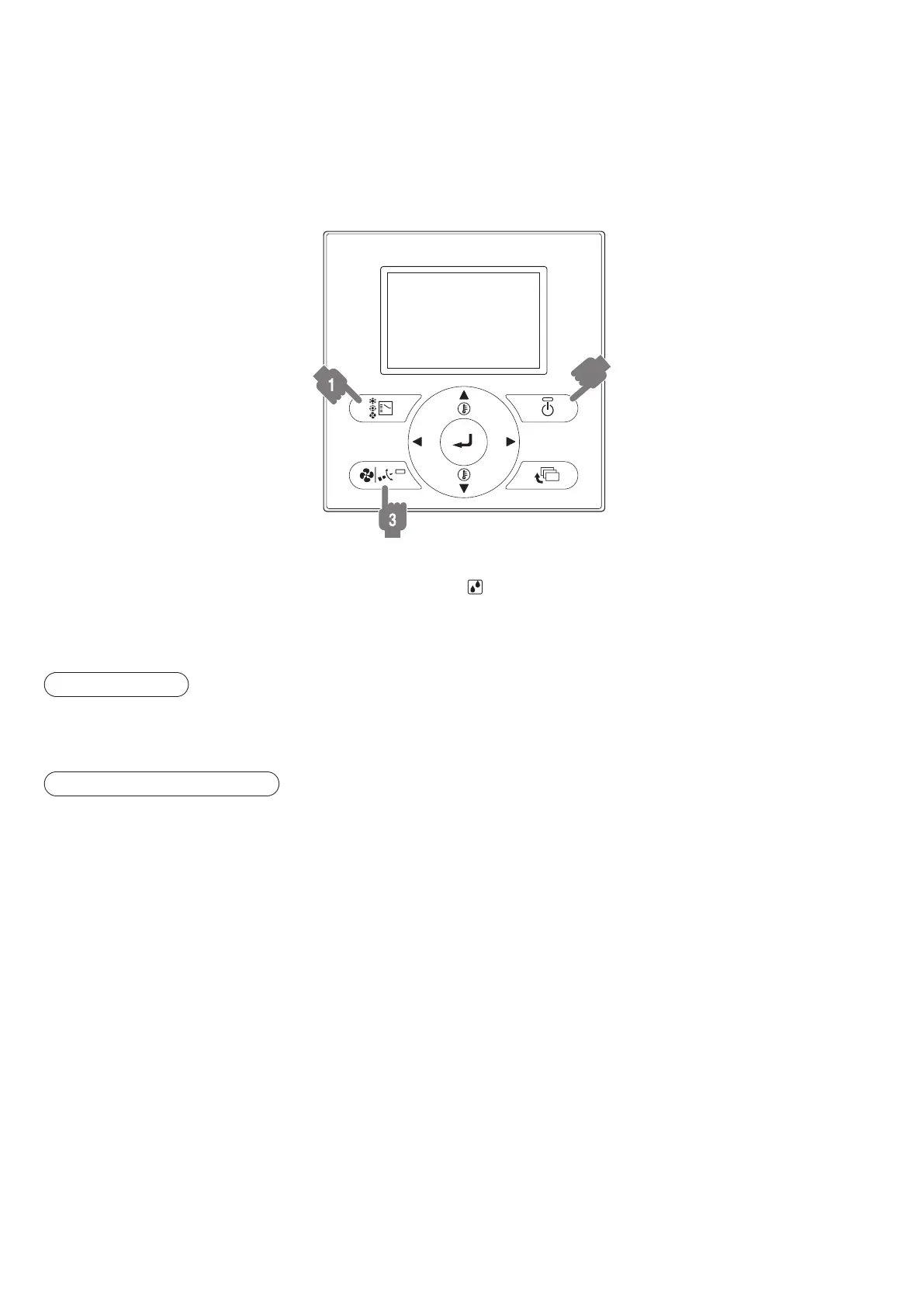
BRC1E62
2,4
1. Pressmodeselectorbuttonseveraltimesandselect“ ”(ProgramDryOperation).
2. PressON/OFFbutton.
Operation lamp lights up and system starts operation.
ADJUSTMENT
3. Pressairowsettingbutton.(only for FXCQ, FXFQ, FXHQ, FXAQ)
Refer to page 10 for details.
STOPPING THE SYSTEM
4. PressON/OFFbuttonagain.
Operation lamp goes off, and the system stops operation.
ATTENTION:
• Do not turn off power immediately after the unit stops. Then, wait on no less than 5 minutes. Water is leaking or there is
something else wrong with the unit.
01_EN_3P344160-13U.indd 9 06-Oct-20 2:42:05 PM



 To Next Page