EasyManua.ls Logo

Dairy Tech Matilda - USING AND PROGRAMMING THE TOUCHSCREEN CONTROLLER; FUNCTION INDICATORS; CONTROLLER LEGEND; ERROR SYMBOLS

Dairy Tech Matilda
40 pages
Print Icon
To Next Page IconTo Next Page
To Previous Page IconTo Previous Page
Loading...
13
USING AND PROGRAMMING THE TOUCHSCREEN CONTROLLER
Be sure the pasteurizer is charged with water using the instructions on page 14 prior to the first use of
your pasteurizer.
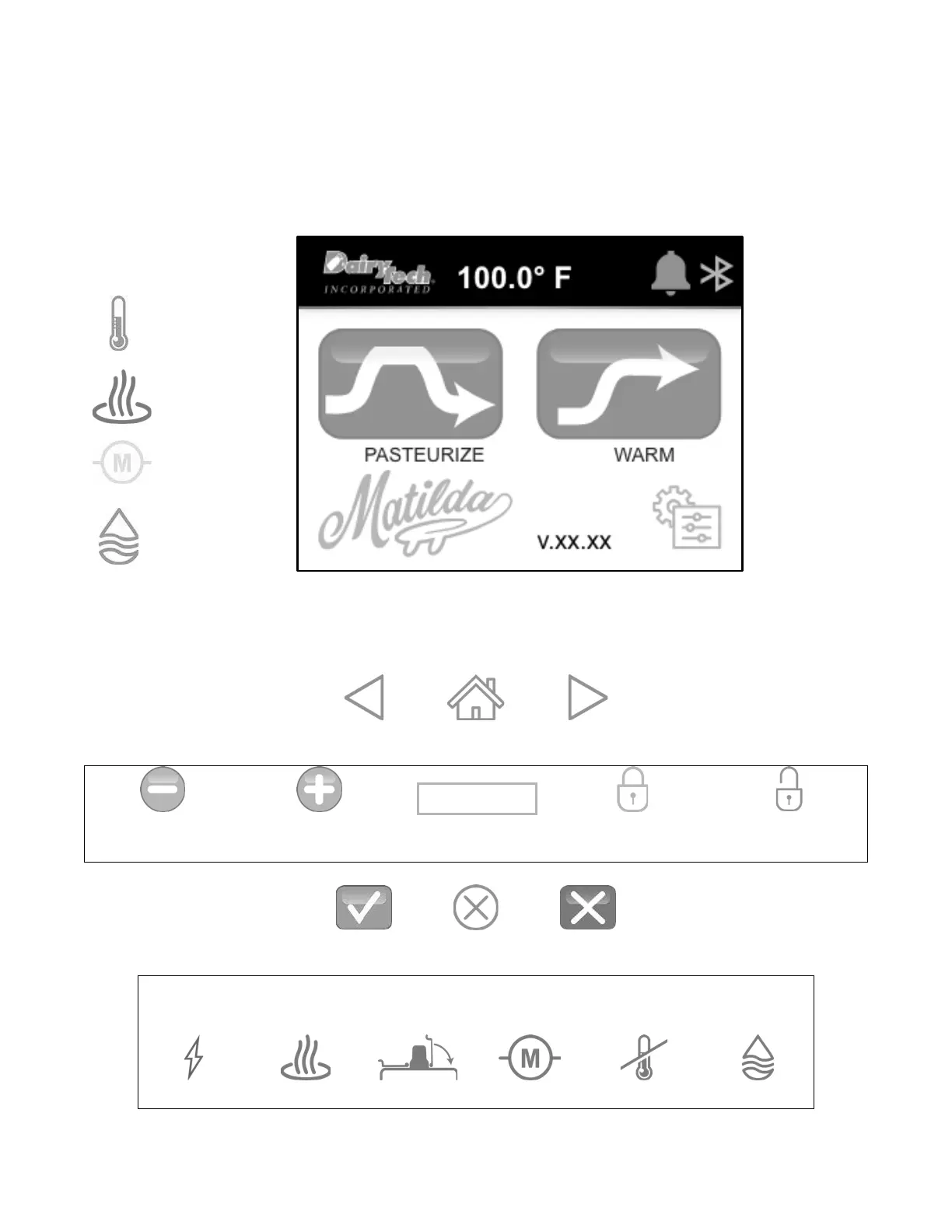
FUNCTION INDICATORS
IDLE TEMP:
GREEN = set Idle
Temperature is
reached.
WHITE = Inactive
SYMBOL
HEAT:
RED = Heating
WHITE = Inactive
MOTOR:
YELLOW = motor is
turning stir rod.
WHITE = Inactive
WATER:
BLUE = water is being
added to the sink.
WHITE = Inactive
VERSION
CONTROLLER LEGEND
Back
HOME
Forward
Adjust DOWN
Adjust UP
Adjustable Setting
Locked
(Requires Password)
Unlocked
Yes
Cancel
No
ERROR SYMBOLS
See page 32 for detailed explanations.
Hardware
Heat
Lid Open
Motor
Temperature
Water
XXX.XX

Related product manuals