10. Touchscreen is Not Responsive
Screen Calibration Error
A number of customers have had issues with their Matilda touchscreens becoming unresponsive and needing
to go through the calibration process.
Note: Users may accidentally enter screen calibration mode during machine startup if they impatiently tap
on the screen.
If the calibration steps are then tapped through incorrectly, the miscalibration can result in a screen that does
not respond to normal touches.
The next firmware release (version > 0.951) will require the user to use a long press to enter screen calibration
mode. This should reduce the number of unintentional recalibrations. Firmware updates can be made with an
Android device and the Matilda app.
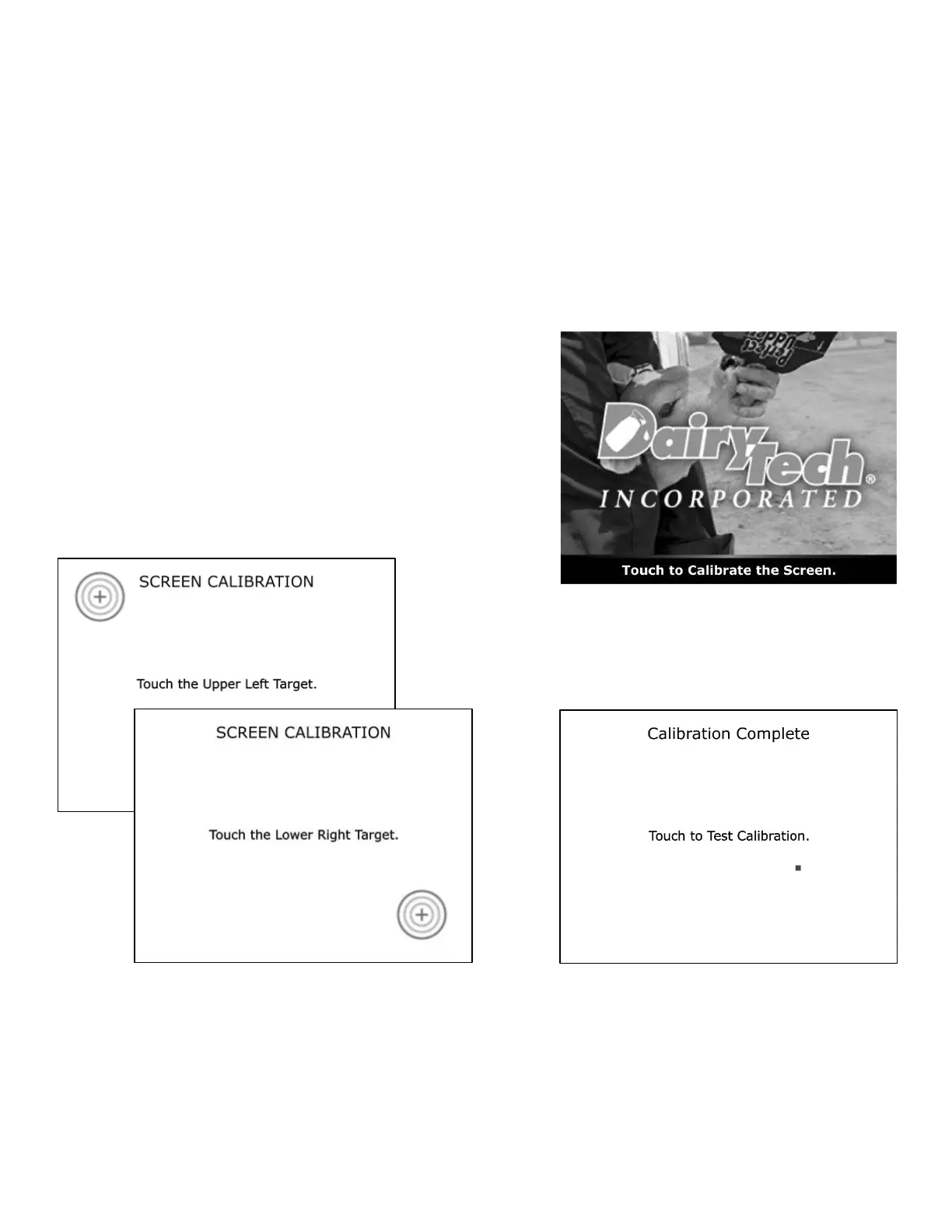
Screen Calibration
During startup, the touchscreen on the Matilda unit can be
calibrated. Calibration mode is entered by tapping on the screen
while the startup splash screen is visible. Machines with
firmware 0.951 and earlier need only a single tap to enter
calibration mode. Machines updated beyond firmware 0.951
will require a long tap or “press-and-hold” input to enter
calibration mode.
Then tap the center of each bullseye target to
calibrate the screen. The calibration can be checked
on the following screen. After a brief delay, the
machine will resume the startup process.


 To Next Page