ADJUSTING SETTINGS
*** IMPORTANT WARNING***
DO NOT ALTER SETTINGS IN THE CONTROLLER WITHOUT CONSULTING A DAIRY TECH REPRESENTATIVE. ANY
UNAUTHORIZED ADJUSTMENTS WILL VOID THE PRODUCT WARRANTY AND MAY LEAD TO SERIOUS HEALTH
CONSEQUENCES FOR THE CALVES.
Settings Categories
01: Language
02: Temperature Scale (Fahrenheit or Celsius)
03: Electricity (3 Phase or 1 Phase)
04: Alert (ON or OFF)
05: Bluetooth (ON or OFF)
06: Feeding Temperature
07: Feed Dwell
08: Cool Temperature
09: Cool Dwell
10: Idle Temperature
11: Test
The following settings require a password to modify.
12: Temperature Calibration
13: Pasteurization Temperature
14: Pasteurization Dwell
15: Change Password
16: Factory Reset
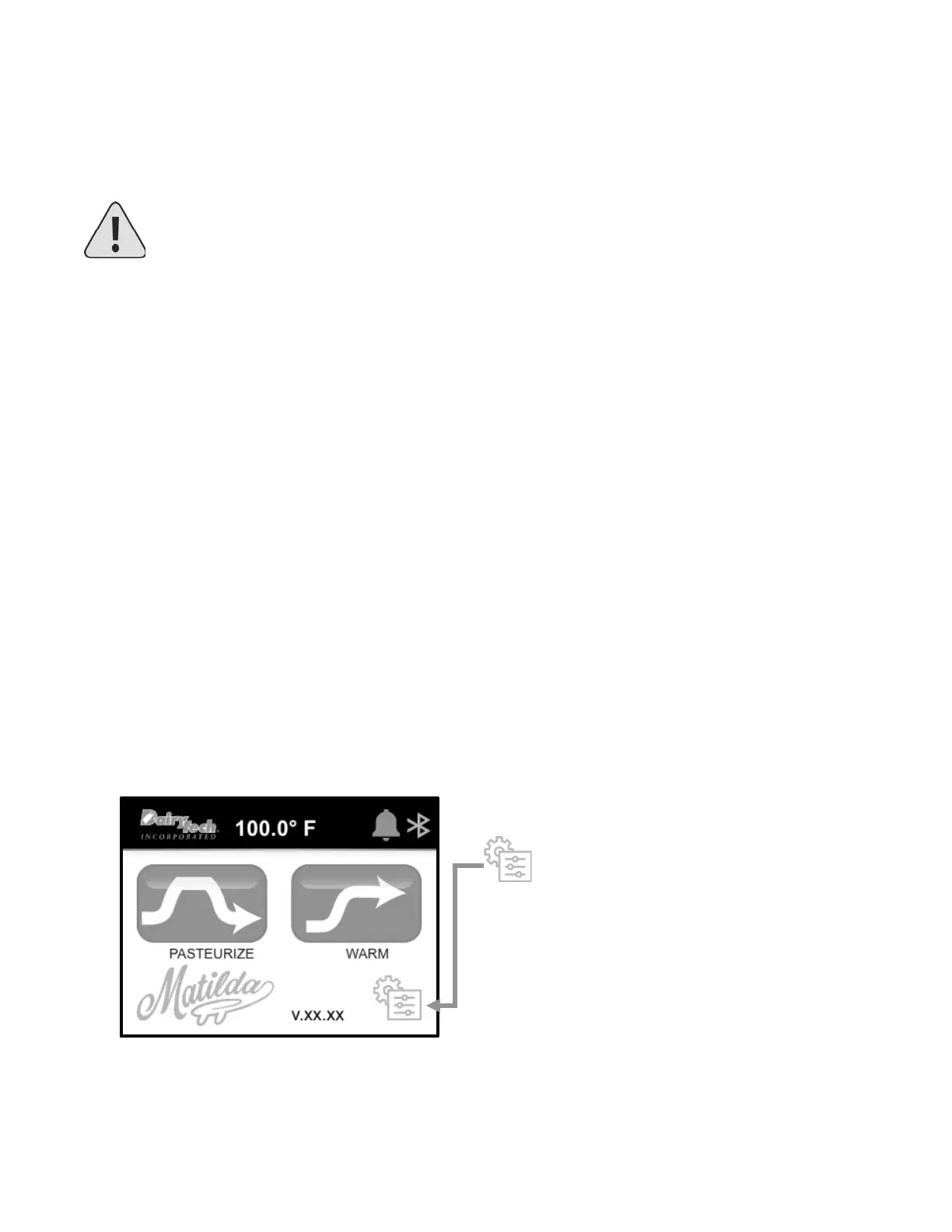
Select “SETTINGS” icon on home screen
This will open the first adjustable setting
“LANGUAGE”. Use the arrow buttons to scroll
through the Settings Categories until you arrive
at the setting you wish to adjust. Follow the on-
screen prompts to customize your controller
settings.


 To Next Page