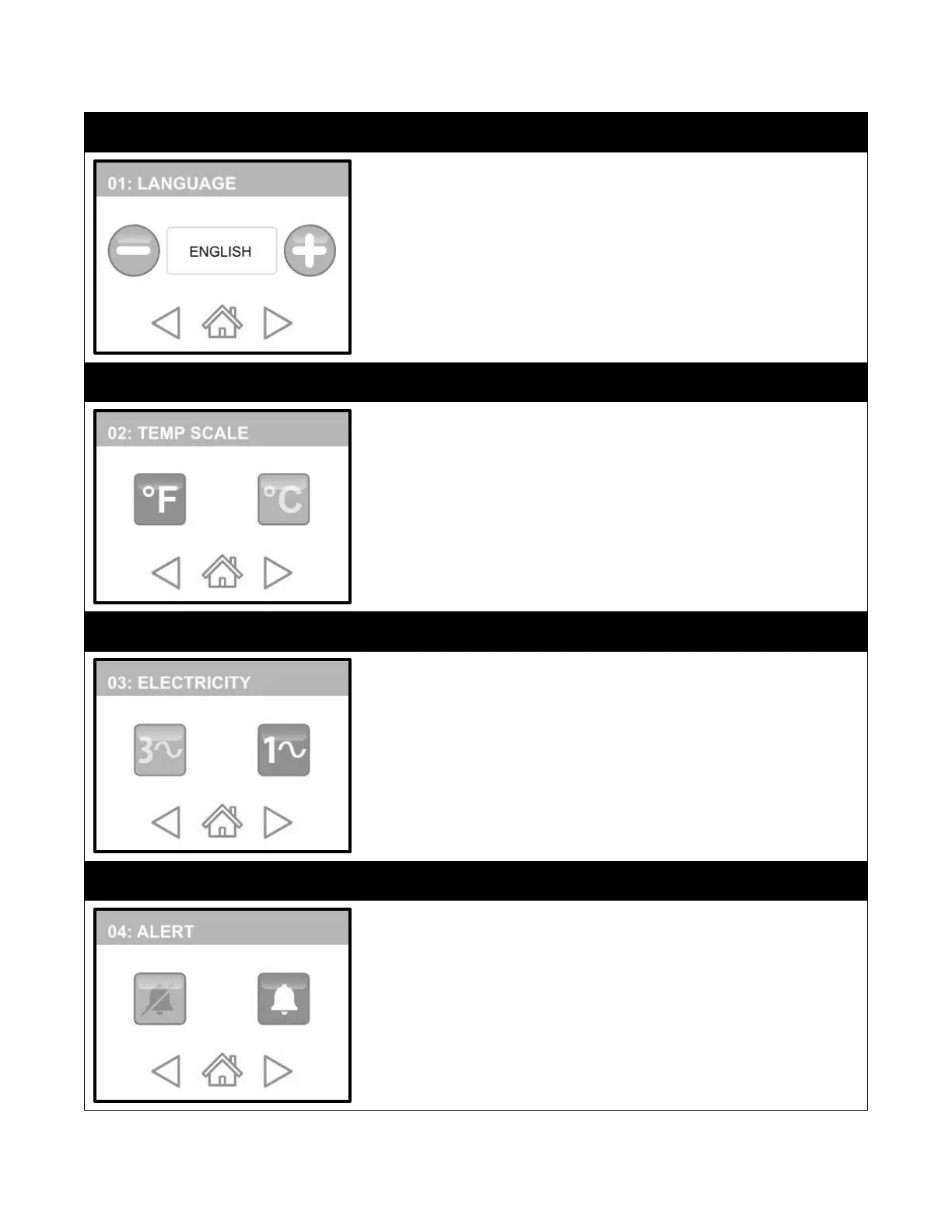
LANGUAGE is the first category. English is the default language.
1.
To change the language, simply touch the Plus (+) or Minus (-)
buttons to scroll to language you prefer.
2.
If you are satisfied with your selection, press “HOME” to save or
press “FORWARD/BACK” to make other modifications.
Temp Scale is the second category.
1.
Touch the FORWARD button to get to this category. Fahrenheit is
the default Temperature Scale. To change the scale, simply touch
the Celsius button. Now all of the information will be in the
language you chose.
2.
If you are satisfied with your selection, press “HOME” to save or
press “FORWARD/BACK” to make other modifications.
Electricity is the third category.
1.
Touch the FORWARD button to get to this category. 1P is the
default setting. To change, simply touch the 3P button.
2.
If you are satisfied with your selection, press “HOME” to save or
press “FORWARD/BACK” to make other modifications.
ALERT is the third category and it determines whether or not you will hear
audible alarms made by the machine
1.
Touch the FORWARD button to get to this category. ALERT ON is the
default setting. To turn off the alert, simply touch the ALERT OFF
button.
2.
If you are satisfied with your selection, press “HOME” to save or
press “FORWARD/BACK” to make other modifications.


 To Next Page