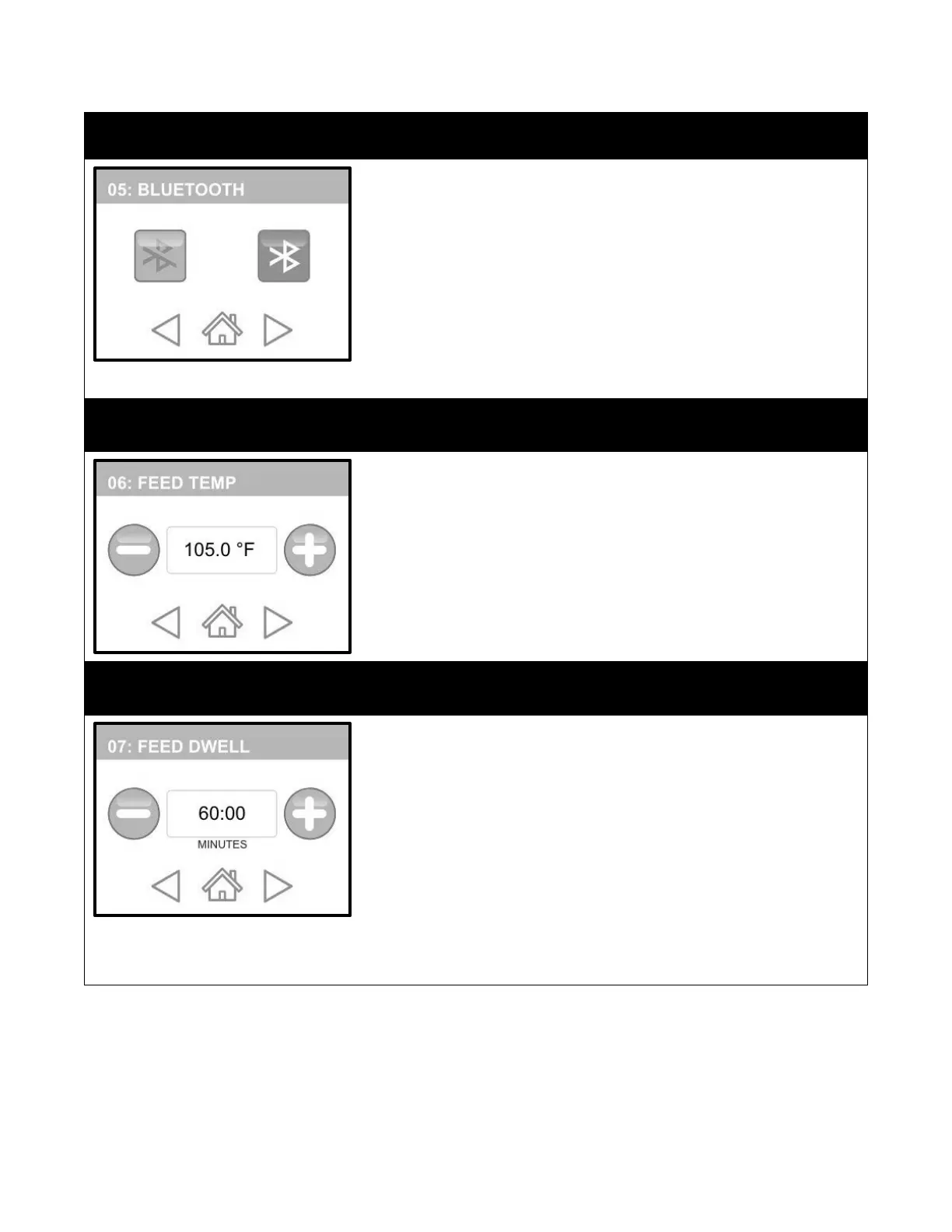
BLUETOOTH is the fifth category. This option must be “ON” if you want to be
able to communicate with Matilda® with the Perfect Udder phone app. You
will need the Perfect Udder™ app if you wish to change the name of your
machine.
1.
Touch the FORWARD button to get to this category. Bluetooth “ON”
is the default setting.
2.
To change the scale, simply touch the “Bluetooth OFF” button. Now
all of the information will be in the language you chose.
3.
If you are satisfied with your selection, press “HOME” to save or
press “FORWARD/BACK” to make other modifications.
FEED TEMP is the sixth category. The default feeding temperature is 105°F
(40°C). Only increase this temperature in extremely cold conditions.
1.
Touch the FORWARD button to get to this category.
2.
Use the (-) or (+) buttons to decrease or increase this setting to your
desired feeding temperature.
3.
If you are satisfied with your selection, press “HOME” to save or
press “FORWARD/BACK” to make other modifications.
FEED DWELL is the seventh category. This setting dictates how long the cycle
will hold the final feeding temperature once a cycle is complete. This is useful
if you expect delays between cycle completion and feeding time. Remember
that when a cycle is complete, Matilda® will return to her Dwell
Temperature. If this is different than your intended feeding temperature,
then increase this FEED DWELL time to hold where you like.
1.
Touch the FORWARD button to get to this category. The default
feeding dwell time is 60 minutes.
2.
Use the (-) or (+) buttons to decrease or increase this setting to your
desired Feeding Temperature Dwell time.
3.
If you are satisfied with your selection, press “HOME” to save or
press “FORWARD/BACK” to make other modifications.


 To Next Page