37
Changing the GSM dialler power pack and battery
User code?
– – – –
Install mode
Programming
OK
Enter the installer code for
direct access to installer mode.
Press any key on
the keypad to
“wake up” the
dialler.
User code?
– – – –
User menu
Programming
OK
User menu
Install mode
Install mode
Programming
Install mode
User mode
OK
User mode
Please wait
User mode
23/02 10:46:00
then
Enter the master
code to access
the user menu
Install code?
– – – –
Enter the
installer code
Select Install mode
using the L and M keys
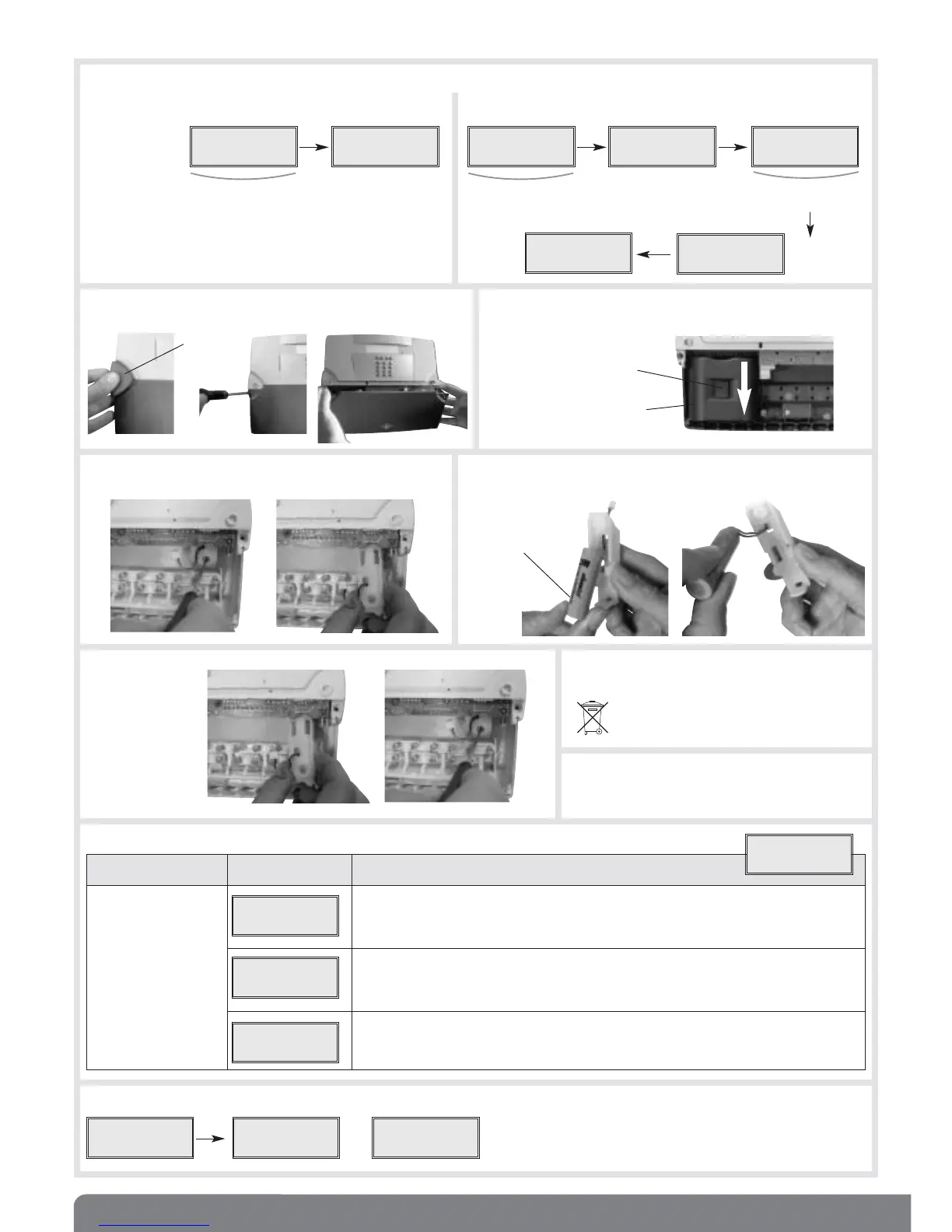
1. Put the dialler in Install mode
Case 1:
if the installer code is still at the factory value 1111
Case 2:
the installer code has been modified
BATLi23 lithium power
pack (2 x 3.6 V - 18 Ah)
Rechargeable battery
908-21X (BATT LiIon
3.6 V-700 mAh-FIL)
Unlocking tab
t
¢
¢
Screw
cover
3. Remove the power pack by pressing the unlocking tab and
sliding the pack downwards.
4. Disconnect, loosen and remove the battery holder.
2. Remove the screw covers, loosen the screws and remove
the dialler cover.
5. Remove the flat battery from its holder and replace it with a new
battery making sure the wiring is properly positioned.
6. Put the battery
holder back
inside the dialler,
screw it in and
reconnect the
wiring.
7. Replace the power pack with the same type of
power pack.
10. Put the dialler in User mode.
9. Programming the date and hour
8. Put the cover back in place, tighten the
2 captive screws in the cover and position
the 2 screw covers.
¢
t
Dispose of the flat battery and power pack
in the appropriate recycling containers.
OK
Programming Display Actions to be performed
to be performed
Programming Select the Date/hour menu using the L and M keys,
the date and hour then press OK
Programming the date using keys 0 to 9.
The L and M keys can be used to place the cursor on the digit to be changed.
Programming the hour using keys 0 to 9.
The L and M keys can be used to place the cursor on the digit to be changed.
General
Date/hour
Date/hour
Date
Date/hour
Hour
Programming
General


 To Next Page