69
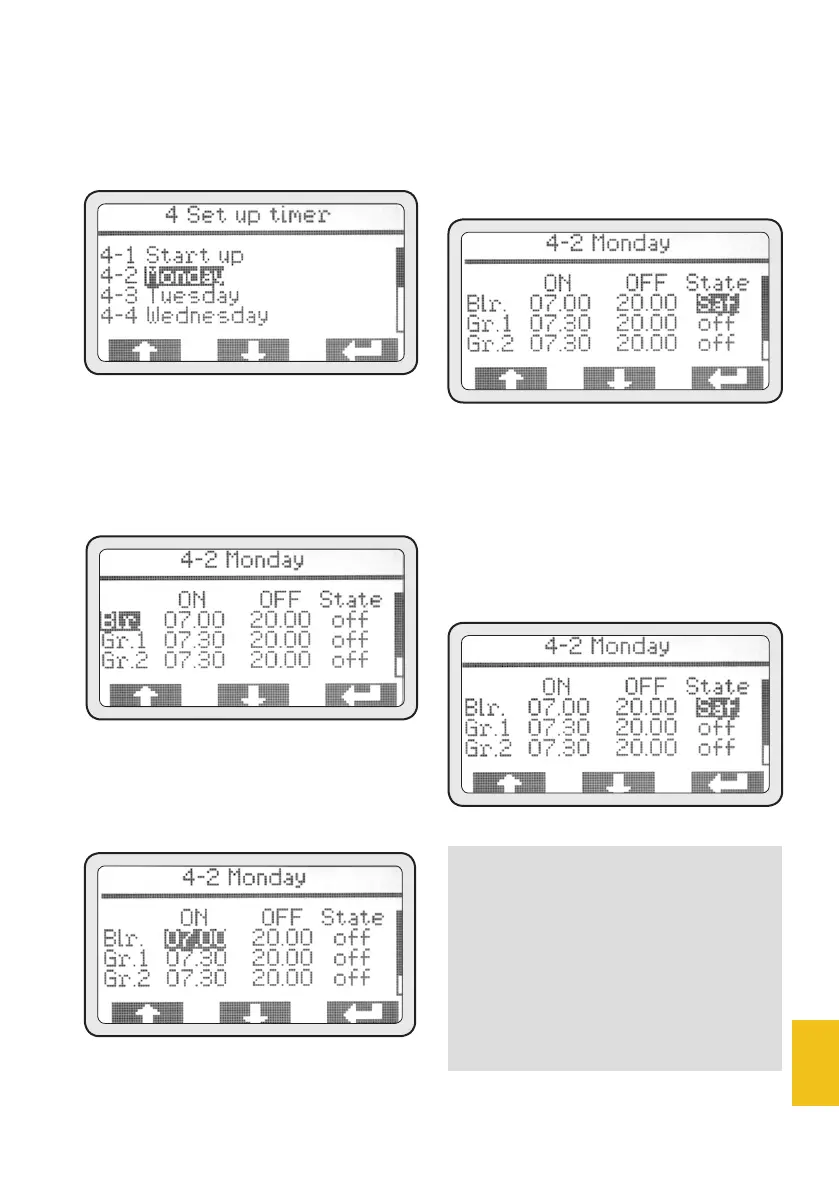
• Use (PD1) and (PD2) to choose
the day to be programmed and
push (PD3) again to access the
programming.
4-2 Monday
• Push (PD3) to access boiler
pro-gramming and (PD3) again
to highlight its turn-on time.
• Use (PD1) and (PD2) to set the
turn-on time, then push (PD3) to
confirm it.
• Once the setting has been con-
firmed, the next one will be auto-
matically highlighted. Use (PD1)
and (PD2) to set the turn-off time,
then push (PD3) to confirm it.
• Once the setting has been confir-
med, the next one will be automa-
tically highlighted. Use (PD1) and
(PD2) to select the machine mode
to be enabled outside the set wor-
king time. Push (PD3) to confirm.
NOTE
It is possible to set 2 options:
• An OFF mode (OFF) - the
unit is turned-off completely.
• A SAFETY mode (SAF) - the
unit is kept at a safe, ener-
gy-saving temperature.














 To Next Page