"CAL"
Min. 0°C
Max. 200°C
Default 80°C
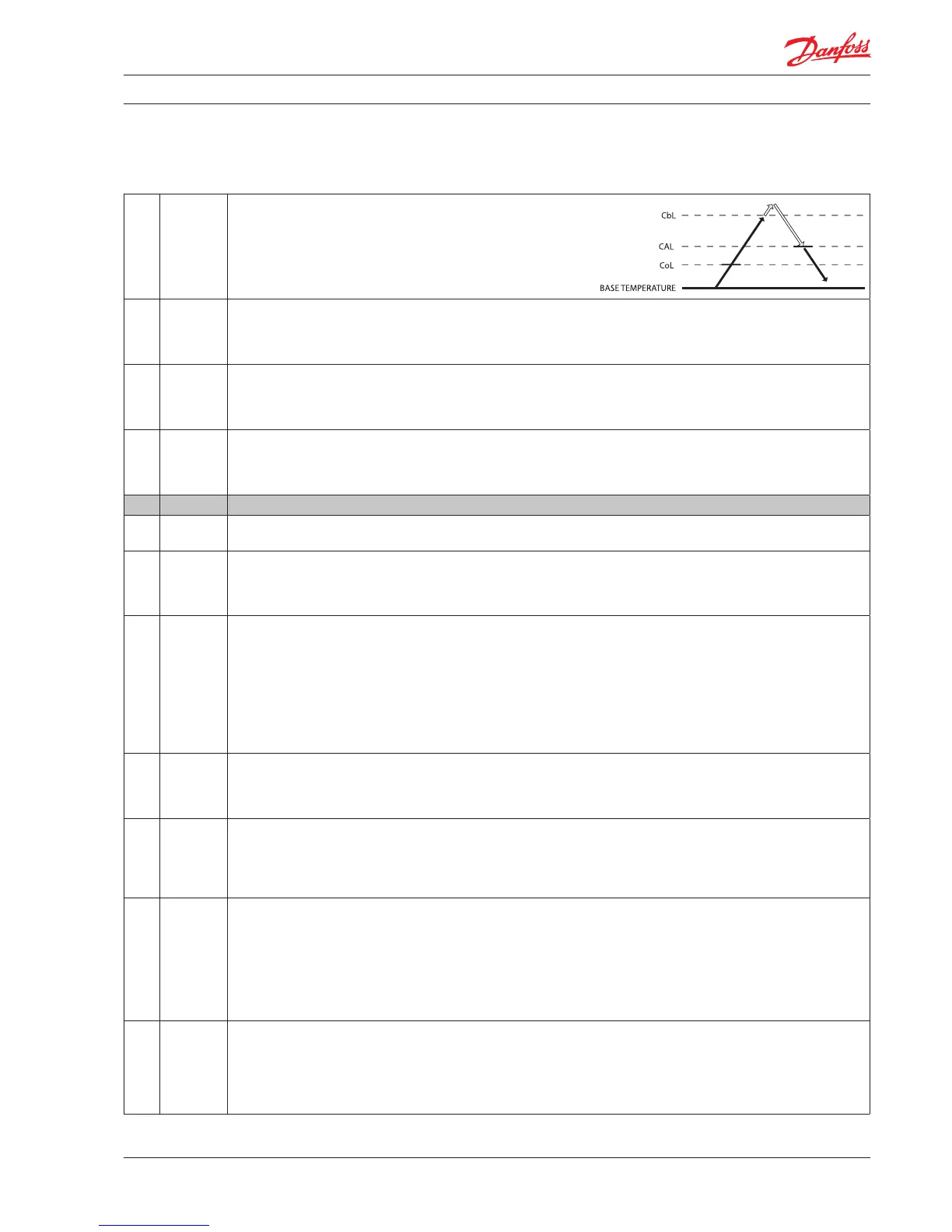
Condenser Alarm Limit/CAL
This parameter sets the temperature for the condenser at which an alarm
will be generated.
"CbL"
Min. 0°C
Max. 200°C
Default 85°C
Condenser Block Limit/CbL
This parameter sets the temperature which if reached will cause the
compressor to switch OFF.
"CoL"
Min. 0°C
Max. 200°C
Default 60°C
Condenser OK Limit/CoL
This parameter sets the temperature at which the compressor is
allowed to start again after the temperature set in "CbL" above has been
exceeded and the compressor stopped.
"CLL"
Min. -100°C
Max. 20°C
Default -5°C
Condenser Low Limit/CLL
This parameter sets the lowest (condenser) temperature at which the
compressor is allowed to start.
diS Display settings
NOTE: some display parameters can be set in such as way that they
may be illegal in some jurisdictions. Please check local legislation.
"diC"
Min. no
Max. yes
Default no
Display intensity auto control
"no": display intensity use fixed value.
"din"
Min. 2
Max. 10
Default 10
Display Intensity
The controller can have its display intensity (brightness) set in one of
two ways:
A) With a Danfoss ambient light sensor attached, the brightness of the
display is adjusted automatically according to the ambient light level
(see the assignments section).
B) When no ambient light sensor is attached, the display intensity can
be set to a fixed intensity.
Both options are on a scale of 1 to 10, where 10 is the brightest.
"CFu"
Min. °C
Max. °F
Default °C
Display Unit
This parameter sets the display to Fahrenheit or Celsius. Switching from
one to the other will cause all temperature settings to be automatically
updated accordingly.
"trS"
Default SCo
Temp sensor to display
"SCo": temperature control.
"EuA": evaporator temperture.
"Con": condenser temperature (condenser cleaning).
"AuS": only for showing on display.
"rES"
Min. 0.1
Max. 1
Default 0.1
Display Resolution
This parameter can be set to 0.1, 0.5 or 1 and affects the way the
temperature is displayed. With the parameter set to 1, the display will
only ever show temperatures rounded to the nearest whole degree.
At 0.5, it will round the temperature to the nearest half degree for display.
For example, 3.3 degrees will be shown in the display as 3.5 degrees
and 3.9 as 4.0. With the parameter set to 0.1, no rounding occurs.
This parameter does not affect the temperature itself, merely the display.
"rLt"
Min. no
Max. yes
Default no
Display Range Limit
In some point of sales applications you may want to show the desired
instead of the real temperature. This parameter sets whether the
displayed temperature is the actual temperature or whether it is restricted
to the cut-in / cut-out limits. Set to "nO" means that the actual temperature
will de displayed. The parameter is set to "nO" by default.




 To Next Page