EasyManua.ls Logo

Danfoss Secop 105N9502 - User Manual

Danfoss Secop 105N9502
20 pages
Print Icon
To Next Page IconTo Next Page
Loading...
www.danfoss.com
Manual
Danfoss commercial compressors
Secop compressors produced for Danfoss
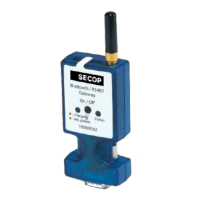
Bluetooth® Gateway
MAKING MODERN LIVING POSSIBLE

Questions and Answers

  • B
    Belinda BauerAug 3, 2025
    Why is my Danfoss Secop 105N9502 Gateway having communication speed issues with Tool4Cool® LabEdition?
    • M
      Matthew EvansAug 3, 2025
      If you are experiencing communication speed issues with Tool4Cool® LabEdition when using the Danfoss Gateway, it might be due to the BlueSoleil software drivers that come with many external Bluetooth® adapters. A test shows that these drivers may cause communication speed problems. To resolve this, enable RS485 in the network setting of Tool4Cool® LabEdition.
  • D
    David BarnesAug 8, 2025
    What to do if there is no connection between my computer and the device served by the Danfoss Gateway?
    • M
      Mr. Robert WestAug 8, 2025
      If there is no connection between the computer and the device served by the Danfoss Gateway, it may be due to a fault in the Bluetooth® gateway pairing. To fix this, remove the existing pairing and then pair the device again.
  • J
    Joseph DavenportAug 13, 2025
    How to resolve double addressing of Modbus nodes on Danfoss Secop 105N9502 Gateway?
    • J
      jesusrodriguezAug 13, 2025
      If you encounter double addressing of Modbus nodes when using the Danfoss Gateway, you should check the addressing of individual network nodes.
  • J
    Jason FrostAug 18, 2025
    How to fix addressing on Modbus nodes not different to zero in Danfoss Secop 105N9502?
    • A
      Angela CunninghamAug 18, 2025
      If addressing on Modbus nodes is not different from zero, you should check the addressing of individual network nodes.
  • P
    Patrick HarrisAug 23, 2025
    What to do if polarity on RS485 network is interchanged on Danfoss Secop 105N9502?
    • I
      Ivan MorrowAug 23, 2025
      Check your wiring to ensure correct polarity on the RS485 network.
  • T
    Thomas FloresAug 27, 2025
    What to do if Parameter Definition Files are not imported on Danfoss Gateway?
    • S
      Samantha WrightAug 27, 2025
      The Parameter Definition File contains the parameter data and settings specific to one type and version of Secop controller. For some controllers, the Parameter Definition File must be imported. For others, the software will automatically obtain the Parameter Definition File from the controller electronics. When a Parameter Definition File import is required, the system will make a request via a dialog in the software. When required, the Parameter Definition File is available from the supplier on a CD or as a file attachment via email.

Summary

Introduction

General Description

Provides an overview of the Secop Bluetooth® gateway's purpose and functionality.

Important to Know

Key information regarding battery, range, and automatic shutdown features.

Contents of the Package

Lists the items included in the product package.

Starting and Charging the Gateway

Gateway Overview and Powering On

Visual identification of gateway components and steps to switch it on.

Battery Charging Procedure

Instructions on how to charge the gateway's internal battery.

Usage Recommendations

Advice on maintaining battery charge and backup charging.

Pairing the Gateway

Pairing Procedure for Windows XP

Step-by-step guide for pairing the gateway with a Windows XP computer.

Pairing Procedure for Windows 7

Step-by-step guide for pairing the gateway with a Windows 7 computer.

Configuring Tool4 Cool

Starting Tool4 Cool and Network Connection

Launching the software and selecting the correct COM port for connection.

Configuring RS485 Network Settings

Adjusting refresh rates and other parameters for reliable communication.

Establishing Tool4 Cool Connection

Finalizing the connection and confirming access to the controller.

Gateway Status

LED2 Status Indicators and Meanings

Explains the meaning of different LED2 sequences for operational status.

Safety Notes

Conformity with Standards

Details compliance with relevant safety directives and equipment standards.

Battery Safety Precautions

Critical safety guidelines for handling, charging, and disposing of the Li-ion battery.

Troubleshooting

Error Message: Install Driver

Solution for the 'please install driver for new hardware' message.

LED2 Flashing Red

Interpretation of LED2 flashing red and troubleshooting steps.

Top Causes of Errors

Identifies common issues like missing parameter files or incorrect addressing.

No Connection Troubleshooting

Steps to resolve issues where the computer cannot connect to the gateway.

Danfoss Secop 105N9502 Specifications

General IconGeneral
BrandDanfoss
ModelSecop 105N9502
CategoryGateway
LanguageEnglish

Related product manuals