40
The default login credentials are:
User Name: admin
Password: admin
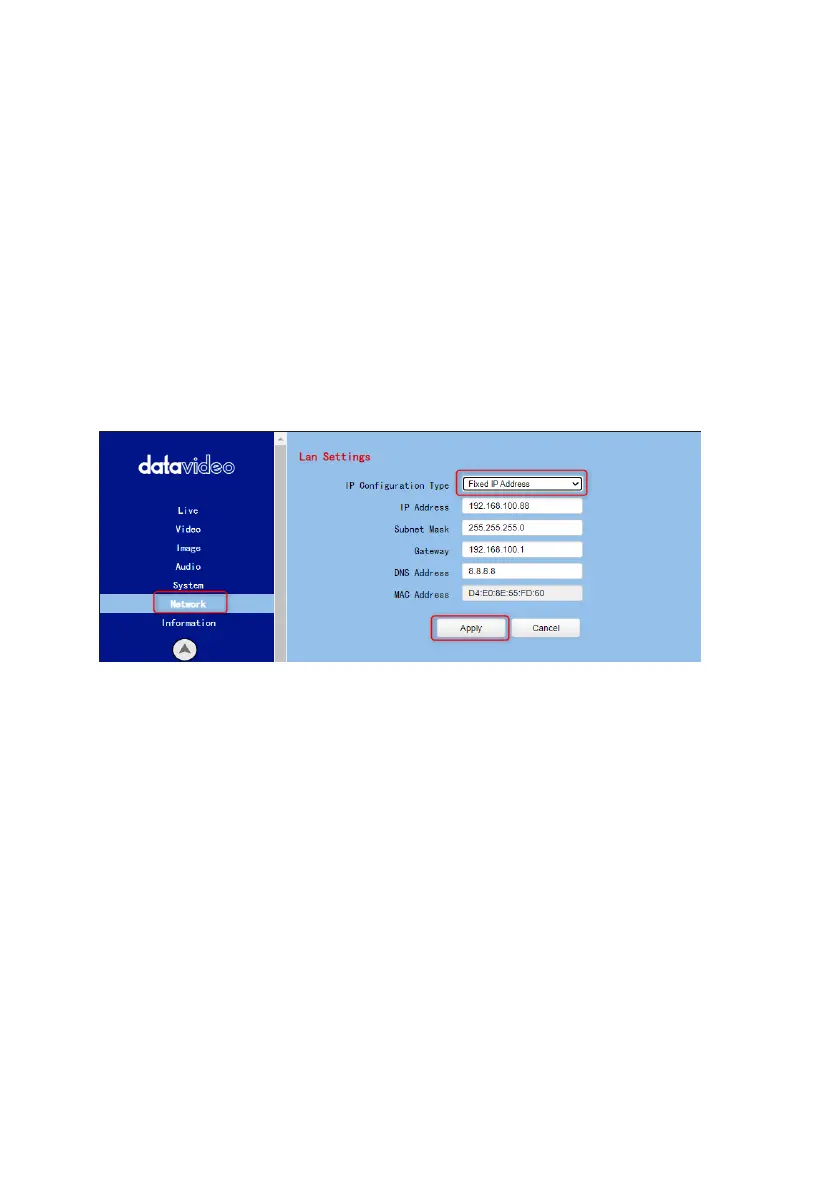
After users login into the web user interface successfully, please click the
“Network” option and then please click the “IP Configuration Type” drop-
down menu from the “Lan Settings” area to modify the connection type of the
camera to DHCP or Fixed IP. If the “Fixed IP Address” is selected, it will be set
in fixed IP mode. If the “Dynamic IP Address” is selected, it will be set in DHCP
mode. After the setting is finished, please click the “Apply” button for
completing the setting.
In following two chapters, we will show you how to enable DHCP and Static IP
modes in two separate sections.
6.1 DHCP Mode
Dynamic Host Configuration Protocol (DHCP) is a network protocol that
enables a server to automatically assign an IP address to a network device
from a defined range of numbers configured for a given network. The diagram
below illustrates a DHCP network connection example.


 To Next Page