75
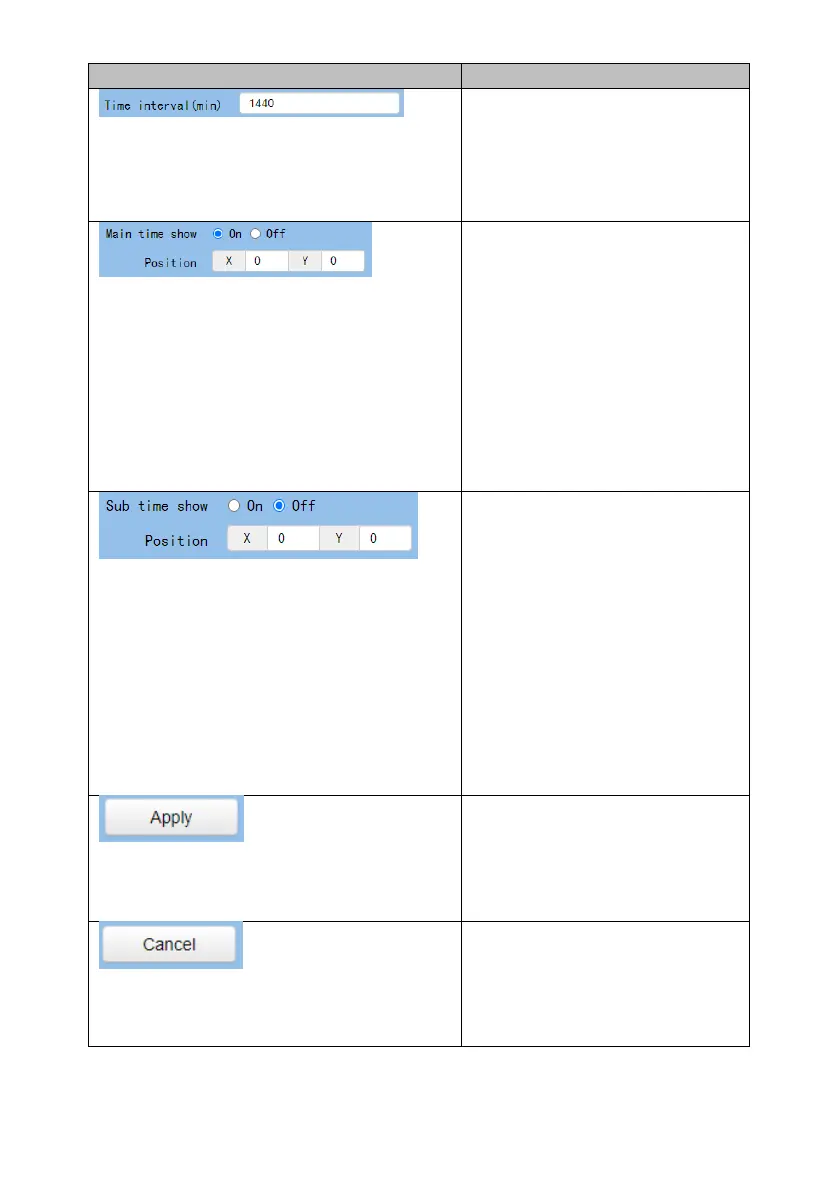
Time Interval
This option allows users to set
the time interval for the time
calibration.
Main Time Show/Position
This option allows users to open
or close the time display
function for the main time.
Moreover, users can enter
different X coordinate and Y
coordinate positions to
determine the position for
showing the time on the screen.
(The allowable setting range is
from 0 to 100).
Sub Time Show/Position
This option allows users to open
or close the time display
function for the sub time.
Moreover, users can enter
different X coordinate and Y
coordinate positions to
determine the position for
showing the time on the screen.
(The allowable setting range is
from 0 to 100).
Apply Key
After all of the options are set,
please click the “Apply” key and
then all of the changes will be
effective.
Cancel Key
If the “Cancel” key is pressed, all
of the changes will not take
effect.


 To Next Page
 Loading...