EasyManua.ls Logo

dbx 222 - Dubbing dbx Encoded Discs to Tape

dbx 222
20 pages
Print Icon
To Next Page IconTo Next Page
To Previous Page IconTo Previous Page
Loading...
I
Dubbing a dbx
Encoded Disc
onto a Tape
in
Encoded Form
This
process
allows
you
to
preserve
the
low
noise and
wide
dynamic
range
of the dbx
noise
reduction system
when transferring an
encoded disc to
a
tape. Such tapes
are
then
played
back
through the
Model
222
in
the same
manner as any dbx
Type I I
encoded tape.
No
special
connections are necessary
(Figure
31.
1.
Press in
the 222's
DISC
and
PLAY
switches.
2.
Set
your preamp
as follows:
TAPE MONITOR
switch to
TAPE,
and
INPUT
SELECTOR switch to
PHONO.
3.
Set
your
tape recorder to
Record,
and
record
normally.
4.
The tape
copy will
be
dbx encoded, and
you
will
hear
the
program
in
decoded
form
while
monitoring
this
operation.
5. After the tape
is recorded, it can
be
played
back
in decoded form by releasing the 222's dbx
DISC
button.
Leave
the
dbx
PLAY
button in,
and the
preamp
TAPE
MONITOR in
TAPE
position
(or
set
its INPUT
SELECTOR
to
TAPE).
Dubbing
a dbx Encoded Disc
onto a Tape
in Non-Encoded Form
This
process
is for transferring
a dbx-encoded disc in
non-encoded
form onto a tape for
future
playback
with-
out
dbx
processing
(such
as in an automobile
tape
pl
ayer).
lf
your
tape recorder is equipped for
off-the-tape
monitoring
and
you
wish
to
listen
to
the tape
as
it is
being recorded,
you
can
plug
a
pair
of
headphones
into
the recorder'3
phones
jack.
Alternately,
you
can
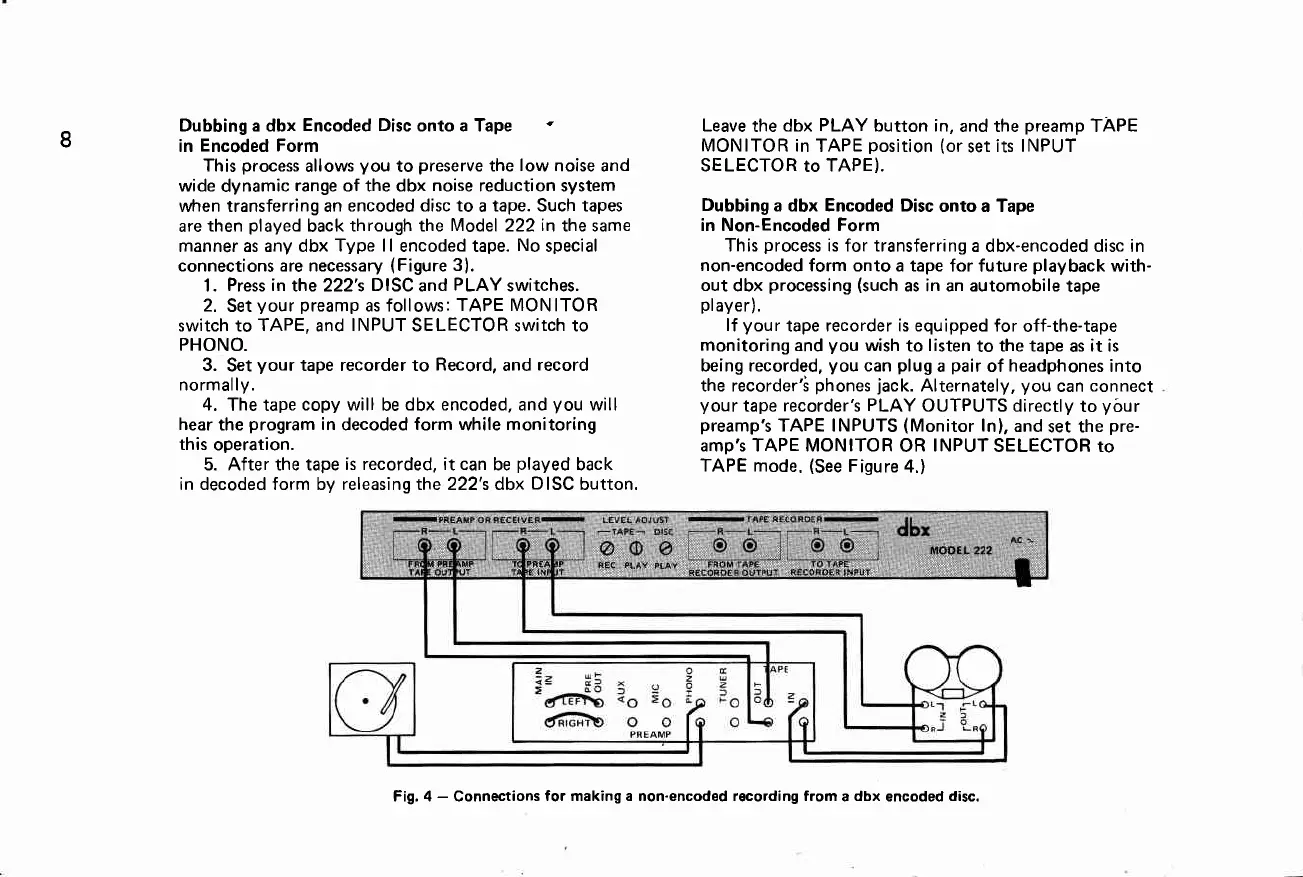
connect
your
tape
recorder's
PLAY
OUTPUTS directly
to
your
preamp's
TAPE INPUTS
(Monitor
ln),
and
set the
pre-
amp's TAPE MONITOR
OR
INPUT
SELECTOR to
TAPE mode.
(See
Figure
4.)
Fig, 4
-
Connections
for making a non-encoded recording from
a
dbx
encoded
disc.

Related product manuals