EasyManua.ls Logo

dbx 222 - Front Panel Controls

dbx 222
20 pages
Print Icon
To Next Page IconTo Next Page
To Previous Page IconTo Previous Page
Loading...
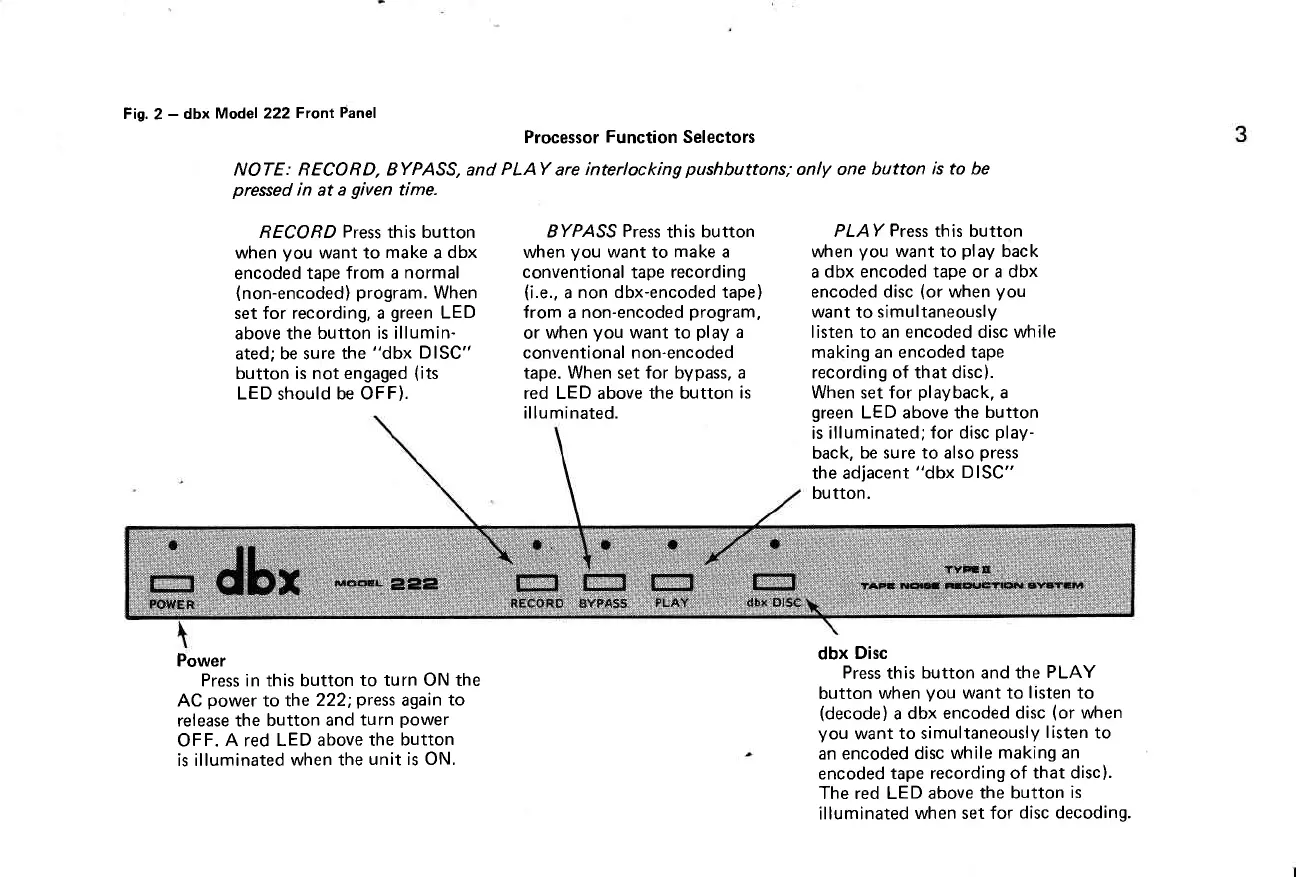
Fig.
2
-
dbx
Model 222
Front
Panel
Processor
Function
Selectors
NOTE: BECORD, BYPASS, and
PLAY
are
interlocking
pushbuttons;
only one button
is to be
pressed
in
at
a
given
time.
RECORD
Press
this button
when
you
want to
make
a
dbx
encoded
tape from a
normal
(non-encoded)
program.
When
set for recording, a
green
LED
above the
button is illumin-
ated; be sure
the
"dbx DISC"
button is not engaged
(its
LED
should
be OFF).
Power
Press in this button
to turn ON the
AC
power
to the
222;
press
again
to
release the
button and
turn
power
OFF.
A
red
LED above the
button
is illuminated
when the
unit is ON.
BYPASS
Press
this
button
when
you
want
to
make a
conventional
tape
recording
(i.e.,
a
non dbx-encoded tape)
from
a
non-encoded
program,
or
when
you
want to
play
a
conventional non-encoded
tape. When set for bypass, a
red LED above the button
is
illu minated.
PLAY
Press
this button
when
you
want to
play
back
a
dbx encoded tape
or
a dbx
encoded disc
(or
when
you
want
to
simultaneously
listen to an encoded disc while
making an encoded tape
recording of that disc).
When set for
playback,
a
green
LED above the
button
is illuminated;
for disc
play-
back,
be sure to also
press
the adjacent
"dbx DISC"
button.
dbx
Disc
Press
this
button and the
PLAY
button when
you
want to
listen
to
(decode)
a
dbx encoded
disc
(or
when
you
want
to simultaneously
listen
to
an encoded
disc while
making an
encoded
tape recording of
that disc).
The red LED above
the button
is
illuminated
when set for
disc decoding.

Related product manuals