EasyManua.ls Logo

dbx 222 - Making a dbx-Encoded Copy from a Non-Encoded Tape; Two Tape Monitor Loops Setup; One Tape Monitor Loop Setup

dbx 222
20 pages
Print Icon
To Next Page IconTo Next Page
To Previous Page IconTo Previous Page
Loading...
12
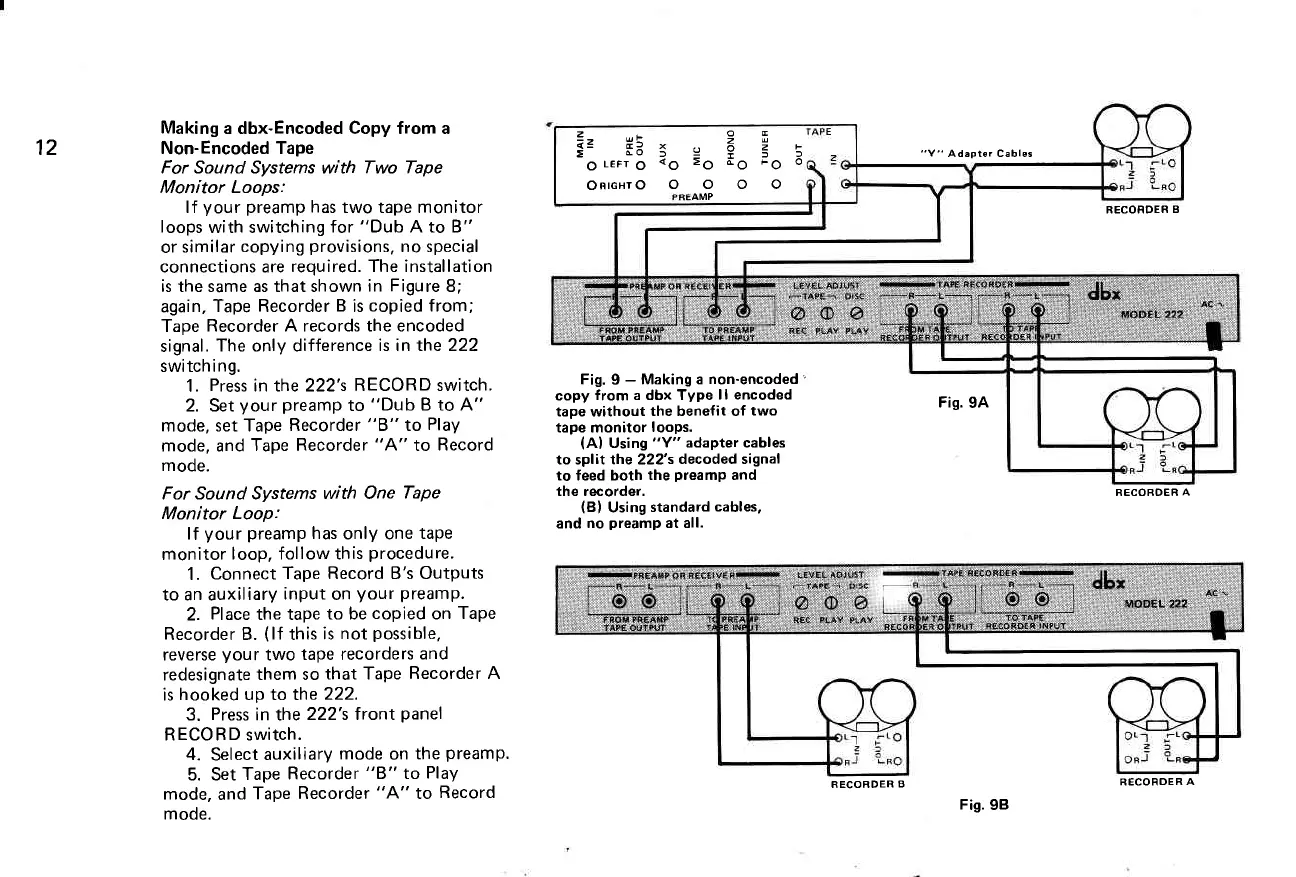
Making
a dbx-Encoded Copy from a
Non-Encoded Tape
For Sound Systems with Two Tape
Monitor Loops:
lf
your
preamp
has
two tape monitor
loops
with switching
for
"Dub
A to B"
or
similar
copying
provisions,
no special
connections are
required. The installation
is the same as that shown
in Figure
8;
again,
Tape Recorder
B
is
copied from;
Tape
Recorder A records the encoded
signal.
The only difference
is in the 222
switching.
1.
Press
in the 222's
RECORD switch.
2. Set
your
preamp
to
"Dub
B to A"
mode, set Tape
Recorder
"8"
to
Play
mode, and
Tape Recorder
"A"
lo
Record
mode.
For Sound Systems
with One
Tape
Monitor
Loop:
lf
your
preamp
has
only one
tape
monitor
loop, follow this
procedure.
1.
Connect
Tape Record B's Outputs
to an auxiliary
input
on
your preamp.
2.
Place
the tape
to be
copied
on
Tape
Recorder B.
(lf
this
is
not
possible,
reverse
your
two
tape recorders
and
redesignate
them so
that Tape
Recorder A
is
hooked up to the
222.
3.
Press
in the
222's f
ront
panel
RECORD switch.
4.
Select
auxiliary
mode
on
the
preamp.
5. Set
Tape
Recorder
"8"
to
PlaY
mode,
and
Tape
Recorder
"A"
to
Record
mode.
Fig.
9
-
Making a
non-encoded'
copy
from a dbx Type
ll encoded
tape without
the benefit of
two
tape monitor
loops.
(A)
Using
"Y" adapter cables
to split the 222's
decoded signal
to feed both
the
preamp
and
the recorder.
(B)
Using
standard
cables,
and
no
preamp
at all.
"Y"
Adapter Cables
Fis.
9A
RECORDER B
RECOROER
A
otr
zs
e9<i
:O c'O;O 6
ooo
z-
e= H5
E
do
o
LEFr
O
ORIGHT
O
l
<o
o
RECORDER
B
Fig.
98
RECORDER A

Related product manuals