EasyManua.ls Logo

dbx 222 - Tape Copying with Monitor Loops

dbx 222
20 pages
Print Icon
To Next Page IconTo Next Page
To Previous Page IconTo Previous Page
Loading...
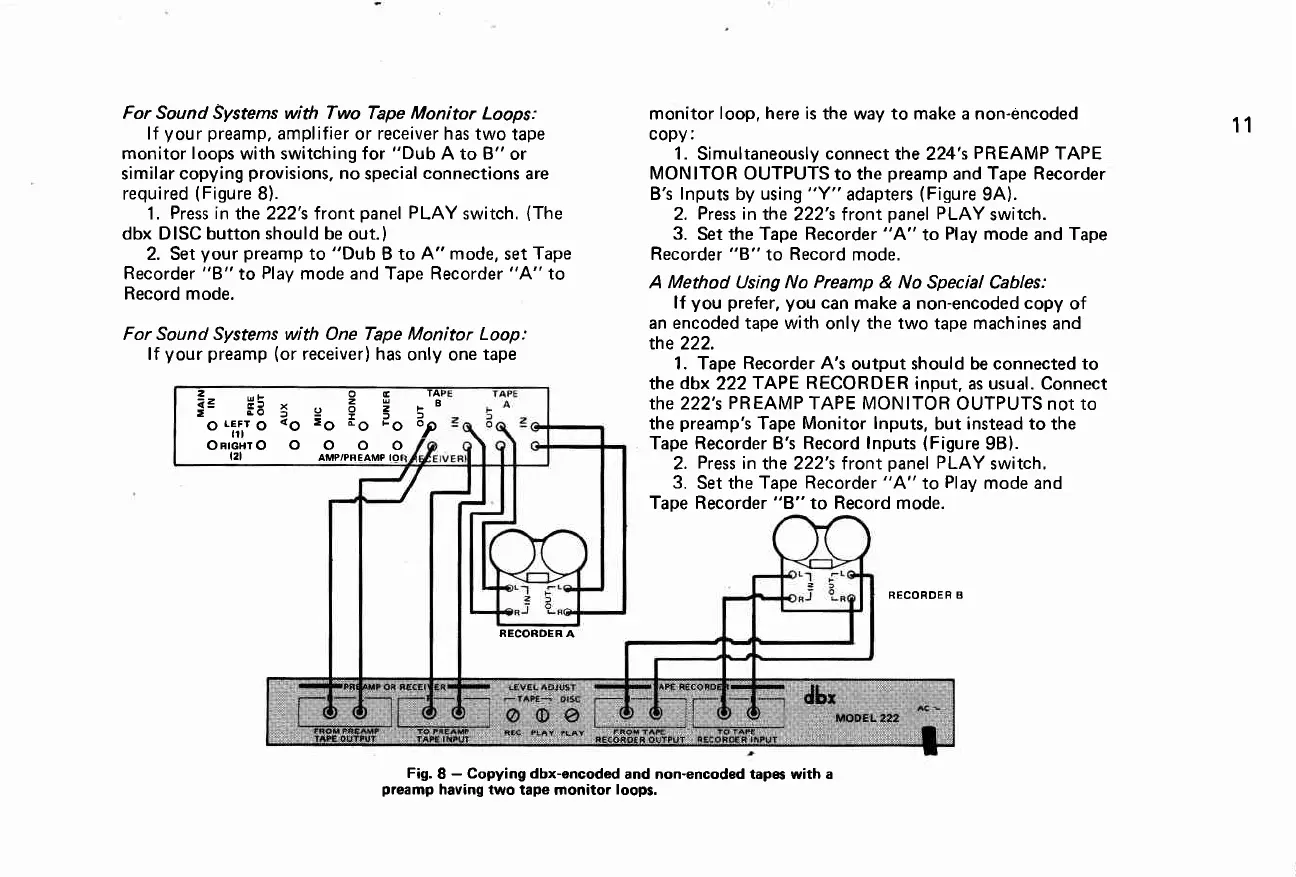
For Sound Systems with Two Tape Monitor
Loops:
lf
your
preamp,
amplifier
or
receiver
has two
tape
monitor
loops
with switching for
"Dub
A to B"
or
similar copying
provisions,
no
special
connections
are
required
(Figure
8).
1.
Press in
the 222's front
panel
PLAY
switch.
(The
dbx DISC button
should
be
out.)
2. Set
your preamp
to
"Dub
B to
A" mode,
set
Tape
Recorder
"B"
to
Play
mode and Tape Recorder
"A"
to
Record
mode.
For Sound Systems with One Tape Monitor Loop:
lf
your preamp
(or
receiver) has
only one
tape
monitor
loop, here is
the way to make a non-incoded
copy:
1.
Simultaneously
connect
the 224's
PR EAMP
TAPE
MONITOR OUTPUTS
to the
preamp
and
Tape Recorder
B's
lnputs
by using
"Y"
adapters
(Figure
9A).
2.
Press in
the
222's f ront
panel
PLAY
switch.
3.
Set the Tape
Recorder
"A"
to
Play
mode and Tape
Recorder "8"
to
Record
mode.
A Method Using No
Preamp
& No
Special Cables:
lf
you prefer, you
can
make
a
non-encoded copy
of
an encoded tape with
only
the two
tape
machines
and
the 222.
1. Tape
Recorder
A's
output
should be connected to
the
dbx
222TAPE
RECORDER
input, as usual. Connect
the 222's
PREAMP
TAPE MONITOR
OUTPUTS not to
the
preamp's
Tape
Monitor lnputs,
but instead to
the
Tape Recorder B's
Record lnputs
(Figure
98).
2.
Press
in
lhe 222's front
panel
PLAY
switch,
3.
Set the
Tape Recorder
"A"
to
Play
mode and
Tape Record to Record mode.
RECORDER B
11
RECORDER A
Fig.
8
-
Copying dbx-encoded
and non-encoded tapes with a
preamp
having two
tape monitor
loops.
2
...-
O E
TAI
e3
ra:
e F 3
:'
O
LEfir
O
<O
-O
.O
'O
?
ORTGHTOOOOO
I2I
AMP/PREAMP |ot

Related product manuals