EasyManua.ls Logo

dbx 222 - Function Select Button Guide

dbx 222
20 pages
Print Icon
To Next Page IconTo Next Page
To Previous Page IconTo Previous Page
Loading...
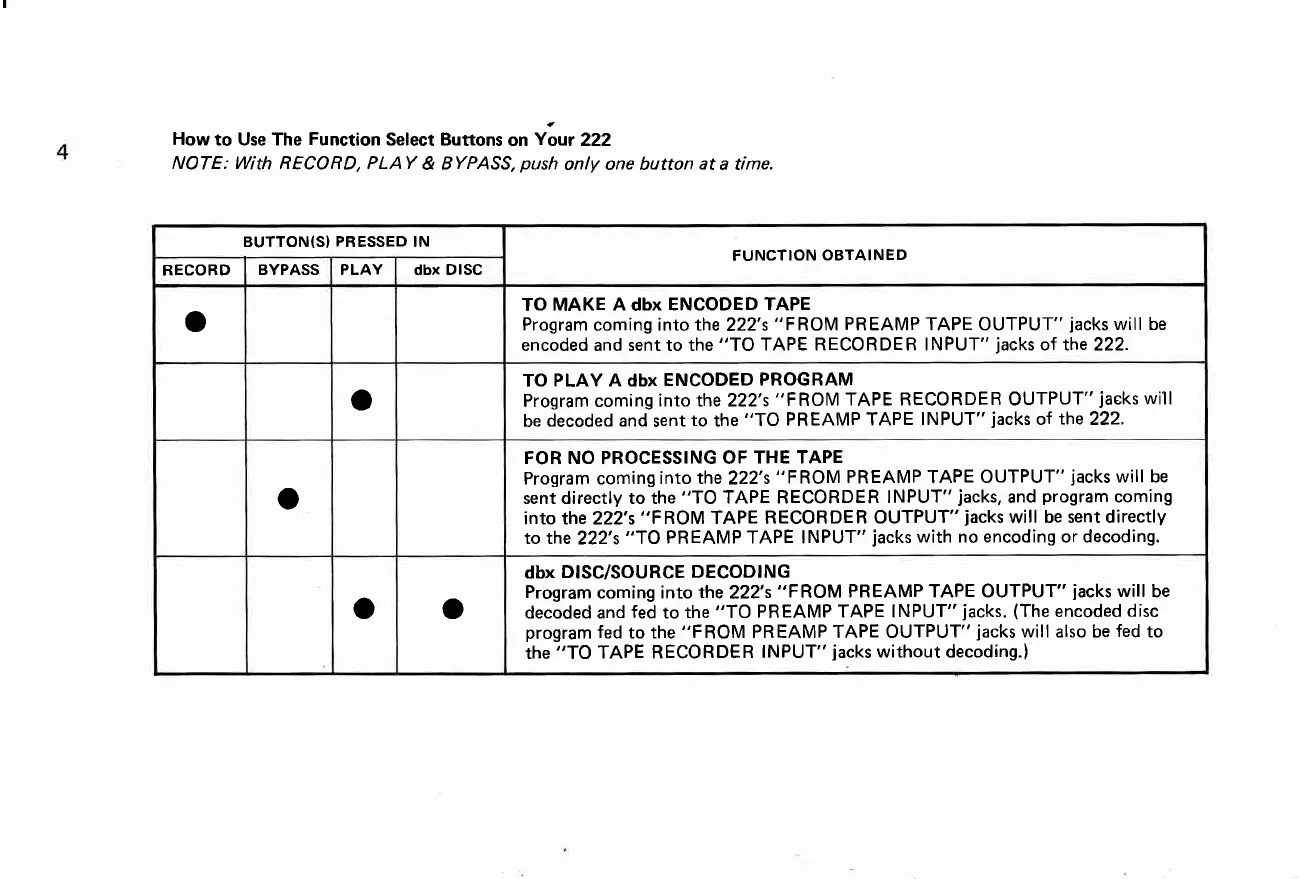
How
to Use The
Function
Select Buttons
on
Your
222
NOTE: With
RECORD,
PLAY
&
BYPASS,
push
only one button
at
a time.
BUTTON(SI
PRESSED
IN
FUNCTION OBTAINED
RECORD
BYPASS PLAY dbx DISC
o
TO MAKE
A
dbx
ENCODED
TAPE
Program
coming into the
222's
"FROM PREAMP
TAPE OUTPUT"
jacks
will be
encoded and sent to the
"TO
TAPE RECORDER INPUT"
jacks
of the 222.
o
TO PLAY A dbx
ENCODED
PROGRAM
Program coming
into the 222's
"FROM TAPE RECORDER OUTPUT"
jaeks
will
be
decoded and
sent
to
the
"TO PREAMP TAPE
INPUT"
jacks
oI
the
222.
o
FOR NO PROCESSING OF
THE TAPE
Program coming
into the
222's
"FROM PREAMP
TAPE
OUTPUT"
jacks
will be
sent directly to the
"TO
TAPE RECORDER
INPUT"
jacks,
and
program
coming
into the 222's
"FROM
TAPE RECORDER
OUTPUT"
jacks
will be sent directly
to the
222's
"TO PR
EAMP
TAPE INPUT"
jacks
with no encoding or decoding.
o o
dbx
DISC/SOURCE
DECODING
Program
coming into
the
222's
"FROM PREAMP TAPE OUTPUT"
jacks
will
be
decoded and
fed
to
the
"TO
PREAMP TAPE INPUT"
jacks.
(The
encoded
disc
program
fed
to the
"F
ROM
PR EAMP TAPE OUTPUT"
jacks
will also be
fed
to
the
"TO
TAPE RECORDER
INPUT"
jacks
without decoding.)

Related product manuals