10
Settings
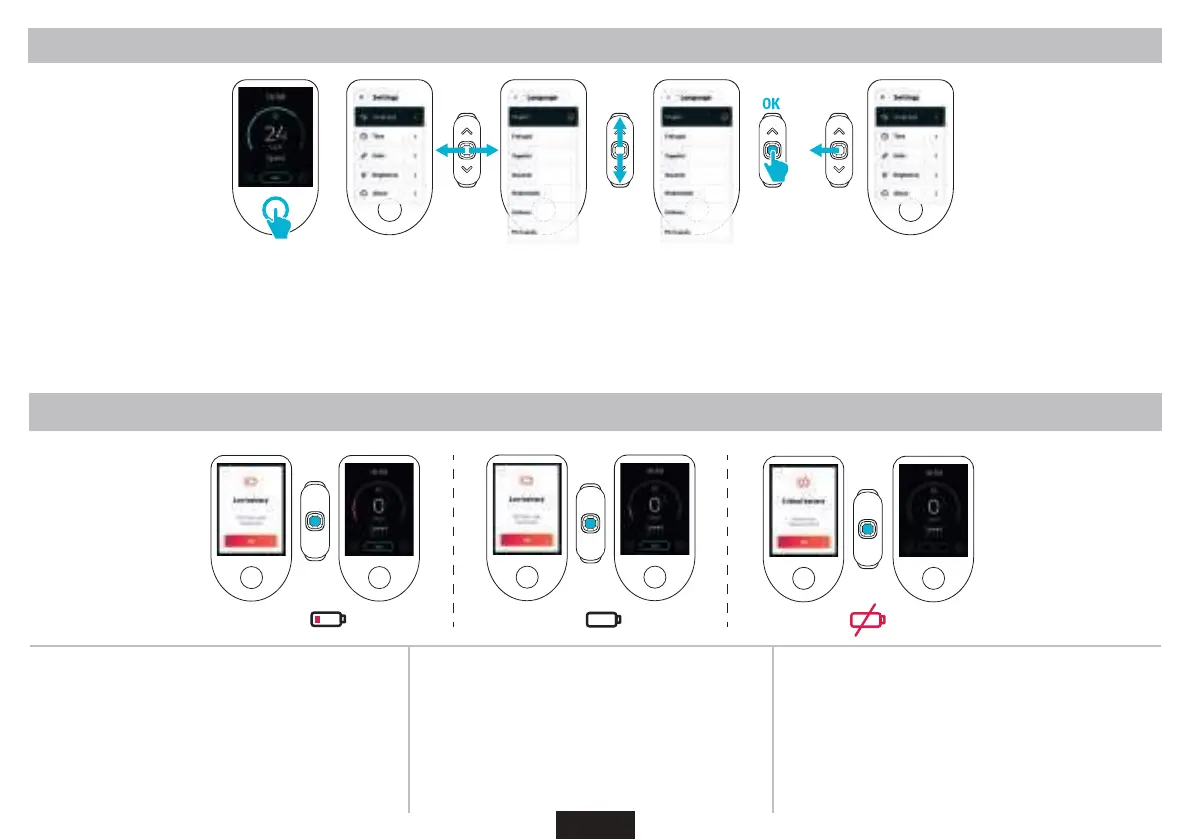
Access the menu by pressing the display button. Then, navigate through the settings with the joyick :
up/down to go up and down
left to go to the previous page
right to go to the next page
press the joyick’s top to validate your choice
You can set the language, the time, units, screen brightness and access the about section.
Low Battery
20%
10%
20%
The popup shows up to warn you there is only 20% battery left.
You have to press the joyick top to remove the popup and
conrm you got the information. It will automatically deactivate
TOUR and TURBO assiance modes to switch to ECO mode.
10%
The popup shows up to warn you there is only 10% battery left.
You have to press the joyick top to remove the popup and
conrm you got the information. It will automatically deactivate
TURBO assiance mode to switch to TOUR or ECO mode.
5%
The battery level as reached a critical point. All assiance modes
are deactivated to preserve the engine variator, the lights and the
screen.


 To Next Page
 Loading...