Editing and Combining Designs
49
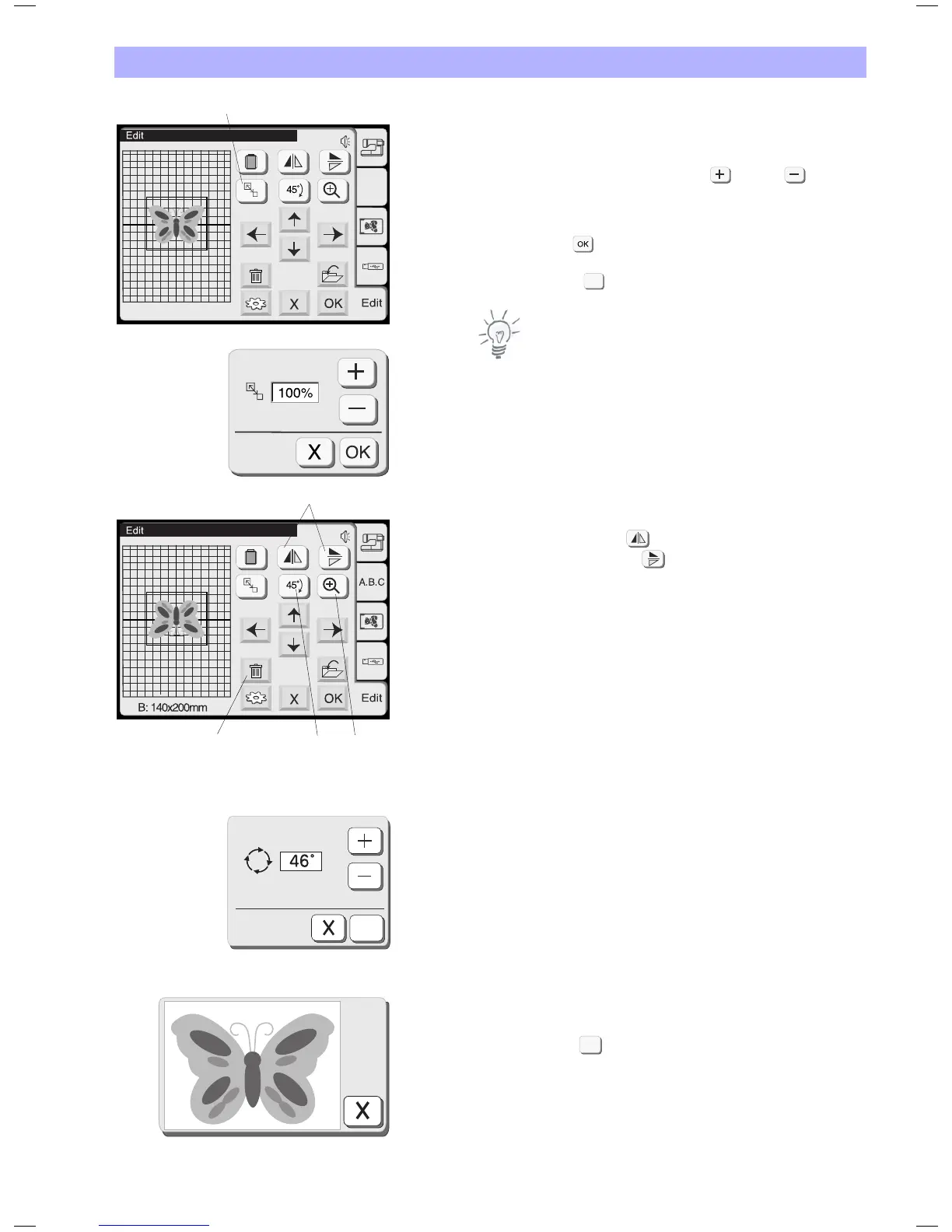
1 Resize Key
Press this key to open the Resize Window.
To alter the pattern size, press the plus or minus key.
The size of the pattern can be altered from 90% to 120% of the
original size.
The size will change 1% each time you press the plus or minus keys.
Press the OK key and the pattern at the new size will be shown
in the Editing Window.
Press the Close key to close the Resize Window without resizing
the pattern.
Note:
All resizing, mirroring and rotating operations bear the risk of a
certain degradation in stitch quality.
2 Mirror image key
Press the vertical mirror key to flip patterns from left to right.
Press the horizontal mirror key to flip the pattern from top to
bottom.
3 Rotate key
Press this key to rotate the pattern 45 degrees clockwise.
Micro rotation
When you press and hold the rotate key for one second or longer,
the rotate dialog box will open.
• Pressthepluskeytorotatethepatterninstepsof1ºclockwise.
• Presstheminuskeytorotatethepatterninstepsof1ºcounter
clockwise.
4 Delete key
Press this key to delete the selected pattern.
5 Magnifier key
Press this key to show a magnified image of the selected pattern.
Press the close key to return to the previous screen.
B: 140x200mm
A.B.C
1
2
4
3
5
X
X
OK


 To Next Page