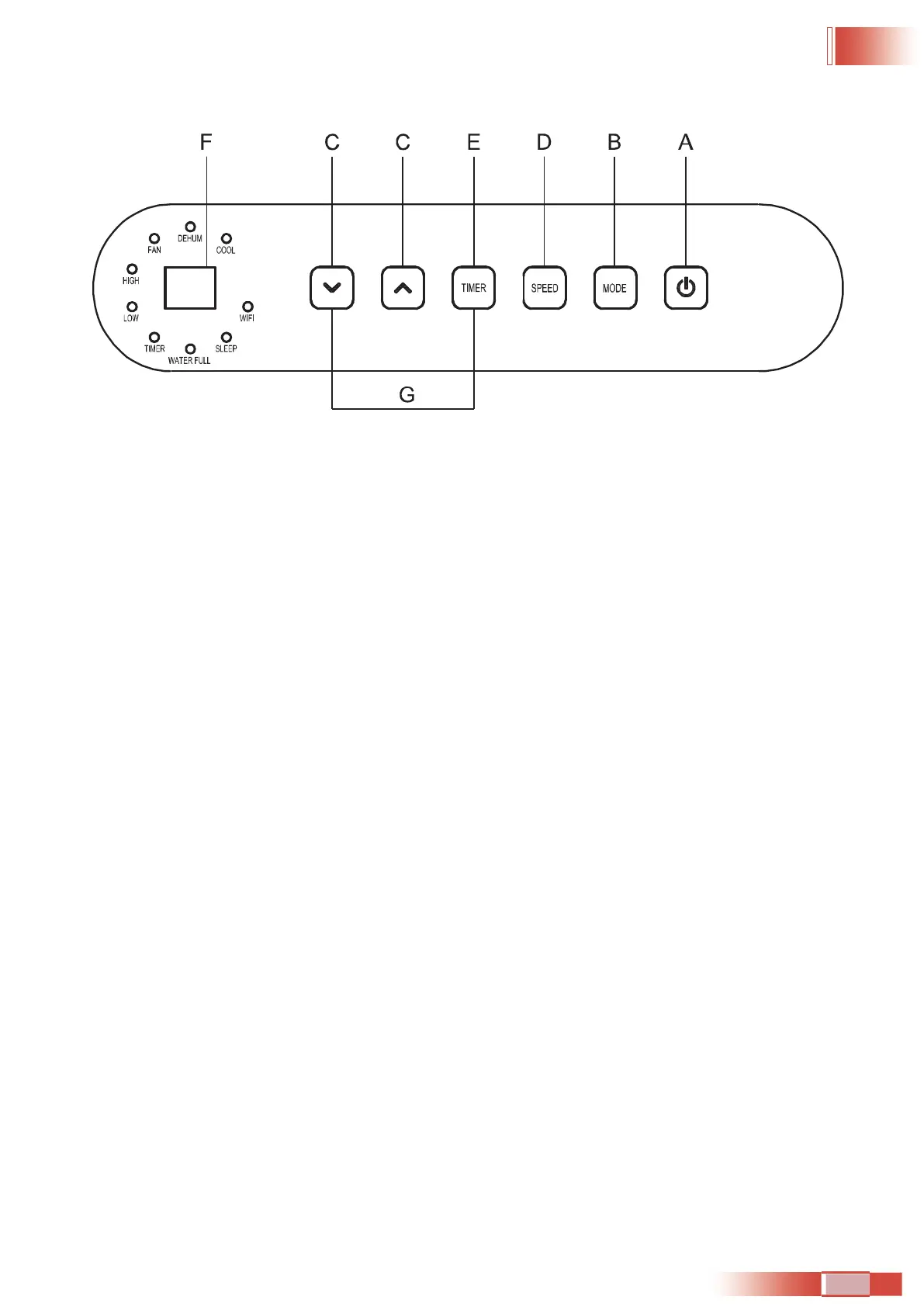
CONTROL PANEL
BUTTONS
A.
POWER BUTTON
Turns ON/OFF power to the air condoner.
NOTE: Turning o power by pressing the Power buon does NOT disconnect the appliance from the power supply.
B.
MODE BUTTON
Press the Mode buon to toggle among the operang opons. The corresponding indicator will illuminate:
Heat (on some models) - Heats the room to the set temperature
Cool – Cools the room to the set temperature
Dehum – Reduces the humidity in the room
Fan – Circulat
es the air in the room without cooling
C. UP AND DOWN ARROW BUTTONS
Adjusts the Temperature or Hours in Time Delay.
To Set the Temperature:
The temperature can be set between 17ºC and 30º C when the air condoner is in Cool mode.
1. Press the Mode buon un the Cool mode is selected.
2. Press the Up Arrow or Down Arrow buons to select the Temperature.
NOTE: The temperature cannot be set when the air condoner is in either Fan or Dehum mode.
NOTE: The Up Arrow and Down Arrow buttons, when pressed at
the same e, allow you to select between displaying
the temperature in ºC or ºF.
D. FAN SPEED BUTTON
The fan speed can be adjusted from Low speed to High speed when the air condoner is in operaon.
NOTE: The fan speed cannot be adjusted when the unit is in Dehum mode.
Press the Fan Speed buon to toggle among the two speeds. The corresponding fan speed indicator will illuminate.
01 02 03 04 05 06 07 08 09 10 11 12 13 14 15 16 17 18 19 20 21 22
23 24 25 26 27 28 29 30 31
32 33 34 35 36 37 38 39 40 41 42 43
44 45 46 47 48 49 50 51 52 53 54 55 56 57 58 59 60 61 62 63 64 65


 To Next Page