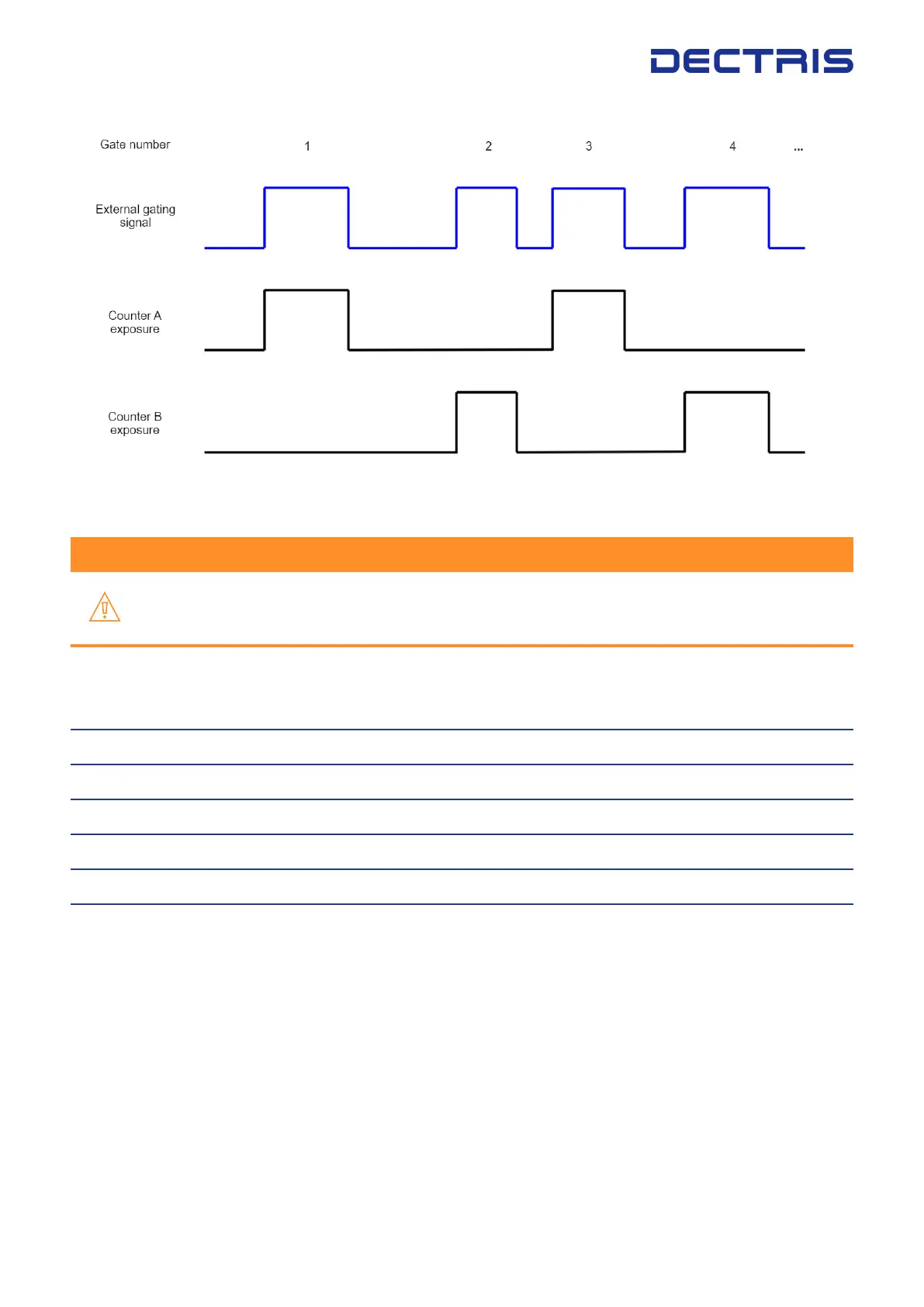
Figure 9.5: Scheme illustrating the gating mode ”double”.
Warning #1
In the extg_mode ”double”, nimages has to be an even number and ntrigger has to be set to 1. If
these parameters are not congured correctly, an error will be returned and the mode cannot
be enabled.
Example detector conguration for externally gated exposure series:
detector | cong | trigger_mode {”value”: ”extg”}
detector | cong | extg_mode {value: ”double”}
detector | cong | ntrigger {”value”: 1}
detector | cong | nimages {”value”: 10}
detector | cong | nexpi {”value”: 10000}
detector | cong | countrate_correction_applied {value: ”false”}
9.7.4. Gating Mode "single"
For gating measurements using gating mode ”single”, the two 16-bit counters of each threshold will be con-
nected to form a single 32 bit counter. In ”single” mode the system adds up the signals in the combined counter.
The advantage is a very large dynamic range, as each threshold gets one 32 bit counter. Photons arriving during
each gated window will be integrated in the counter. After the desired number of gated windows is reached,
as dened in nexpi, a readout will happen and produce a 32 bit image for each threshold enabled. The readout
will take less than 2 ms. This will be repeated until the congured number of images nimages has been reached.
Please note, that it is not necessary to use the mode ”single” gating mode to achieve a 32-bit dynamic range.
The other trigger modes oer auto-summation, also achieving 32 bit depth, and which are generally recom-
mended unless you need very short gating windows and minimal jitter.
DECTRIS EIGER
®
2 User Manual v1.8.2 27 | 36



 To Next Page