Dedicated Micros ©2009
15
EcoSense
Relays
The unit support up to two 24V 200mA relays
Relay Connector
Pins Connection
22 & 23 Relay 1 signal
24 & 25 Relay 2 signal
Note: The 4 channel unit supports one relay output.
Step 6 Connecting Serial Ports
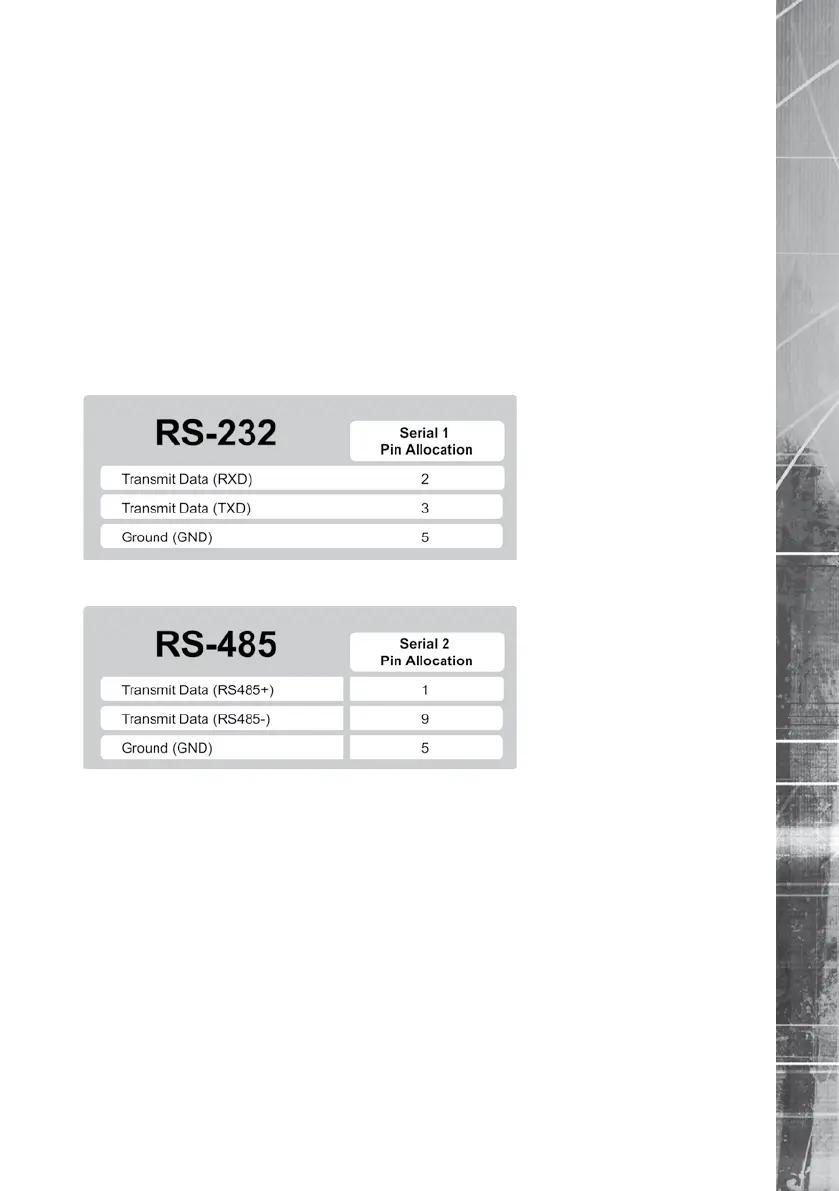
Serial port 1 offers RS-232 connectivity, serial port 2 offers RS-485 connectivity.
Serial ports have two main uses:
1. Connecting twisted pair telemetry for PTZ cameras.
2. Debug operations.
RS232
RS485
5.16
6.1
Step 7 Connecting a Keyboard
The unit supports Dedicated Micro keyboards DM/KBC1 and DM/KBC2. Connect either of these
keyboards via the KBD connector socket on the rear panel.
Note: The optional Keyboard is not supported on the 4 channel unit.
Note: Refer to the Unit Operation section of this manual for further guidance regarding the
supported keyboards.



 To Next Page