Dedicated Micros ©2009
70
EcoSense
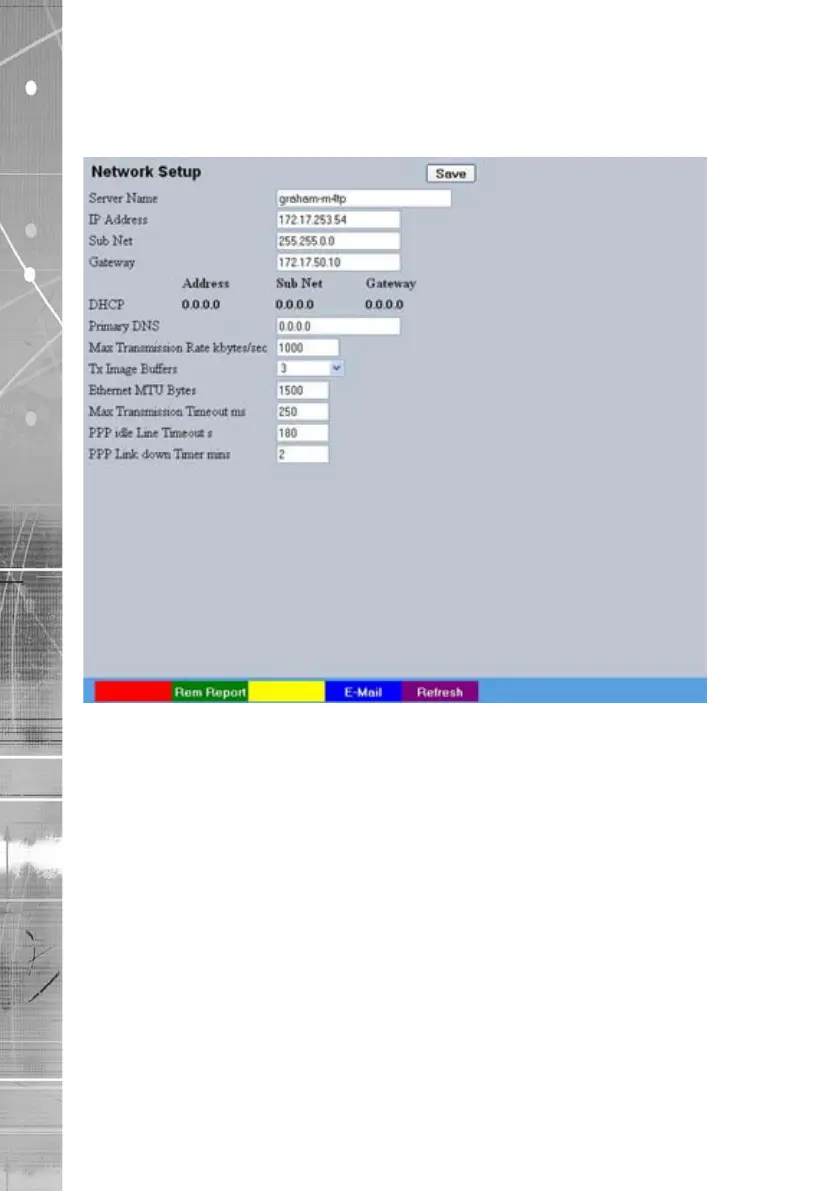
Network
This menu allows additional network settings to be congured if required.
Server Name This eld can be edited to allocate a name to the unit. This would
be used if accessing the unit via a Domain Name Server (DNS).
IP Address
This is the IP address allocated to the unit.
Sub Net
This is the subnet of the network were the unit is located.
Gateway
This is the IP address of the default gateway (router).
Primary DNS
This is the primary DNS server IP address for applications utilising
domain names.
Max Transmission Rate Shows the maximum transmission speed for the network type.
Force 10BaseT operation The unit supports 10 or 100BaseT half duplex transmission.
Selecting this option will force the unit to operate at a 10BaseT
connection.
Tx Image Buffers This is used in order to improve the picture delivery over Ethernet
when using a slow connection i.e. 256Kbps. A buffer setting of 1,2
or 3 is available.
Ethernet MTU This is the maximum transmit unit for the Ethernet packet. The
MTU is the largest physical packet size measured in bytes that the
network can transmit. By default this gure is set to 1500bytes.
Mx Transmission Timeout ms This is the time (in milliseconds) the unit will wait to re-send a
packet if an acknowledgement is not received.



 To Next Page