Installation Dedrone
14 v0.4 IM-Inst-RF360en
11
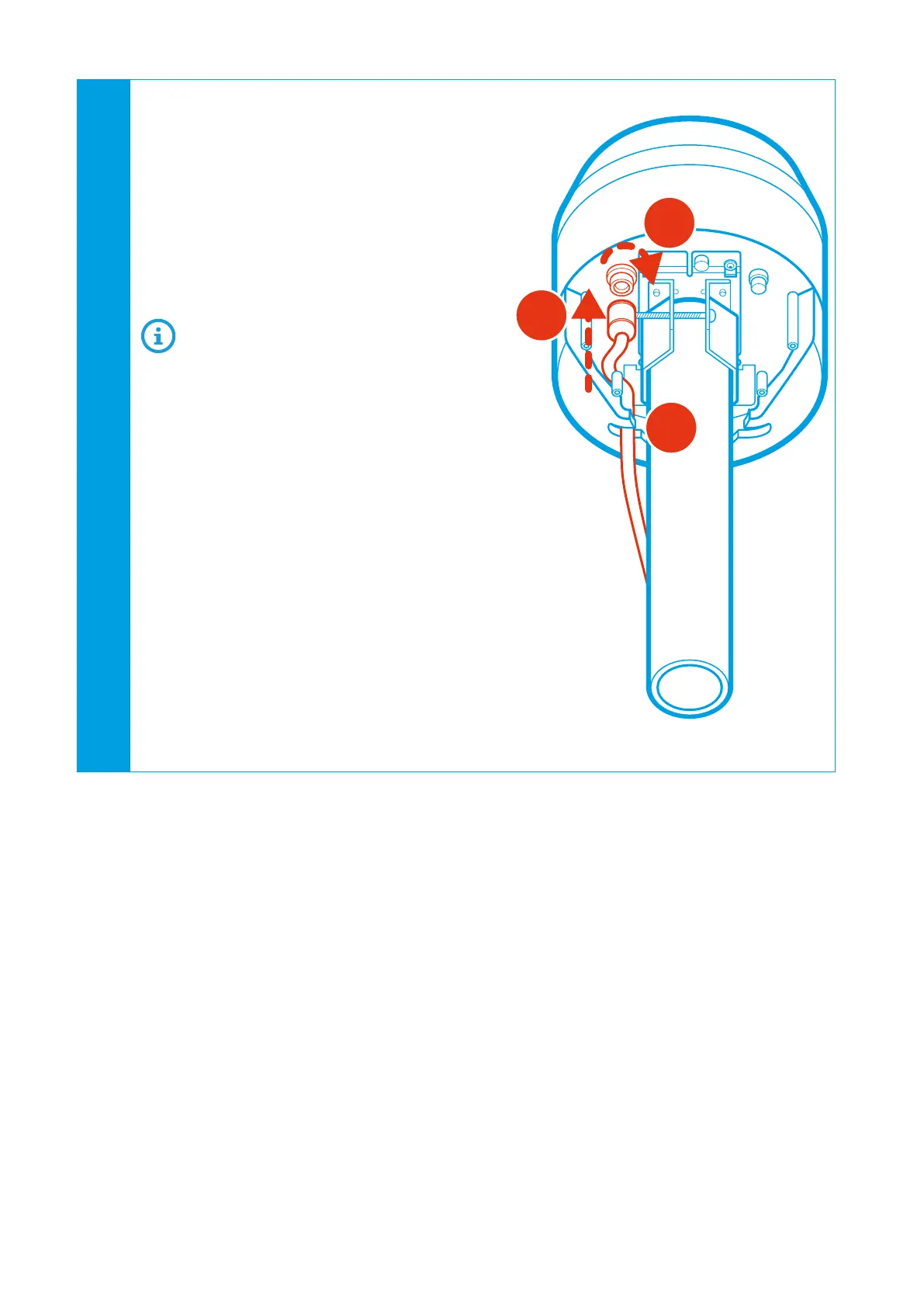
To connect the RF-360 to your local network,
connect the patch cable with the outdoor
housing to the network socket:
• Remove the protective cap from the plug.
• Plug the Ethernet cable with the outdoor
housing into the plug (1). Make sure that
the plug orientation fits the socket.
• Rotate the housing until it is locked (2).
• Lay the cable in the cable guide (3).
If you want to operate the RF-360 via
PoE+, make sure that PoE+ (802.3at) is
enabled on the connected switch.
If the patch cable is connected to the net-
work and PoE+ is activated, the RF-360
boots automatically and after approxi-
mately 1 second the blue button at the
RF-360 illuminates, indicating that the
hardware is ready.
The patch cable is connected to the net-
work with activated PoE+ and the RF-360
does not boot automatically after appro-
ximately 1 second?
E Push the blue button and wait for it
to illuminate.
E Make sure that active PoE+ (802.3at)
is activated in your network.
E If you do not want to operate the
RF-360 via PoE+, connect the AC cab-
le as described in the next step.
2
3
1


 To Next Page