9 Homedepot.ca
Please contact 1-866-308-3976 for further assistance.
Operation (continued)
5
Adjusting the TIME control
NOTE: The “TIME” control determines the amount of
time the light will stay on full bright after all motion has
stopped.
□ Turn the “TIME” dial toward the “ + ” position
to increase the light on-time (up to 4 minutes).
□ Turn the “TIME” dial toward the “ – ” position
to decrease the light on-time (10 seconds
minimum).
+–
6
Adjusting the LUX control
NOTE: The “LUX” control determines how dark the
surrounding light level needs to be before the motion
sensor (C) will turn on the light when motion is detected.
□ Turn the “LUX” dial toward the “ + ” position to
turn the light on when the surrounding light is
brighter (daytime).
□ Turn the “LUX” dial toward the “ – ” position to
turn the light on when the surrounding light is
darker (nighttime).
+
7
Completing motion sensor
setup
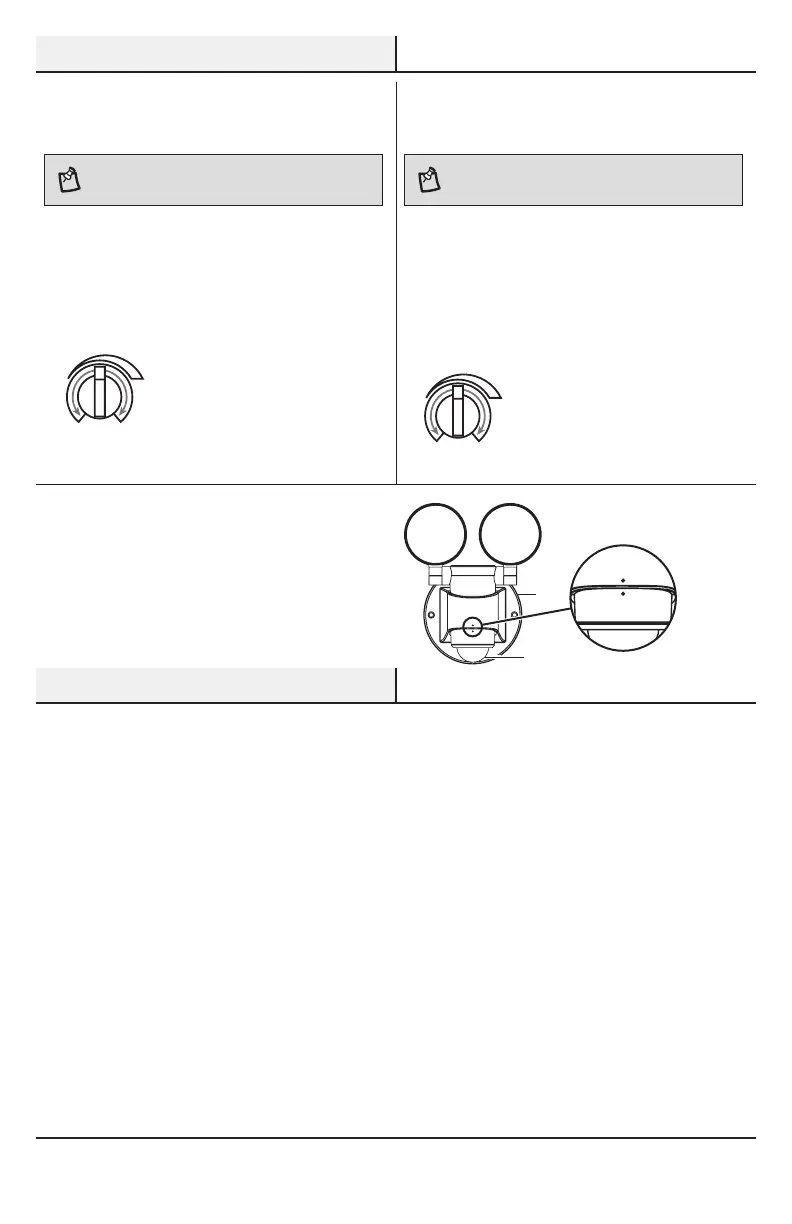
□ After all motion sensor (C) adjustments are
complete, rotate the motion sensor (C) so the
controls are facing the rear of the xture (B)
and the two dots are in alignment.
Care and Cleaning
□ To prolong the original appearance, clean the light xture with clear water and a soft, damp cloth only.
□ Do not use paints, solvents, or other chemicals on this light xture. They could cause a premature
deterioration of the nish. This is not a defect in the nish and will not be covered by the warranty.
□ Do not spray the light xture with a hose or power washer.
B
C




 To Next Page