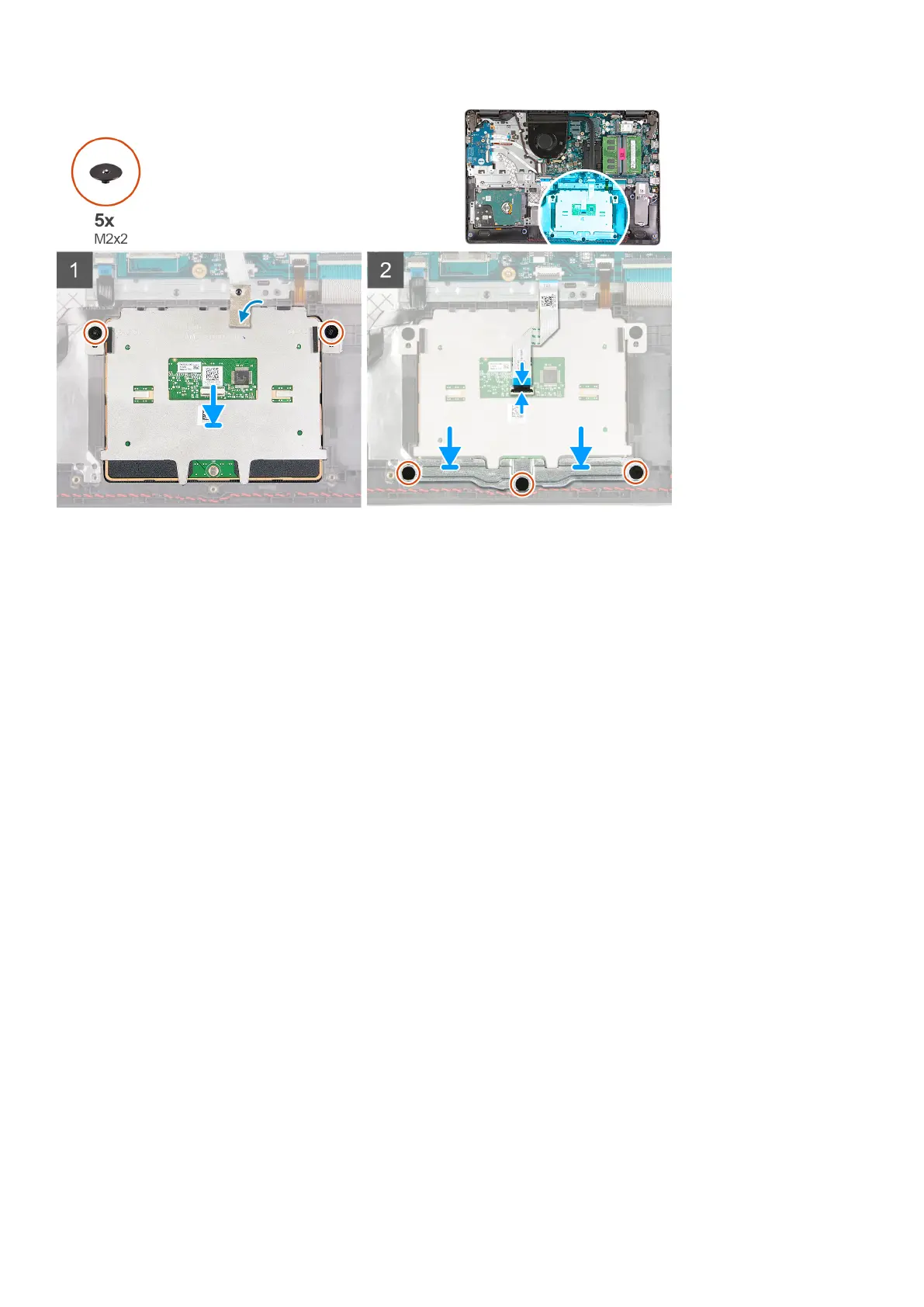
Steps
1. Reconnect the touchpad FFC to the touchpad module.
2. Align and place the touchpad module onto the system.
3. Install the two (M2x2) screws to secure the touchpad module to the palmrest.
4. Install the touchpad bracket on the touchpad and secure it using the three (M2x2) screws.
5. Peel back the conductive tape over the touchpad module.
6. Reconnect the touchpad FFC to the system board.
Next steps
1. Install the battery.
2. Install the base cover.
3. Install the SD card.
4. Follow the procedure in after working inside your computer.
Display assembly
Removing the display assembly
Prerequisites
1. Follow the procedure in before working inside your computer.
2. Remove the SD card.
3. Remove the base cover.
4. Disconnect the battery cable.
5. Remove the WLAN.
Disassembly and reassembly
51











 To Next Page