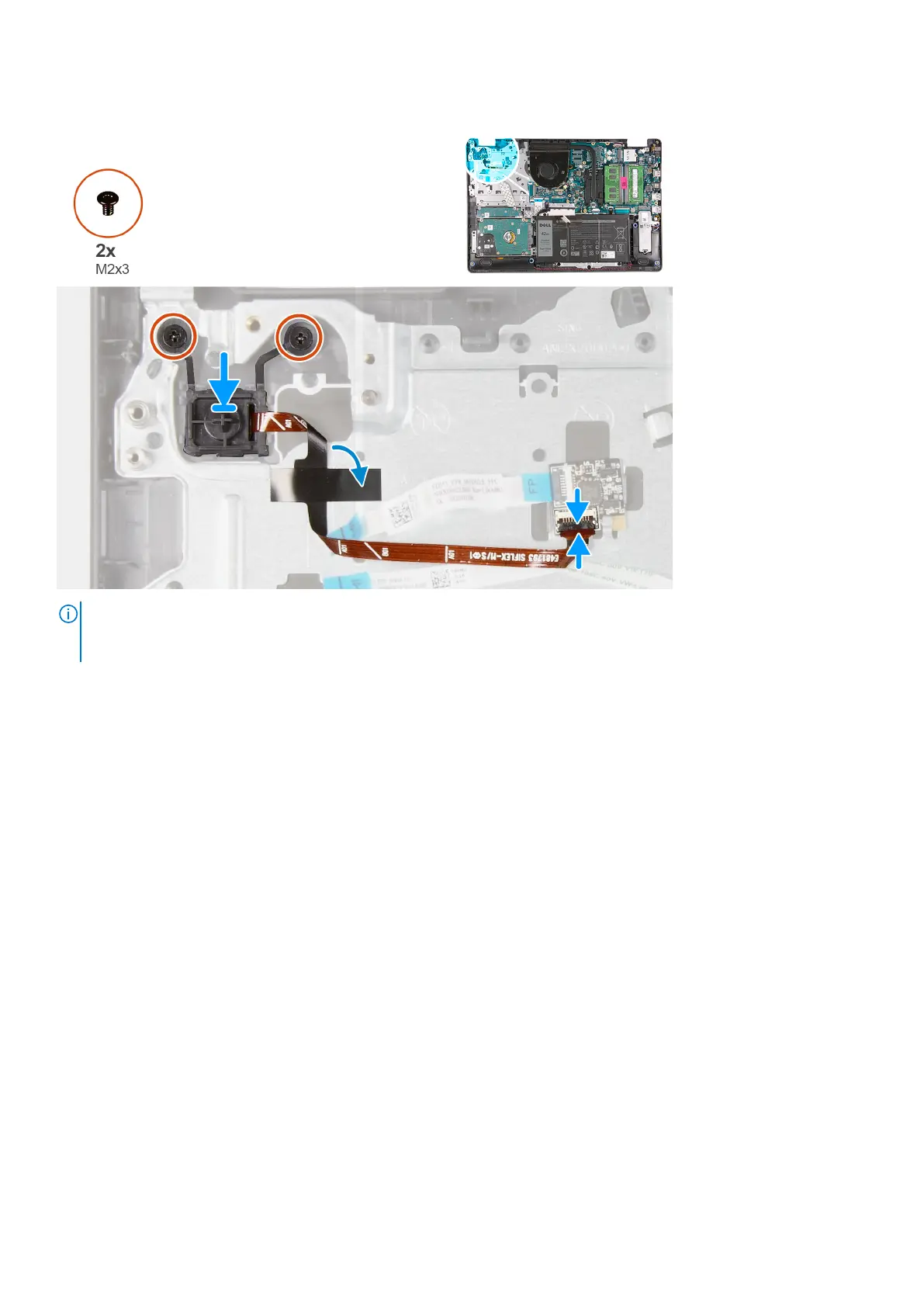
About this task
NOTE: When replacing/re-installing the power button with fingerprint reader assembly on the Vostro 3501, a mylar sticker
must be adhered to the fingerprint reader FPC to ensure that it is properly grounded to the palm rest. The mylar sticker is
packaged together with new replacement power button with fingerprint reader assemblies
Steps
1. Place the power-button board into the slot on the palmrest.
2. Install the two (M2x3) screws to secure the power button to the palmrest.
3. Connect the power button cable to the connector on the system board.
Next steps
1. Install the IO board.
2. Connect the battery cable.
3. Install the base cover.
4. Install the SD card.
5. Follow the procedure in after working inside your computer.
System board
Removing the system board - Realtek audio
Prerequisites
1. Follow the procedure in before working inside your computer.
2. Remove the SD card.
3. Remove the base cover.
4. Remove the battery.
5. Remove the WLAN.
6. Remove the SSD.
68
Disassembly and reassembly











 To Next Page