My Account My Order Status Feedback
United States
Contact Us Premier Login
Shop Support Community
Support Home Page
Back to Contents Page
Using Your Adjustable Monitor Stand
Dell™ 2007FP Flat Panel Monitor
Attaching the Stand
Organizing Your Cables
Using the Tilt, Swivel and Vertical Extension
Removing the Stand
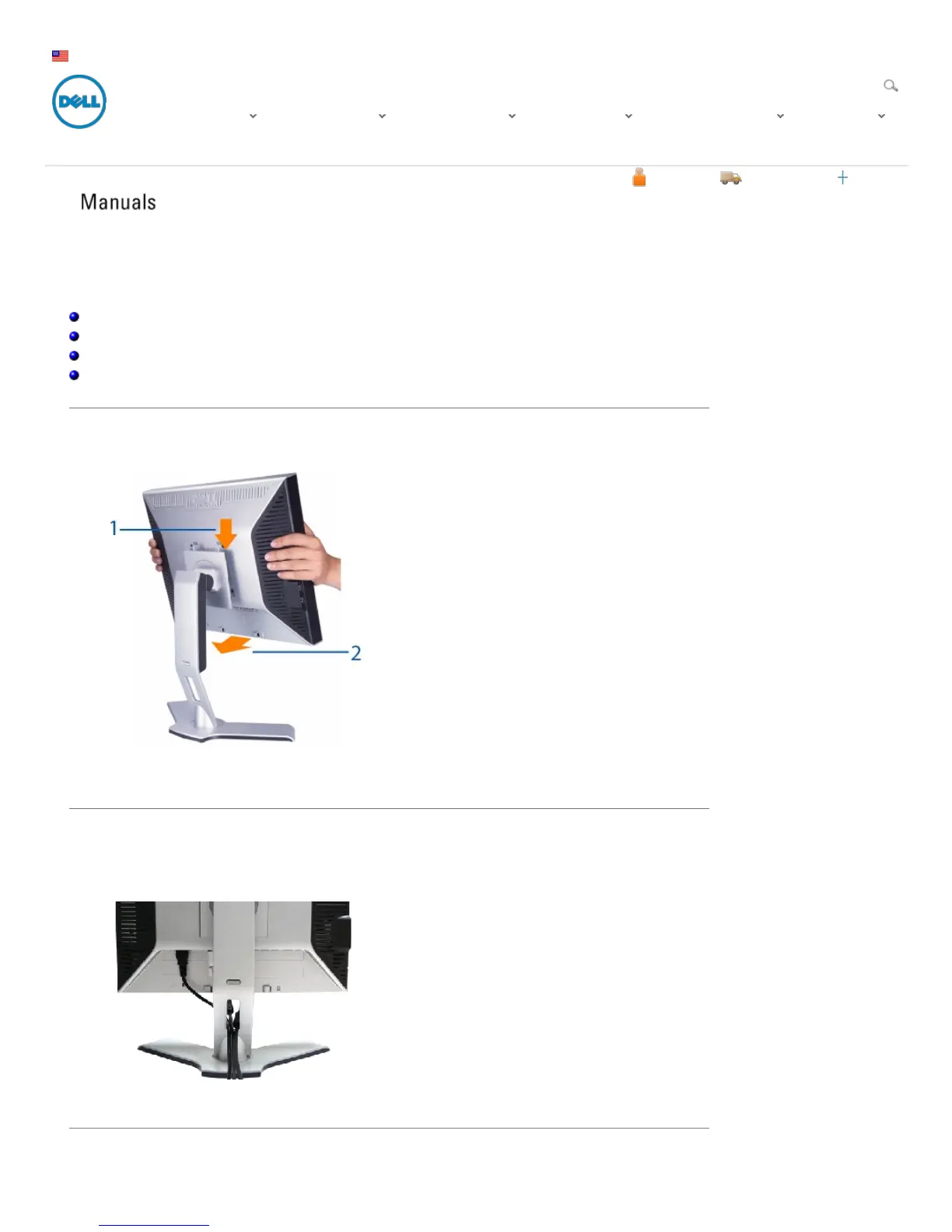
Attaching the Stand
1. Place the stand on a flat surface.
2. Fit the groove on the back of the monitor onto the 2 tabs of upper stand.
3. Lower the monitor so that the monitor mounting area snaps on or locks to stand.
Organizing Your Cables
After attaching all necessary cables to your monitor and computer, (See Connecting Your Monitor for cable
attachment,) use the Cable management hole to neatly organize all cables as show n above.
Using the Tilt, Swivel and Vertical Extension
Drivers and Dow nloads Product Support Support by Topic Order Support Warranty Inform ation View More
Sign In Cart










 To Next Page