40 │ Operating the Dell Canvas 27
Icon Menu and
Submenus
Description
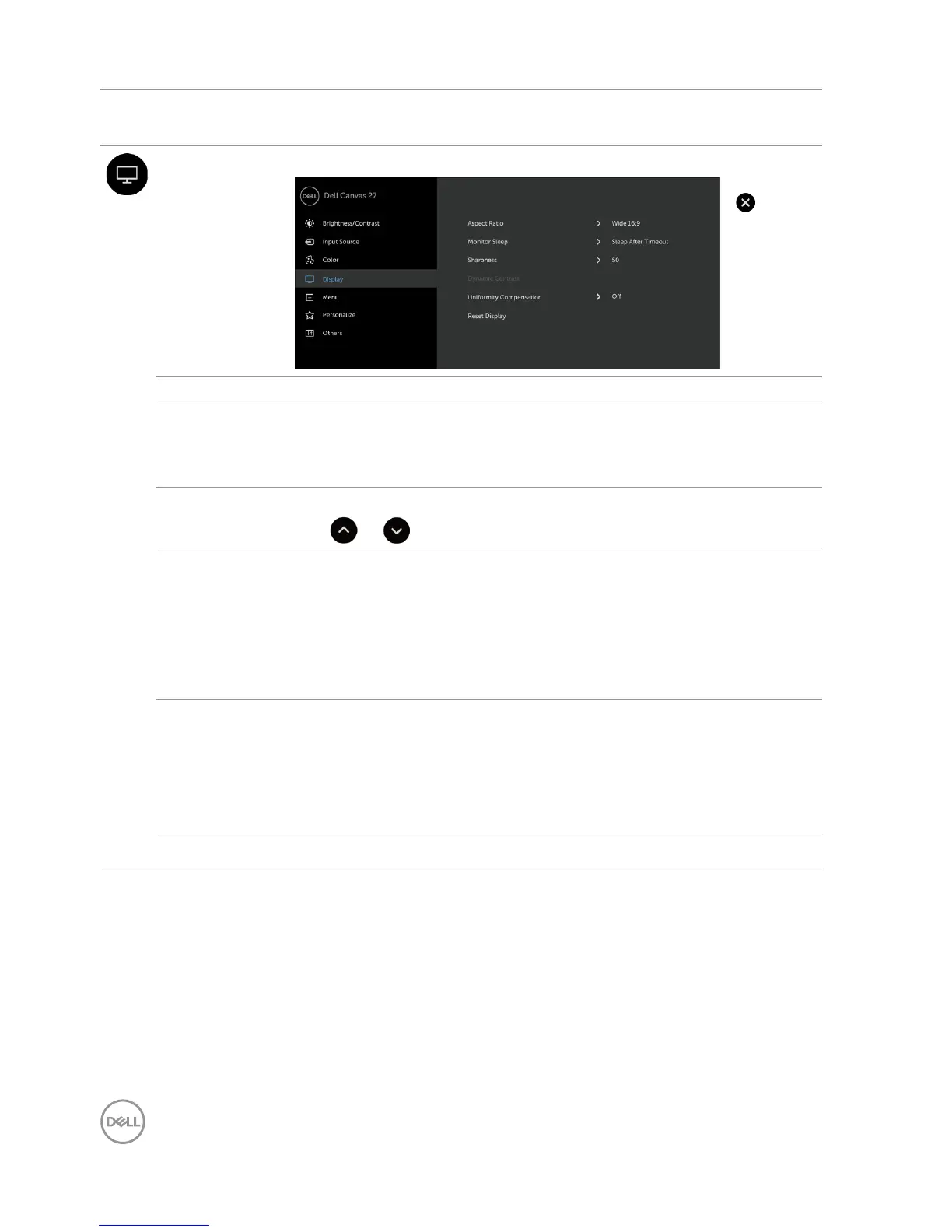
Display Use the Display menu to adjust image.
Aspect Ratio Adjust the image ratio to Wide 16:9, Auto Resize,4:3, or 1:1.
Monitor
Sleep
Sleep After Timeout: Dell Canvas 27 goes into sleep after
timeout.
Never: Dell Canvas 27 never goes into sleep.
Sharpness Makes the image look sharper or softer.
Use or to adjust the sharpness from ‘0’ to ‘100’.
Dynamic
Contrast
Allows you to increase the level of contrast to provide sharper and
more detailed image quality.
Touch screen to select the Dynamic Contrast “On” or “Off”.
NOTE: For Game and Movie preset mode only.
NOTE: Dynamic Contrast provides higher contrast if you select
Game or Movie preset mode.
Uniformity
Compen-
sation
Select screen brightness and color uniformity compensation
settings. Off is factory setting by default.
Uniformity Compensation adjusts different areas of the screen
with respect to the center to achieve uniform brightness and color
over the entire screen.
Reset Display Restores the display settings to factory defaults.


 To Next Page