About Your Dell Canvas 27 │ 9
Back View
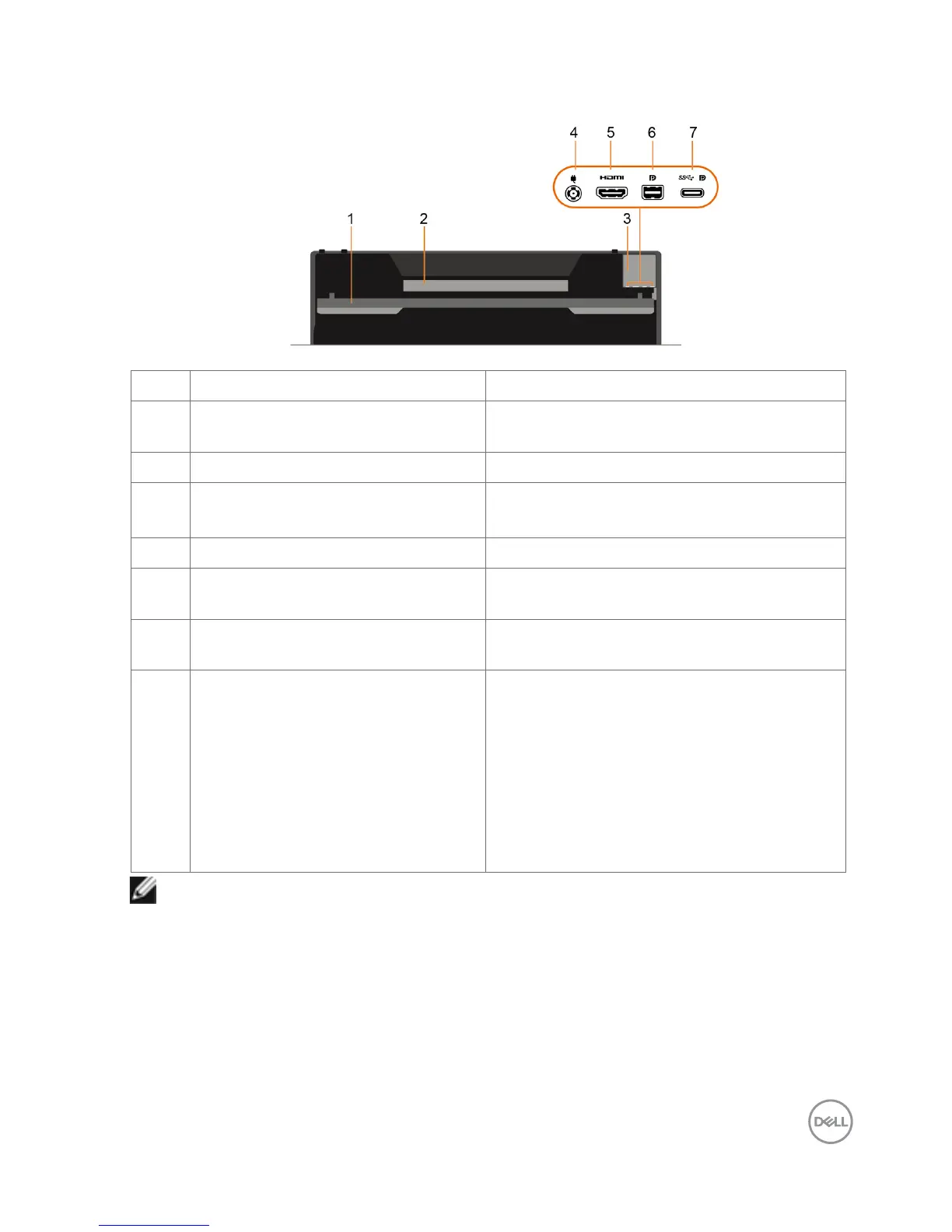
Label Description Use
1 Kickstand Provides support to the Dell Canvas screen
to place it in a fixed position.
2 Regulatory label Lists the regulatory approvals.
3 Barcode, serial number, and service
tag label
Refer to this label if you need to contact Dell
for technical support.
4 DC power connector To connect the Dell Canvas 27 power cable.
5 mini HDMI connector When a mini HDMI cable is connected it can
only be used as a monitor.
6 mini DP connector When a mini DP cable is connected it can
only be used as a monitor.
7 USB Type-C host system
connectivity
• When a Type-C to Type-C cable is
connected from the Dell Canvas to the
host computer, it supports USB 3.0 for
data and DP for video if host system
supports DP Alt mode.
• In this case (Connect C to A cable) - the
user may need either Label 5 (HDMI) or
Label 6 (DP) video signal for full function
support.
NOTE: Remove the port cover to connect your cables. Replace the port cover once
all cables are connected.



 To Next Page