Dell DCS-1130 Setup and Features Information
Power Supply Indicator Codes | Page 11
Power Supply Indicator Codes
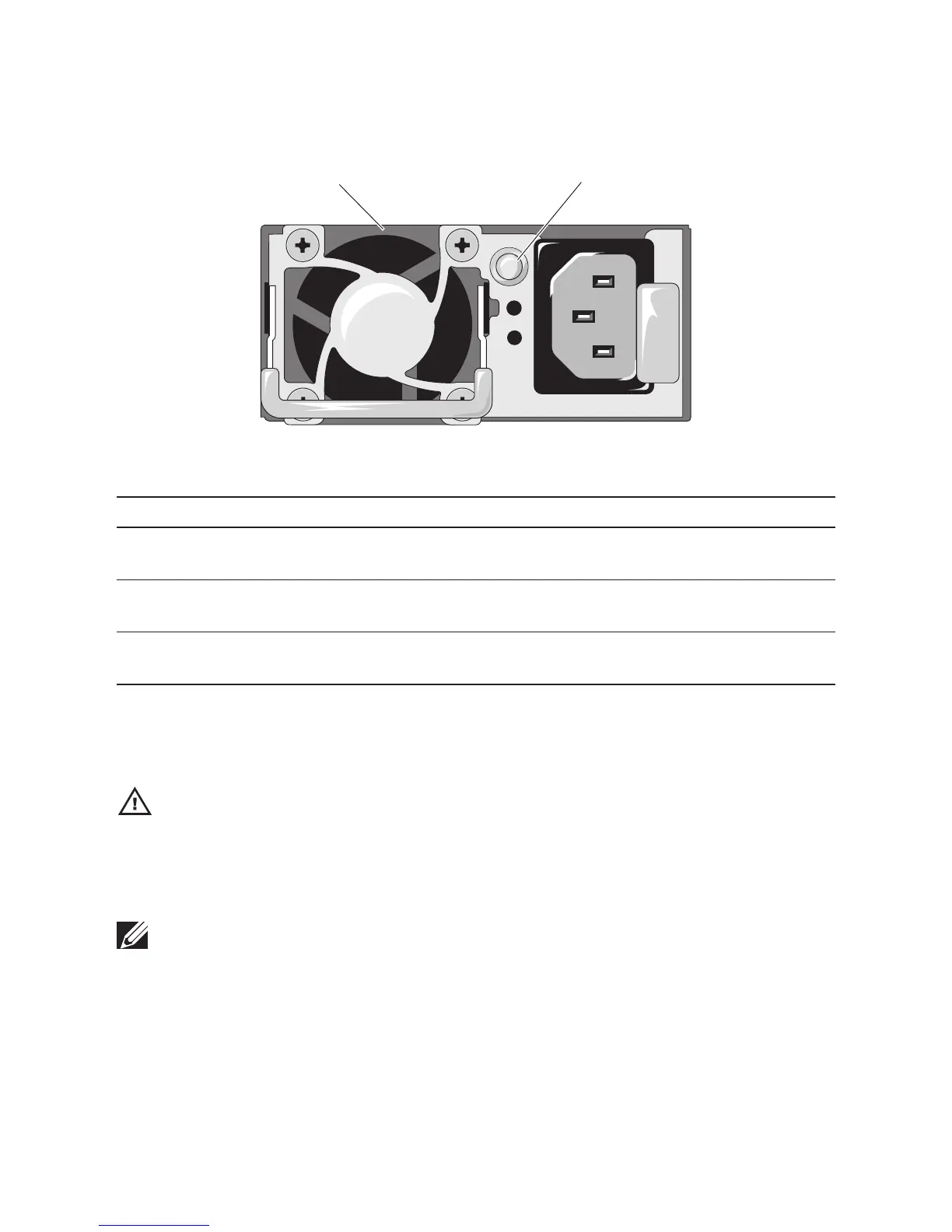
Figure 7. Power Supply Status Indicator
1
2
1. power supply 2. power supply indicator
Power Supply Status Indicator Condition
Steady green Power supply is on (AC OK/DC OK) or in standby mode
(90 VAC–264 VAC)
Steady yellow Power supply faulty (UVP/OVP/OCP/SCP/OTP/Fan
Fault)
Yellow o Power supply is o or AC input voltage is out of normal
operating range (90 VAC–264 VAC)
Other Information You May Need
WARNING: See the safety and regulatory information that shipped with your system. Warranty
information may be included within this document or as a separate document.
e Getting Started Guide provides an overview of rack installation, system features, setting up
your system, and technical specications.
NOTE: Always check for updates on support.dell.com/manuals and read the updates first be-
cause they often supersede information in other documents.


 To Next Page