Shutting Down the Storage System
If you are replacing the storage system chassis or rack rails, use the Dell Storage Client to shut down the
storage system.
About this task
CAUTION: Shutting down the storage system results in a system outage.
Steps
1. Select Actions → System → Shutdown/Restart. The Shutdown/Restart dialog box appears.
2. Select Shutdown from the first drop-down menu.
3. Click OK.
After the storage system shuts down, unplug the power cables from the PSUs.
Replacing PSUs
The SCv2080 storage system supports two hot-swappable power supply units (PSUs). If one unit fails, the
second unit continues to provide power to the storage system.
Identifying the Failed PSU
To determine which power supply unit (PSU) failed, use the Dell Storage Client.
1. Click the Hardware tab.
2. In the Hardware tab navigation pane, select the Storage Center.
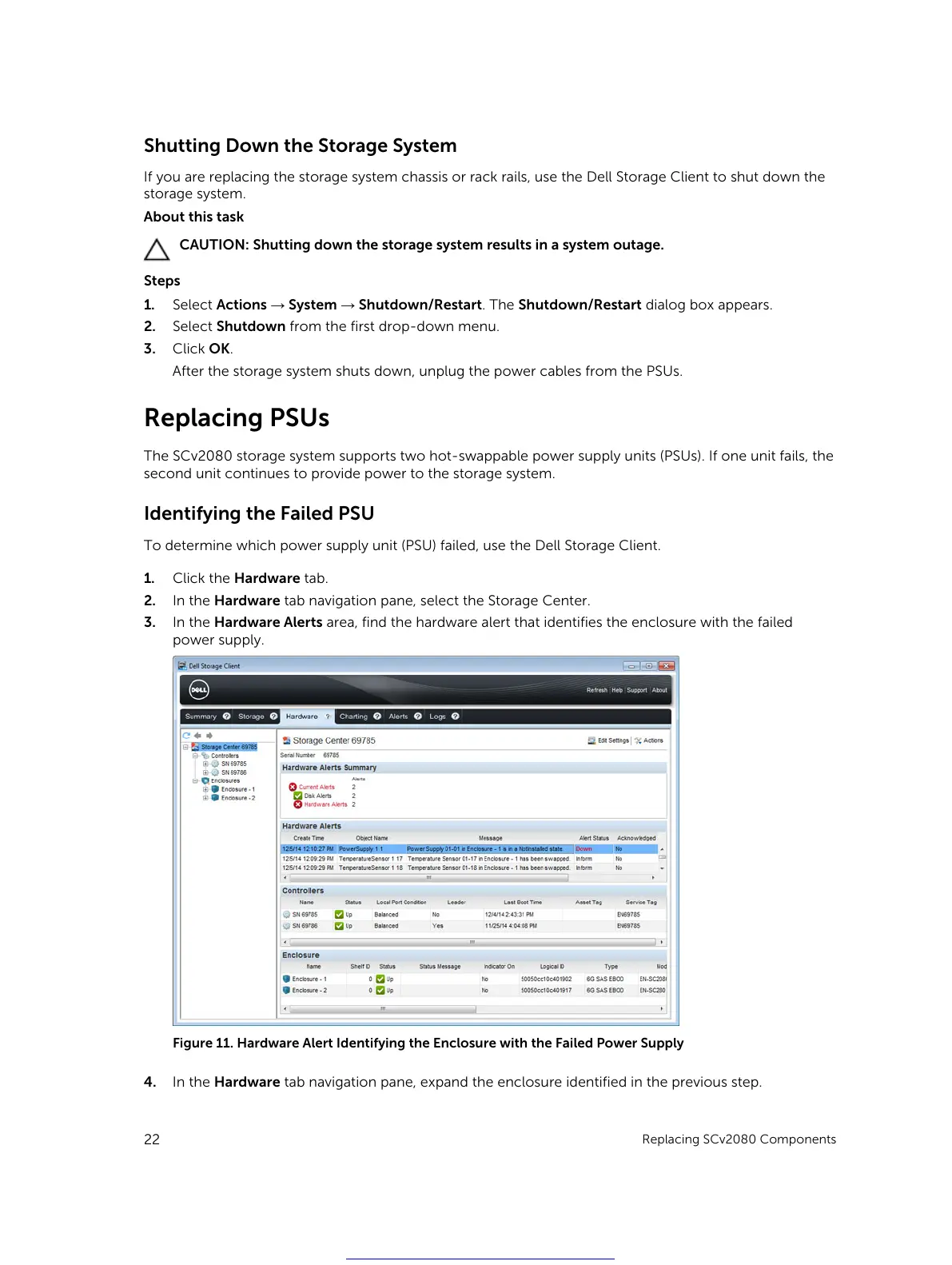
3. In the Hardware Alerts area, find the hardware alert that identifies the enclosure with the failed
power supply.
Figure 11. Hardware Alert Identifying the Enclosure with the Failed Power Supply
4. In the Hardware tab navigation pane, expand the enclosure identified in the previous step.
22
Replacing SCv2080 Components
Get other manuals https://www.bkmanuals.com





 To Next Page