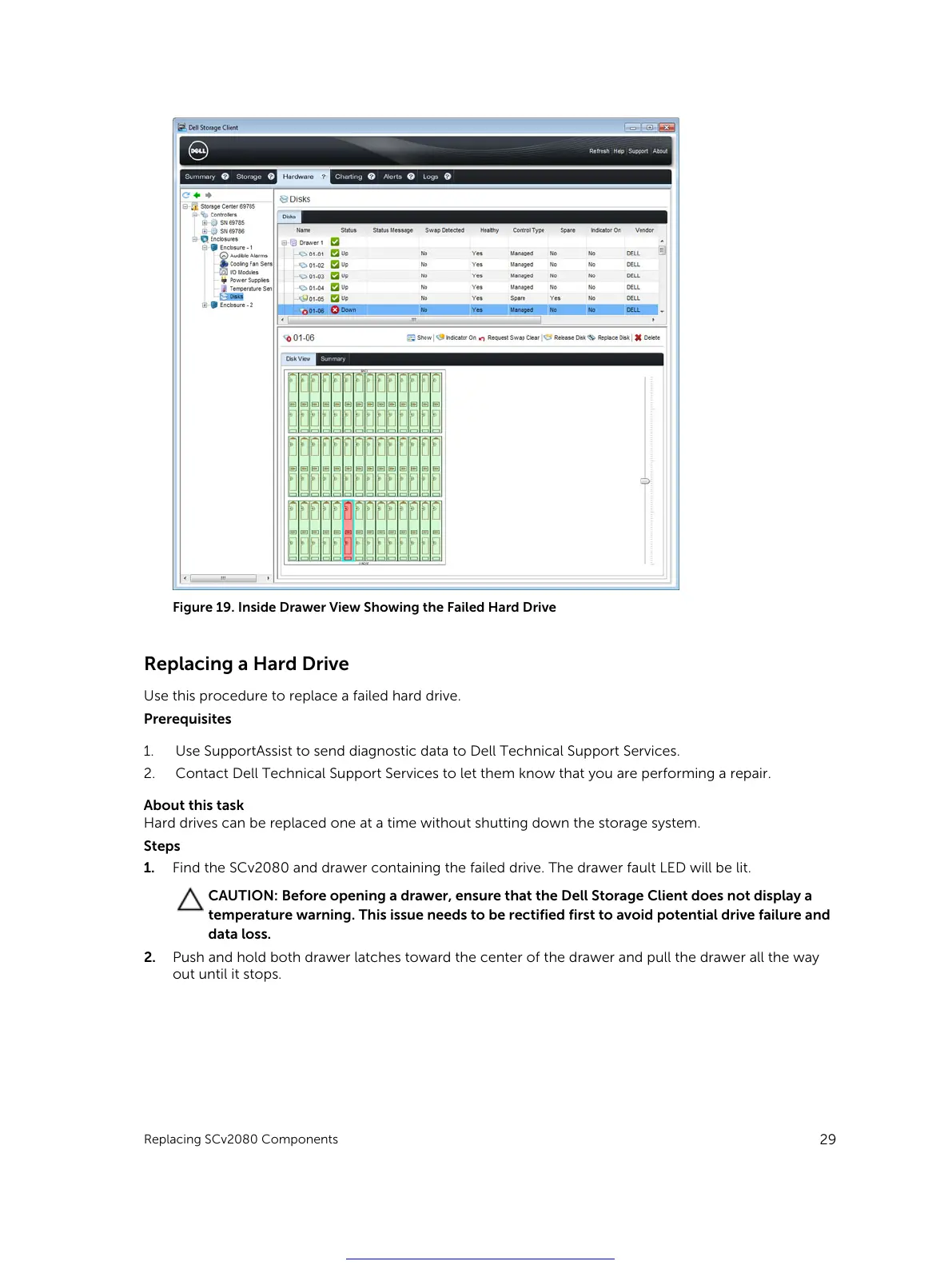
Figure 19. Inside Drawer View Showing the Failed Hard Drive
Replacing a Hard Drive
Use this procedure to replace a failed hard drive.
Prerequisites
1. Use SupportAssist to send diagnostic data to Dell Technical Support Services.
2. Contact Dell Technical Support Services to let them know that you are performing a repair.
About this task
Hard drives can be replaced one at a time without shutting down the storage system.
Steps
1. Find the SCv2080 and drawer containing the failed drive. The drawer fault LED will be lit.
CAUTION: Before opening a drawer, ensure that the Dell Storage Client does not display a
temperature warning. This issue needs to be rectified first to avoid potential drive failure and
data loss.
2. Push and hold both drawer latches toward the center of the drawer and pull the drawer all the way
out until it stops.
Replacing SCv2080 Components
29
Get other manuals https://www.bkmanuals.com





 To Next Page