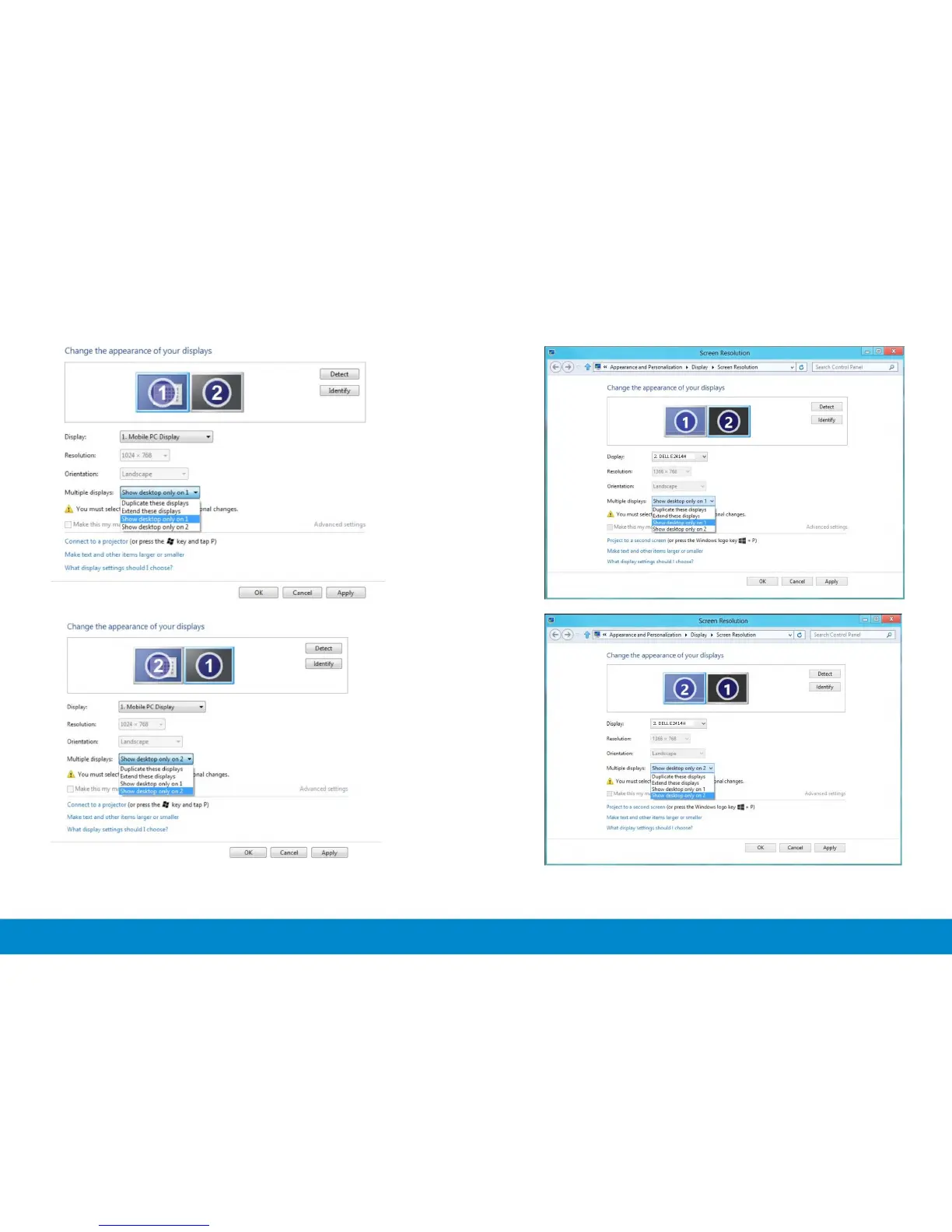
Change
the
appearance
of
your
displays
Display.
\
1.
Mobil•
PC Display
RHolution: 1024
768
Orientation:
lanci~ape
Multople dosplays: [
Show
desl:top
only
on 1
Duplicat•
these
displays
•
Yo
u must sel
ed
Extend these
dis
Ia
nal
changes.
Connoct
to a
projector
(or
press
the
II
key
and
tap
P)
Make t
ext
and other ftems larger or smaller
What d•splay settmgs should I choose?
Change the appearance
of
your displays
D1splay:
[£
Mobile PC Display =:=J
Resolution:
1024
768
Orientation: landscape
ConnKt
to
a proJector (
or
press
the
II
key
and
tap
P)
Make
te:xt
and
other
rtems larger or smaller
What
display sett
1
ngs
should
I
choose?
..
Detect
Identify
II
Ca
ncel
II Apply
'----~
OK
..
Detect
ld•n
tify
Advanced
s~
ngs
OK
II
Cancel
II
Apply
Screen Resolution
=
------;-:--
-::;:-::;::::-:---;;:;;:;;::;-:~;;;,;R,;~IM;;
·
;;;-
----:
.
T(
e
~
j
Search
Control
Panel
i'
9 « Appear
anc
e a
nd
Pmona
l
iza
tion • Display • Screen Reso
ubon
Change the appearance of your displays
D1spl
a
y:
2.
OE
LL
E24
14H
Rnohrtion: 1366 768
Ori
e
nta
tion: Landscape
ProJect
to
a sK
ond
«:r
el!:
n (
or
press
the
Wi
ndows
logo
key
::
.,.
P)
Make text a
nd
other
rt.mu
larger
or
smaller
What
display settings
should
I choose?
Screen
Reso
lution
D~•
~
Identify
Advan
ced
settm
gs
OK
Cancel
Apply
r.
~
---:----:-:-=~;-::;:::;;;:;;;;;;--;-;o.;;;~
-;-;
~;;;R;;cl;rt;;;;;;----=~-
~
1eQ I
S..mh
Cont<ol
Ponol
P I
't
L• «
Appe
arance
and
Personaliz
at
ion
~
Display
~
Scr~n
Resolution ....!.
Change the appearance
of
yo
ur displays
Di
s
play:
2. DELL
E2
414H
Resolution:
1166
768
Orientation: Landscape
Multiple displays:
Sho
w desktop
only
on 2
~
Dupli
cate
th
ese displays nal
chang~.
You
must
sele<
Ext
end
these
displa
ys
.
~
s
~
n
~
ow
~
d"
i
"
~
o
D]
o
~
~nly
~
·o
!:i
"
z
'
r
Make th•s
my
m
1
ProJeCt
to
a
second
s<r
ee
n (or press t
he
Windows logo key
::
• P)
Make text
and
other
items
larger
or
smaller
What
d•splay
s~m9"
should
I
choos~?
Identify
OK
Canc
el
Apply
64 Setting Up Your Monitor Setting Up Your Monitor 65
(iii) For Windows
®
8(ii) For Windows
®
7



 To Next Page