10 About Your Monitor About Your Monitor 11
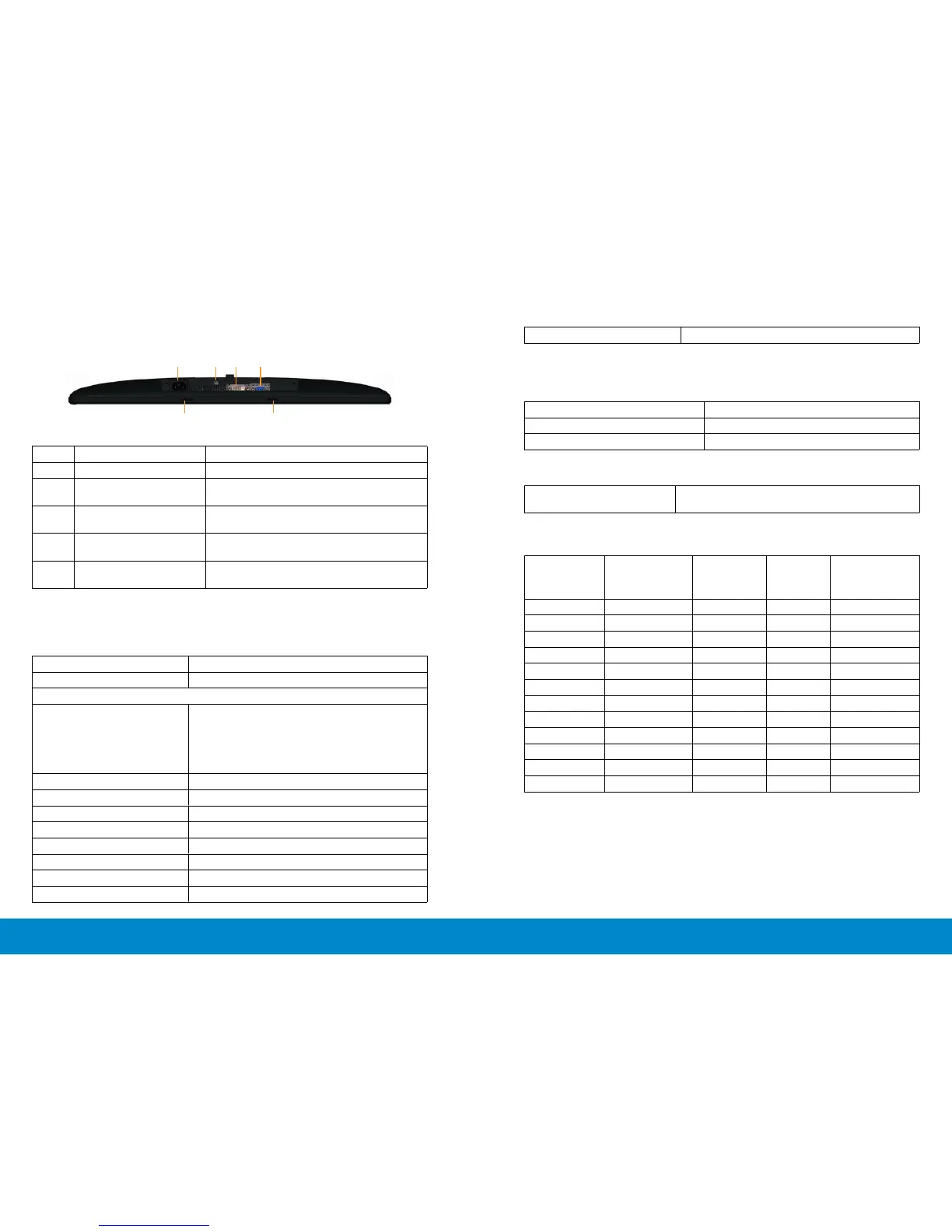
Bottom View
1 2 3 4
5 5
Bottom view
Label Description Use
1. AC power connector To connect the monitor power cable.
2. Stand lock To lock the stand to the monitor using a
M3 x 6mm screw (screw not included).
3 DVI connector To connect your computer to the moni-
tor using a DVI cable.
4 VGA connector To connect your computer to the moni-
tor using a VGA cable.
5 Dell Soundbar mounting
slots
Attaches the optional Dell Soundbar.
Monitor Specifications
Flat Panel Specifications
Screen type Active matrix - TFT LCD
Panel type TN
Viewable image
Diagonal
Horizontal Active Area
Vertical Active Area
Area
60.97 cm (24 inches)
531.36 mm (20.92 inches)
298.89 mm (11.77 inches)
158818.19 mm
2
(246.17 inch
2
)
Pixel pitch 0.277 mm
Viewing angle 160° (vertical) typ, 170° (horizontal) typ
Luminance output 250 cd/m ²(typ)
Contrast ratio 1000:1 (typ)
Faceplate coating Antiglare with hard-coating 3H
Backlight LED edgelight system
Response Time 5 ms typical
Color depth 16.7 million colors
Color gamut (Typical) 83%* (CIE1976)
*[E2414H/E2414Hr] color gamut (typical) is based on CIE1976 (83%) and
CIE1931 (72%) test standards.
Resolution Specifications
Horizontal scan range 30 kHz to 83 kHz (automatic)
Vertical scan range 56 Hz to 75 Hz (automatic)
Maximum resolution 1920 x 1080 at 60 Hz
Video Supported Modes
Video display capabilities
(DVI playback)
480p, 576p, 720p, 1080p and 1080i
Preset Display Modes
Display Mode Horizontal
Frequency
720 x 400 31.5 70.0 28.3 -/+
640 x 480 31.5 60.0 25.2 -/-
640 x 480 37.5 75.0 31.5 -/-
800 x 600 37.9 60.0 40.0 +/+
1024 x 768 60.0 75.0 78.8 +/+
1152 x 864 67.5 75.0 108.0 +/+
1280 x 1024 64.0 60.0 108.0 +/+
1280 x 1024 80.0 75.0 135.0 +/+



 To Next Page