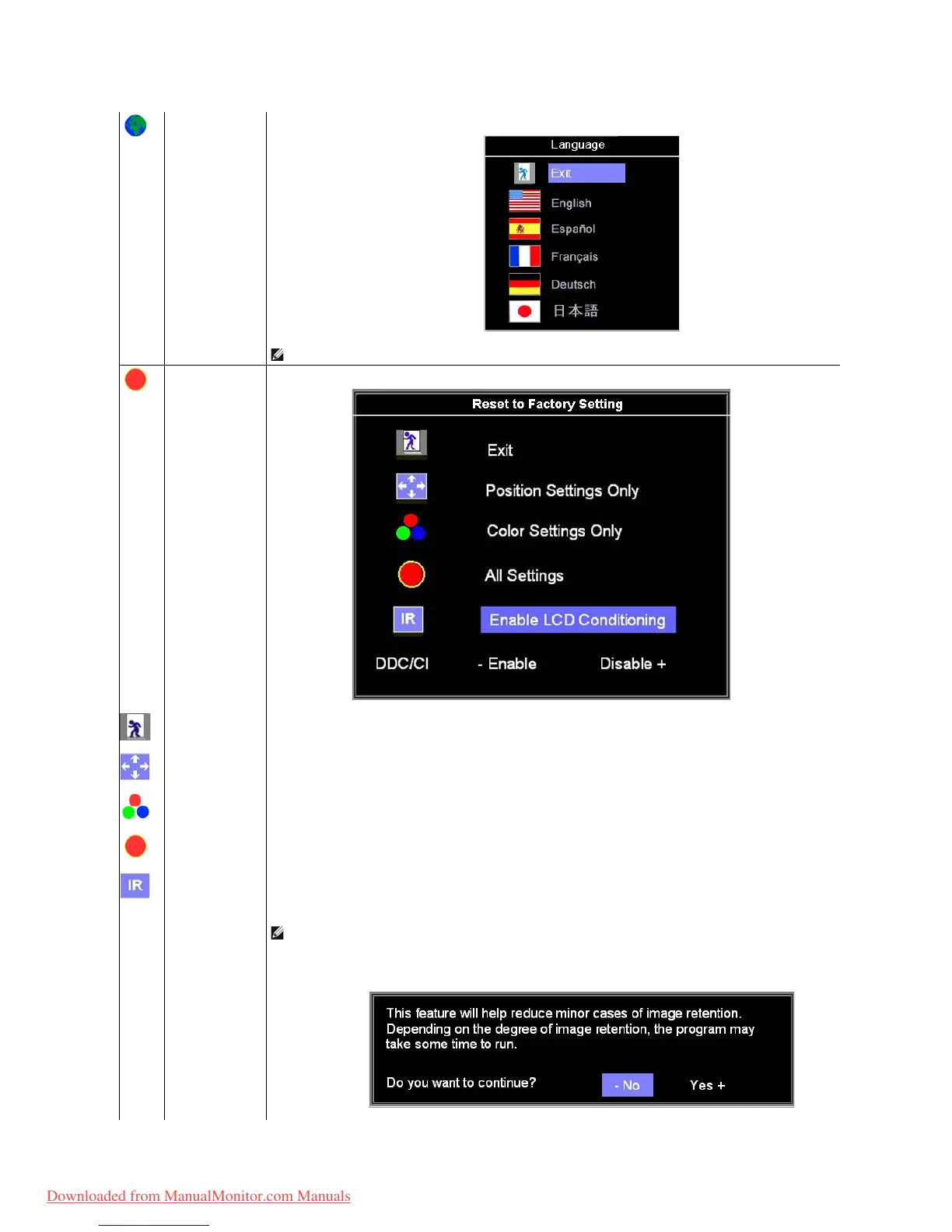
Select to have the OSD display in one of five languages (English, French, Spanish, German, or Japanese).
NOTE: The change only affects the OSD. It has no effect on any software running on the computer.
ResettheOSDmenuoptionstothefactorypresetvalues.
Select to exit out of Reset to Factory Settings menu without resetting any OSD options.
Change the settings for Image Position back to original factory settings.
ChangetheRed,Green,andBluesettingsbacktotheiroriginalfactorysettingsandsetthedefaultsettingforNormalPreset.
adjustablesettingsincludingcolor,position,brightness,contrastandOSDholdtimetothefactorydefaults.The
language of the OSD does not change.
This feature will help reduce minor cases of image retention.
Enable LCD Conditioning: If an image appears to be stuck on the monitor, select LCD Conditioning
to help eliminate any image retention.
Using the LCD Conditioning feature may take several hours. Severe cases of image retention are known as burn-
feature does not remove burn-in.
Below warning message appears once user select “Enable LCD Conditioning”:
NOTE: Use LCD Conditioning only when you experience a problem with image retention.
Downloaded from ManualMonitor.com Manuals



 To Next Page