2
Features
Top view
Features
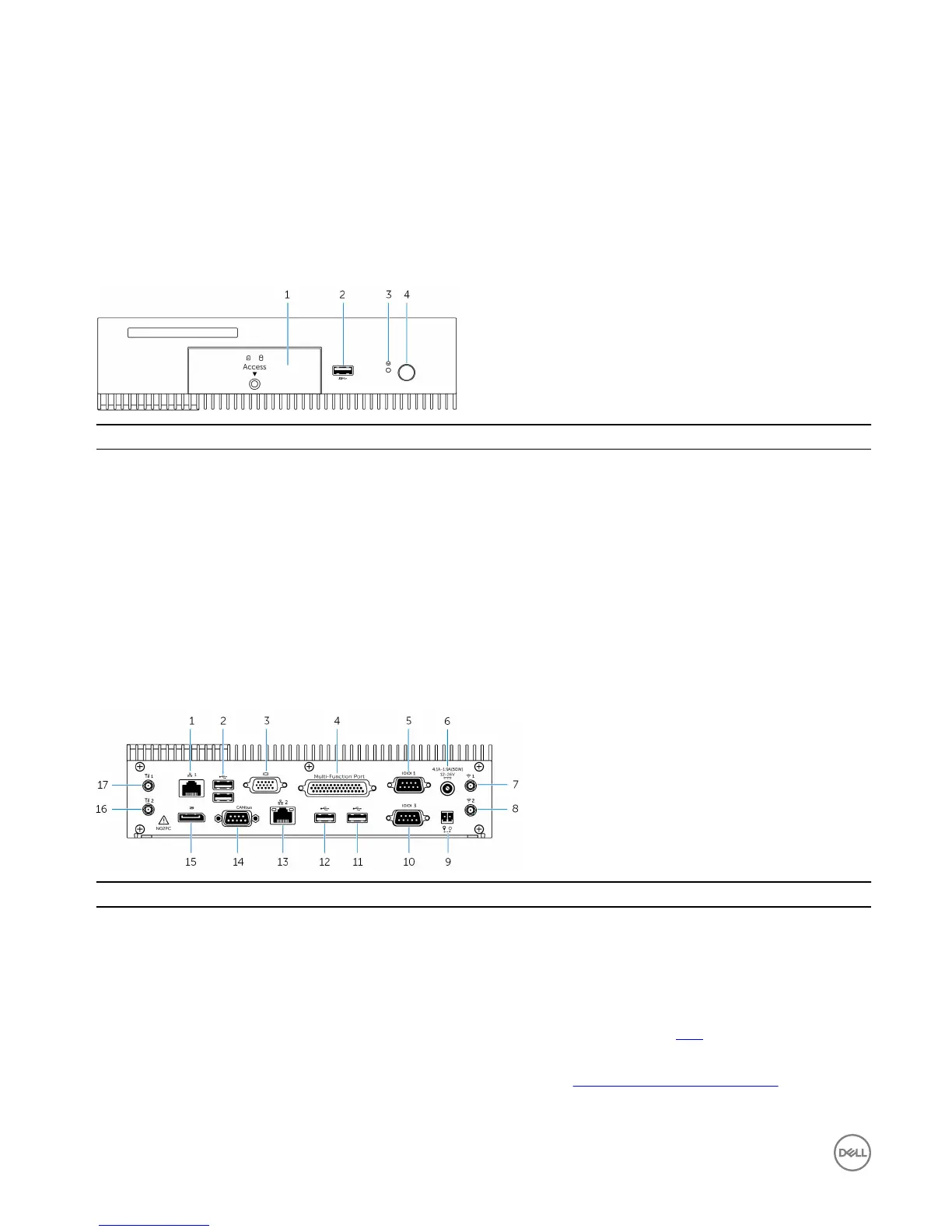
1 Front access door Loosen the captive screw that secures the front access door to
the chassis. Remove the front access door to access the hard
drive, solid-state drive, or SIM-card slot.
2 USB 3.0 port Connect a USB enabled device. Provides data transfer speeds up
to 5 Gbps.
3 Hard reset Using a pin, press the button located inside the pin hole to restart
the Embedded Box PC.
4 Power button Press to turn on or off the Embedded Box PC.
Bottom view
Features
1 Network port one Connect an Ethernet (RJ45) cable for network access. Provides
data transfer speeds up to 10/100/1000 Mbps.
2 USB 2.0 ports (2) Connect USB enabled devices. Provides data transfer speeds up
to 480 Mbps.
3 VGA port Connect a monitor or another VGA enabled device. Provides video
output. For more information, see VGA connector mapping.
4 Multi-function port (female) Connect Multi-function port cable (optional). For more
information, see Using the Multi-function port cable.
6













 To Next Page