7
Using the Multi-function port cable
NOTE: The Multi-function port cable is sold separately.
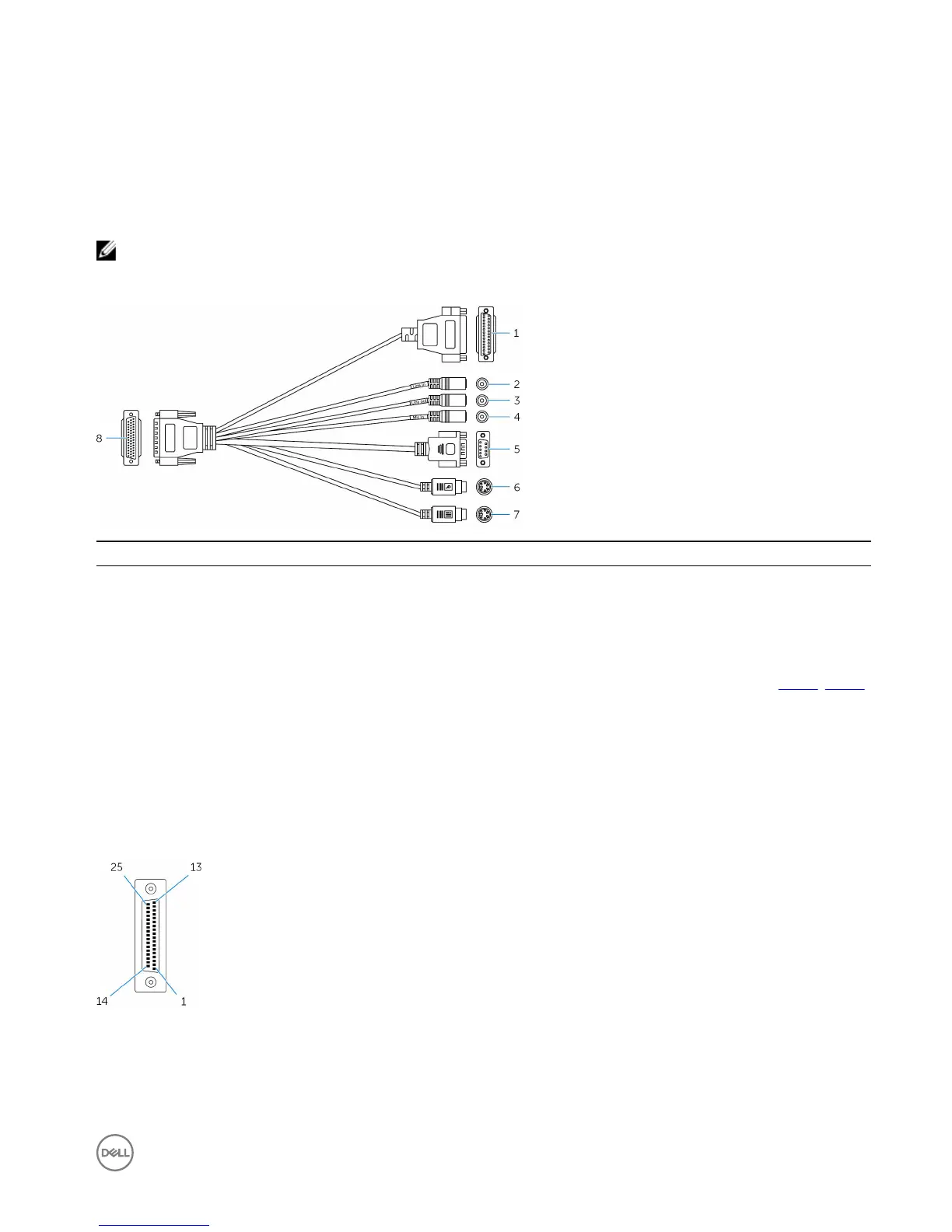
You can use the Multi-function port cable to increase the number of available ports on the Embedded Box PC.
Features
1 GPIO port Connect a GPIO enabled device or dongle.
2 Line-in port Connect recording or playback devices.
3 Line-out port Connect to audio-output devices such as speakers and amplifiers.
4 Microphone port Connect an external microphone to provide sound input.
5 RS232/RS422 port two (configurable in the
BIOS)
Connect a RS232/RS422 cable. For more information, see RS232/RS422
connector mapping.
6 PS/2 connector (mouse) Connect a PS/2 mouse.
7 PS/2 connector (keyboard) Connect a PS/2 keyboard.
8 Multi-function port Connect the Multi-function port cable to the Multi-function port on the
Embedded Box PC.
The following figure shows the GPIO-port pin number mapping.
The following table shows the GPIO-port pin definition details.
33













 To Next Page