Back to Contents Page
Suspend-Switch Sensor Board
Dell™Latitude™D430
1. Follow the instructions in "BeforeYouBegin"onpage7.
2. Remove any installed PC Cards from the PC Card slot.
3. Remove any installed memory modules or Mini PCI cards (see Memory and Mini-Cards).
4. Remove the hard drive (see Hard Drive).
5. Remove the hinge cover (see Hinge Cover).
6. Remove the keyboard (see Keyboard).
7. Remove the internal card with Bluetooth®wireless technology (see Internal Card With Bluetooth®Wireless Technology).
8. Remove the display assembly (see Display Assembly).
9. Remove the palm rest (see Palm Rest).
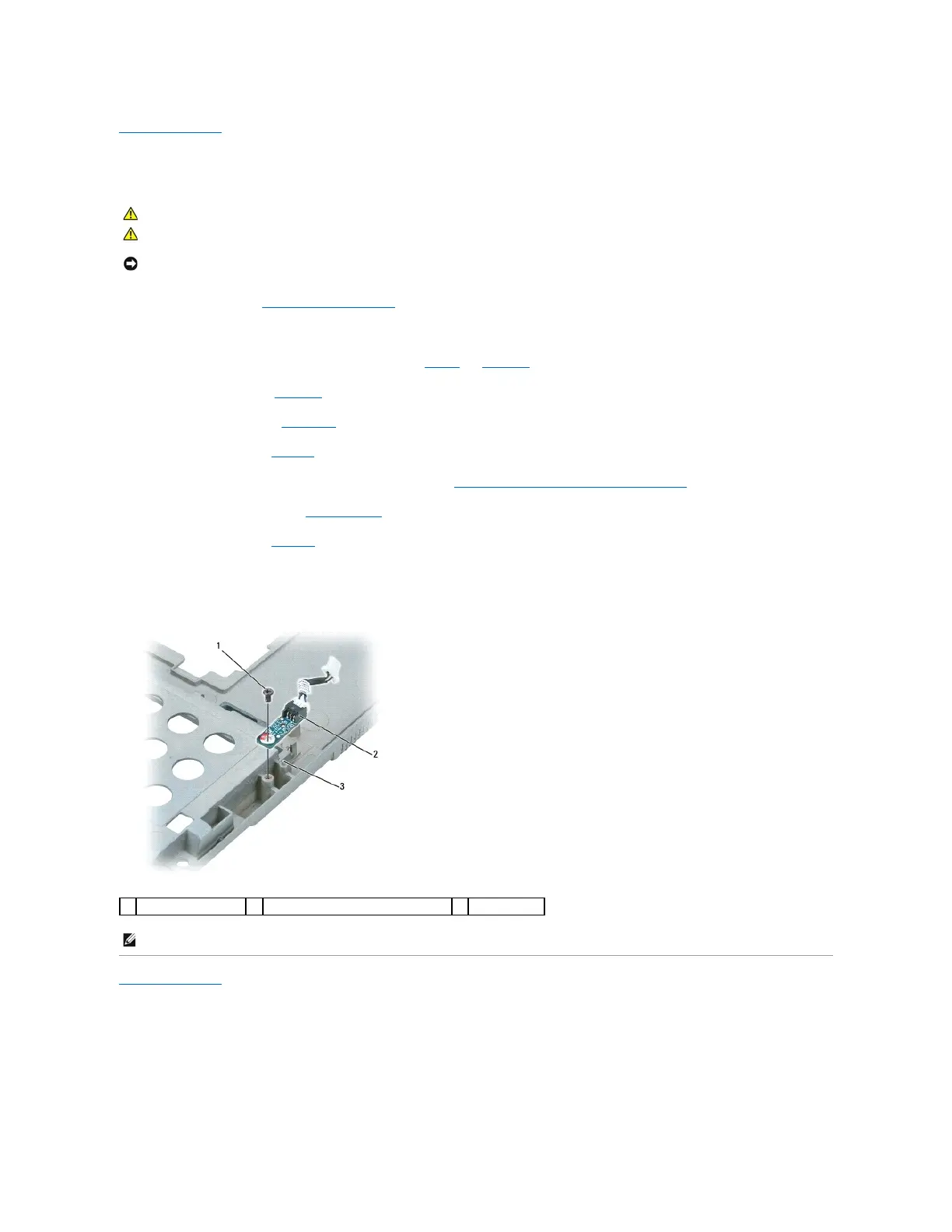
10. Disconnect the suspend-switch sensor board connector from the system board.
11. Remove the M2 x 3-mm screw and lift the suspend-switch sensor board away.
Back to Contents Page
CAUTION: To prevent static damage to components inside your computer, discharge static electricity from your body before you touch any of
your computer's electronic components. You can do so by touching an unpainted metal surface.















 To Next Page