46 | Operating the Monitor
Preset Modes
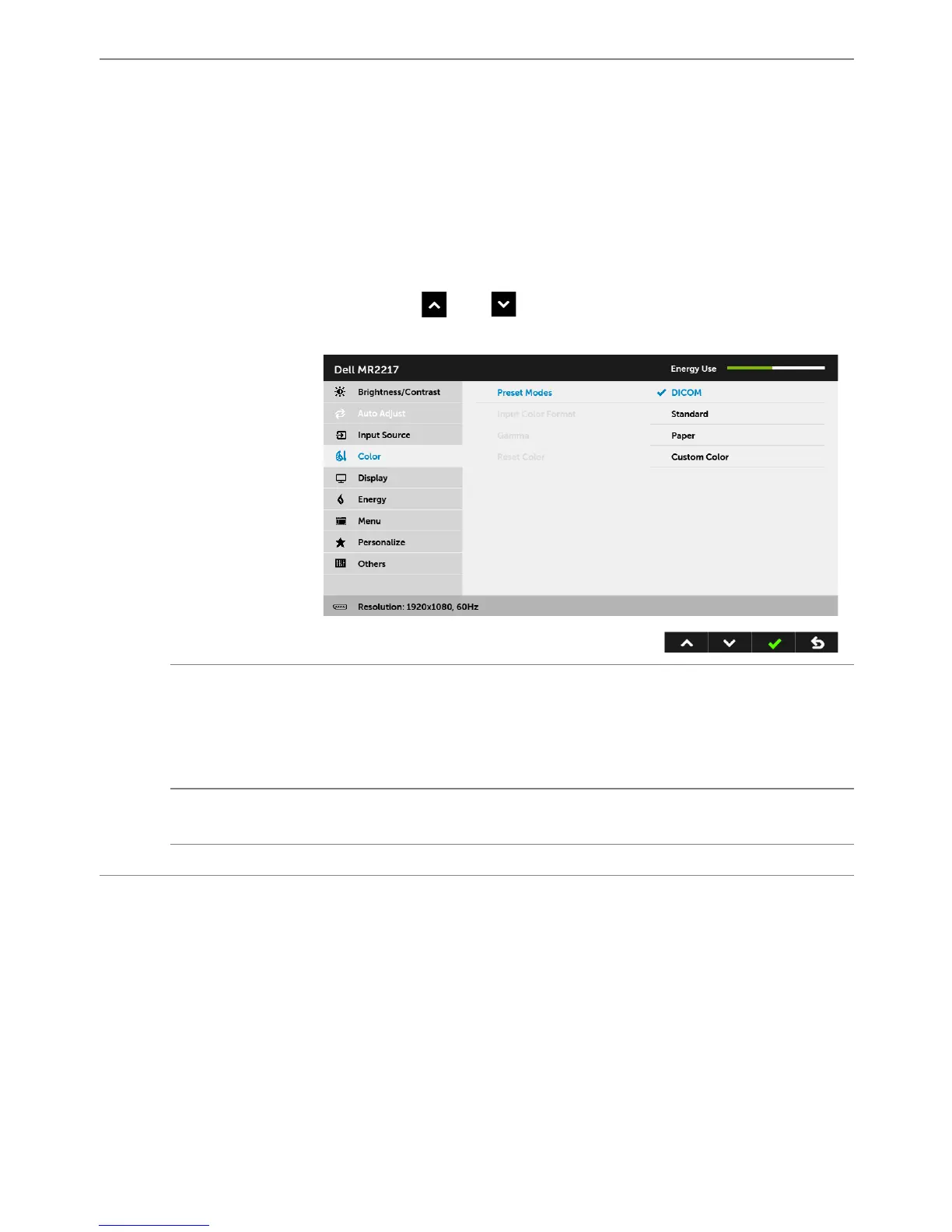
When you select Preset Modes, you can choose DICOM, Standard,
Paper, or Custom Color from the list.
•DICOM: Pr
ovides consiste
nt luminance uniformity and on diverse
displa
ys with consistent methodology. This is the default pr
eset
mo
de.
•Standard: Load
s the monitor's default color settings.
•Paper: Loads brightness and sharpness set
tings ideal for viewing
tex
t. Blend the text background to simulate paper media wi
thout
aff
ecting color images. Applies to RGB input format only.
• Custom Color: Allows you to
manually adjust the color settings.
Pr
ess the
and buttons to adjust the three colors (R, G, B)
values and create your own preset color mode.
Input Color
Format
Allows you to set the video input mode to:
RGB: Select this option if your monitor is connected to a computer (or
DV
D player) using the DP or HDMI cable.
YPbPr: Select this option if your DVD player support
s only YPbPr
output.
Gamma
Allows you to set the Gamma to PC or MAC.
NOTE: This option is not available when the Preset Modes is DICOM.
Reset Color
Reset your monitor color settings to the factory settings.



 To Next Page