60 | Troubleshooting
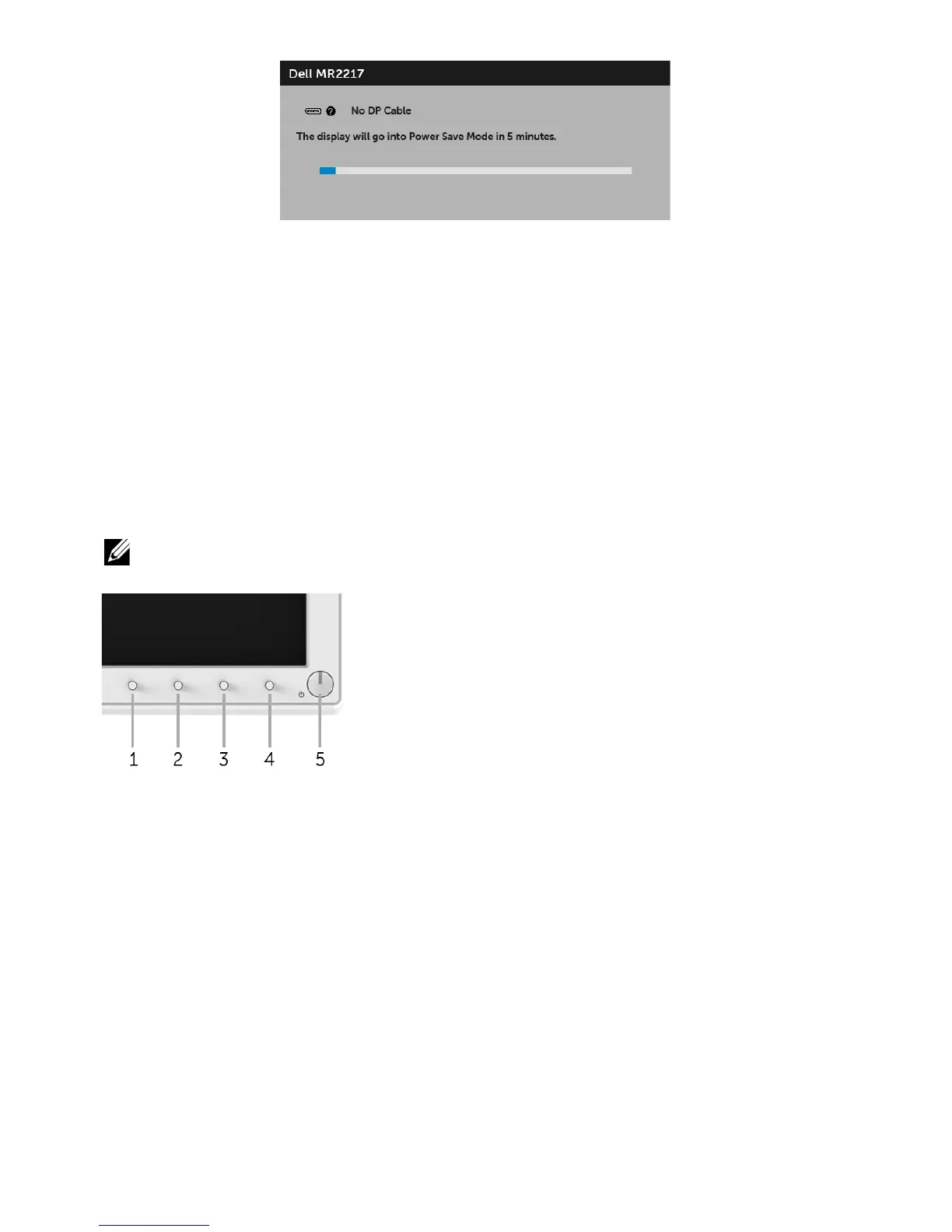
4 This box
also appears during normal system operation, if the video cable becomes
disconnected or damaged.
5 Turn Off your monitor and reconnect the video cable; then turn On both your
computer and the monitor.
If your monitor screen remains blank after you use the previous procedure, check your
video controller and computer, because your monitor is functioning properly.
Built-in Diagnostics
Your monitor has a built-in diagnostic tool that helps you determine if the screen
abnormality you are experiencing is an inherent problem with your monitor, or with your
computer and video card.
NOTE: You can run the built-in diagnostics only when the video cable is unplugged
and the monitor is in self-test mode.
To run the built-in diagnostics:
1 Ensure that the screen is clean (no dust particles on the surface of the screen).
2 Unplug the video cable(s) from the back of the computer or monitor. The monitor
then goes into the self-test mode.
3 Press and hold Button 1 and Button 4 on the front panel simultaneously for 2
seconds. A gray screen appears.
4 Carefully inspect the screen for abnormalities.
5 Press Button 4
on the front panel again. The color of the screen changes to red.
6 Inspect the display
for any abnormalities.
7 Repeat s
teps 5 and 6 to inspect the display in red, green, blue, black, white and text
screens.
The test is complete when the text screen appears. To exit, press Button 4 again.








 To Next Page