58 Advanced Troubleshooting
www.dell.com | support.dell.com
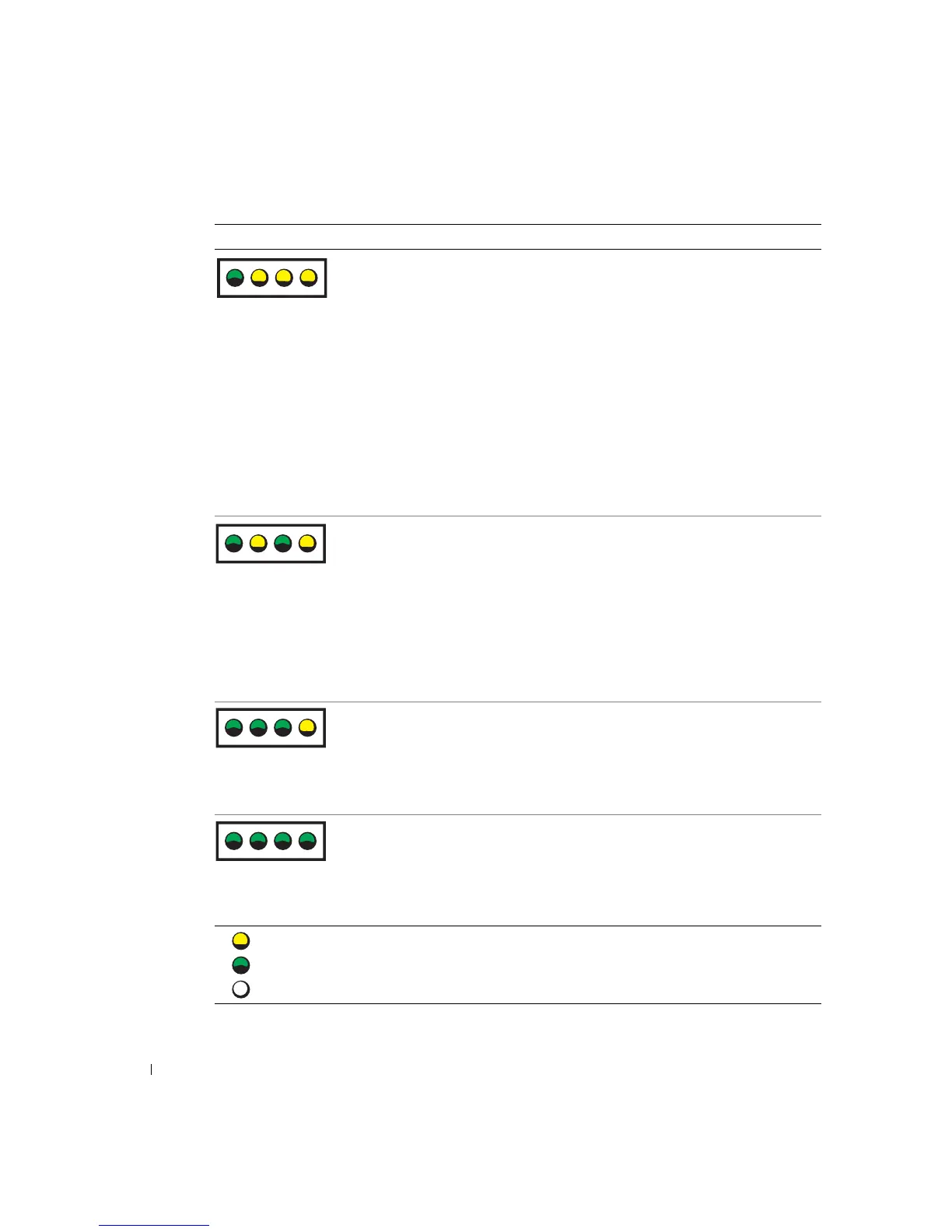
No memory modules are detected. • Reinstall all memory modules (see
page 92) and restart the computer.
• To eliminate the possibility of a
faulty memory connector, remove
all memory modules, reinstall one
memory module (if the computer
supports a single module) (see
page 92), and then restart the
computer. If the computer starts
normally, move the memory
module to a different connector
and restart the computer.
Continue until you have identified
a faulty connector or reinstalled all
modules without error.
Memory modules are detected, but a
memory configuration or
compatibility error exists.
• Ensure that no special memory
module/memory connector
placement requirements (see
page 92) exist.
• Verify that the memory modules
that you are installing are
compatible with your computer
(see page 99).
• If the problem persists, contact
Dell (see page 107).
Another failure has occurred. • Ensure that the cables are properly
connected to the system board (see
page 79) from the hard drive, CD
drive, and DVD drive.
• If the problem persists, contact
Dell (see page 107).
The computer is in a normal operating
condition after POST.
None.
Light Pattern Problem Description Suggested Resolution
= yellow
= green
= off
ABCD
ABCD
ABCD
ABCD













 To Next Page