Operating the Monitor:Dell P170S/P190S Flat Panel Monitor User's Guide
file:///S|/SSA_Proposal/P170S_P190S/UG/operate.htm[7/8/2011 4:48:31 PM]
DDC/CI (Display Data Channel/Command Interface) allows you to adjust the monitor parameters (brightness, color balance, etc) via software applications on your
PC.
Default is "Enable". You can disable this feature by selecting "Disable".
For best user experience and optimum performance of your monitor, keep this feature enabled.
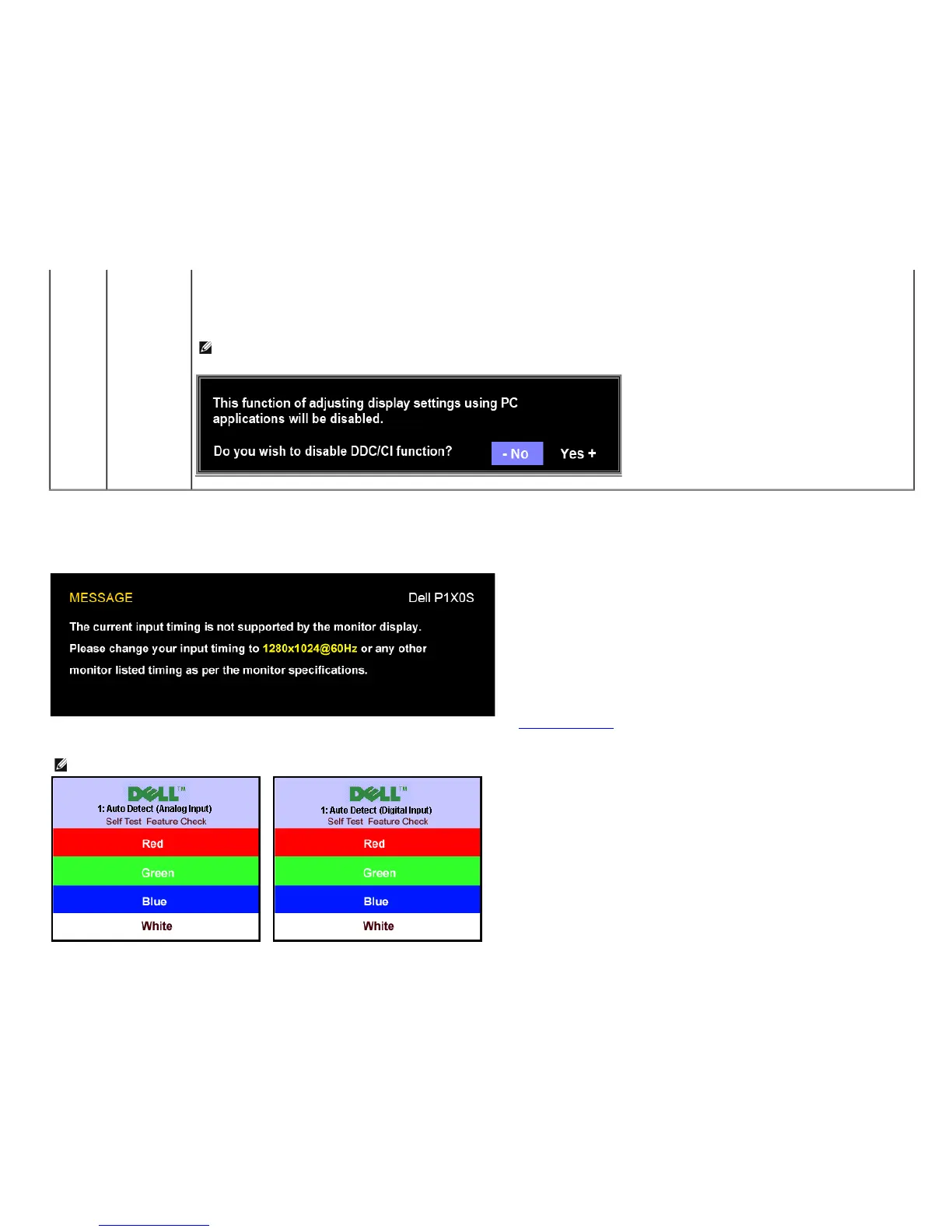
NOTE:If user select "Disable", display Warning message box as below. Select "Yes" disable DDC/CI and
return to "Factory Reset" menu. Warning message time-out in 20 sec.
OSD Warning Messages
The following warning messages may appear on the screen indicating that the monitor is out of synchronization.
This means that the monitor cannot synchronize with the signal that it is receiving from the computer. See Monitor Specifications for the Horizontal and Vertical frequency ranges
addressable by this monitor. Recommended mode is 1280 X 1024.
NOTE: The floating Dell Self-test Feature Check dialog appears on-screen if the monitor cannot sense a video signal.
or


 To Next Page